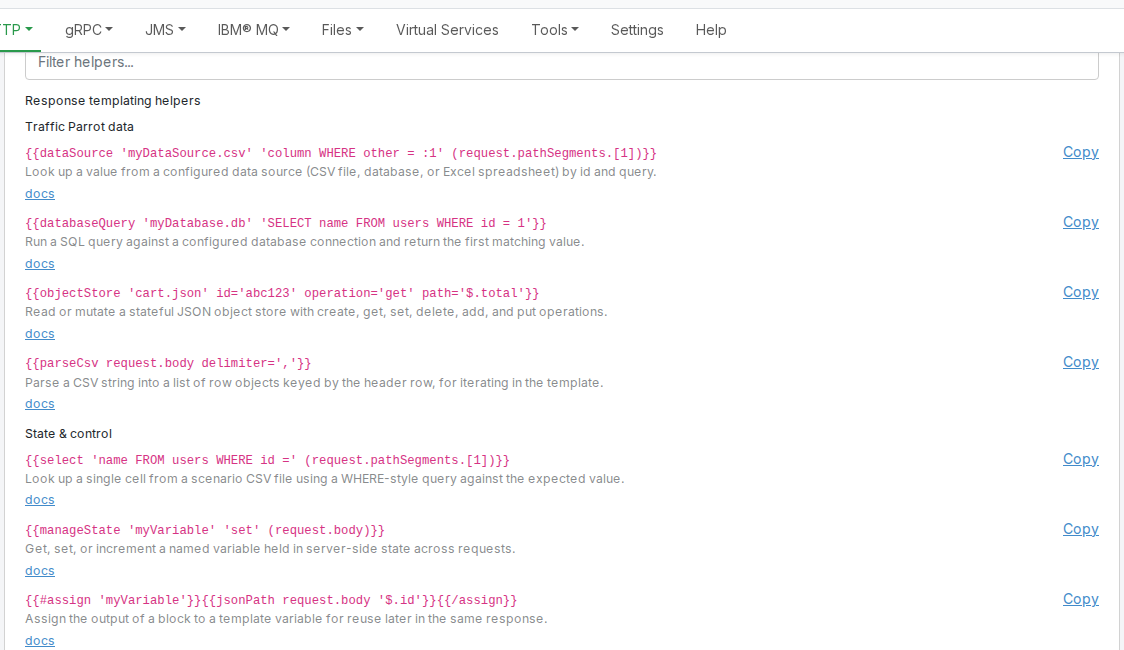
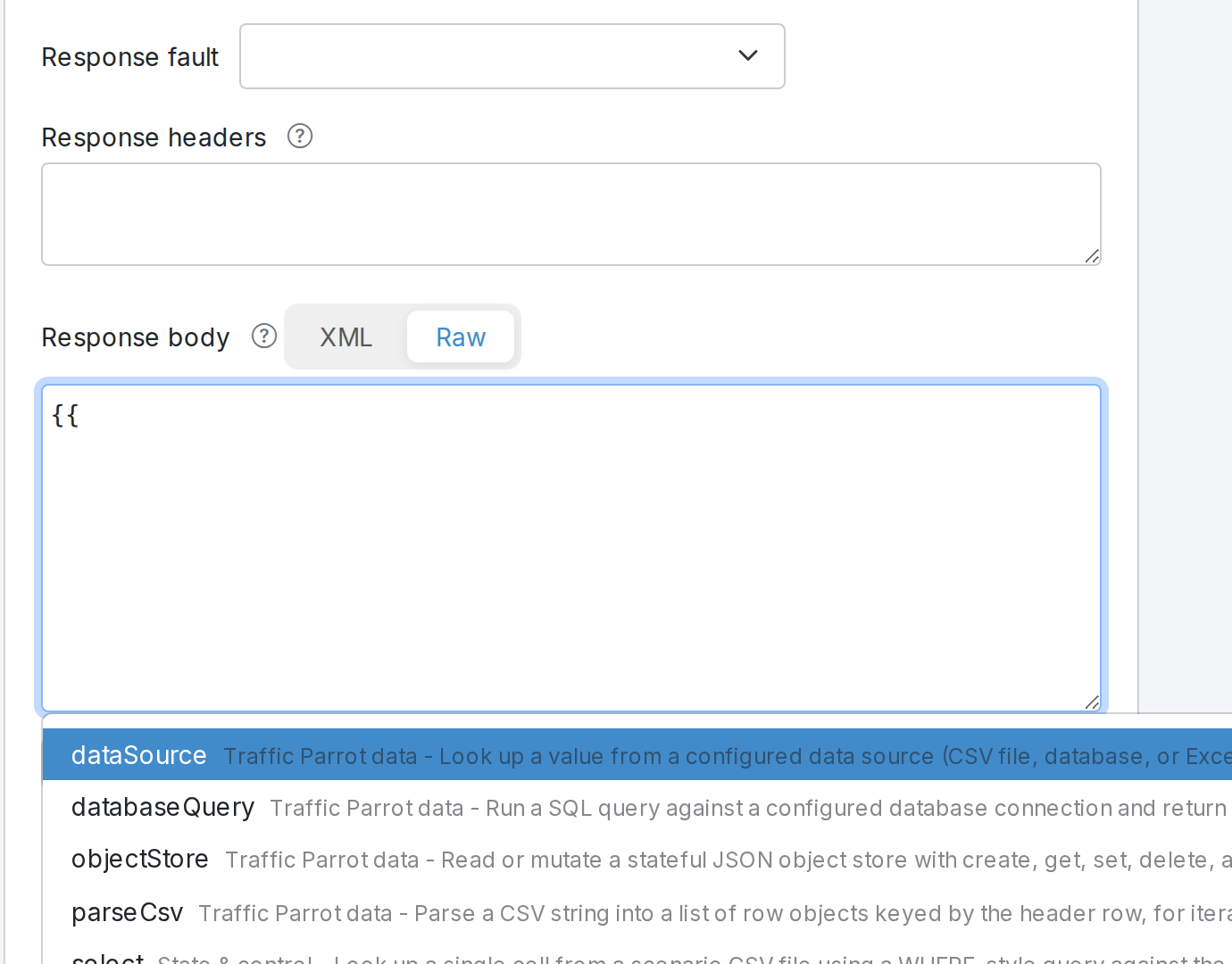
Traffic Parrot includes several built-in response transformers that provide common functionality
without requiring custom code.
Some built-in transformers (for example HmacSigningTransformer) read their configuration
from a transformerParameters object on the mapping's response. You can edit that
object directly in the Edit Mapping form: open the mapping, expand
Advanced parameters, and scroll to the Transformer parameters panel.
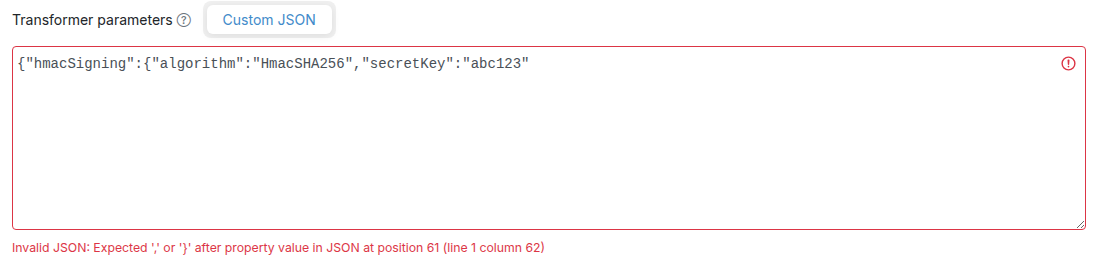
The panel exposes a JSON textarea bound to response.transformerParameters:
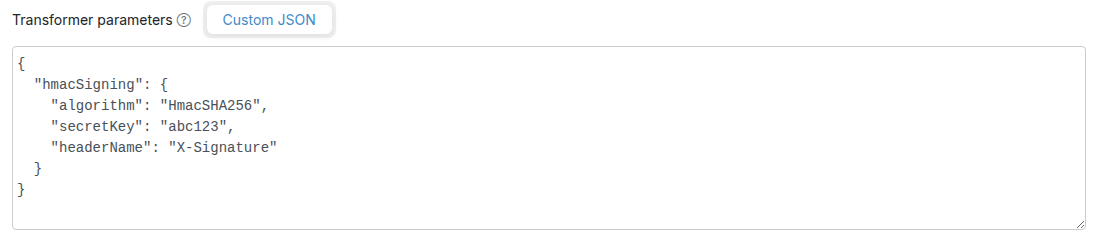
- The textarea is pretty-printed with 2-space indent when the form opens, and is auto-formatted on blur (when you click away from the textarea).
- Invalid JSON is rejected on form submit with an inline error — the textarea must parse to a plain JSON object.
- An empty or whitespace-only textarea is treated as "no transformer parameters" and serialises to nothing on disk.
- Round-trip is semantically equal (whitespace is normalised; field order is preserved). A customer who never opens the mapping in the editor keeps their on-disk JSON unchanged.
You can also continue to edit transformerParameters by hand in the mapping JSON file
on disk, or via the WireMock Admin API — the GUI editor reads and writes the same JSON shape.
Scope
The Custom JSON tab is a single JSON editor that covers any
transformer reading from transformerParameters (for example hmacSigning
and modifyResponse). Some transformers also have a schema-driven tab with structured
fields next to the Custom JSON tab — HMAC Signing, and
External Process for the
external-process middleware
transformer. A schema tab appears only when its transformer is toggled on, and it writes the same
transformerParameters JSON the Custom JSON tab shows.
RequestToPdf
The RequestToPdf transformer converts the incoming request body into a PDF file.
This is useful for simulating endpoints that generate PDF documents from input data.
Class: com.trafficparrot.virtualservice.extensions.responsetransformer.RequestToPdf
Usage:
- Add the transformer to your mapping's
transformers array
- The transformer will convert the request body to PDF format
- The response will have appropriate PDF headers set automatically
Example mapping:
{
"request": {
"url": "/generate-pdf",
"method": "POST"
},
"response": {
"status": 200,
"transformers": ["requestToPdf"]
}
}
Note
The RequestToPdf transformer is ideal for test environments where you need to simulate
PDF generation services without implementing the actual PDF creation logic.
ResponseToPdf
The ResponseToPdf transformer converts the original response body into a PDF file.
This is useful for simulating endpoints that transform their responses into PDF documents.
Class: com.trafficparrot.virtualservice.extensions.responsetransformer.ResponseToPdf
Usage:
- Add the transformer to your mapping's
transformers array
- The transformer will convert the response body to PDF format
- The original response status code is preserved
- PDF headers are added automatically if not already present
Example mapping:
{
"request": {
"url": "/get-report",
"method": "GET"
},
"response": {
"status": 200,
"body": "<report><data>Sample content</data></report>",
"transformers": ["responseToPdf"]
}
}
Difference between RequestToPdf and ResponseToPdf
RequestToPdf converts the incoming request body to PDF, useful when simulating services that generate PDFs from client input.
ResponseToPdf converts the response body to PDF, useful when you want to transform existing response data into PDF format.
HlsStreamTransformer
The HlsStreamTransformer serves HLS (HTTP Live Streaming) video content
from a single wildcard mapping. It dynamically generates .m3u8 playlist files
and serves .ts video segments stored in the __files/ directory.
This is useful for simulating video streaming APIs that deliver content via the HLS protocol.
Class: com.trafficparrot.virtualservice.extensions.responsetransformer.HlsStreamTransformer
How it works:
- You create a single mapping with a wildcard URL pattern (e.g.
/stream/.*) and select hlsStreamTransformer from the response transformer dropdown
- The response body contains a JSON configuration describing the stream
- The transformer inspects the request URL to decide what to serve:
- master.m3u8 requests return a generated master playlist pointing to a media playlist
- Other .m3u8 requests return a media playlist listing the .ts segment files found in the configured directory
- .ts requests serve the binary segment file directly from __files/
JSON configuration:
| Field |
Required |
Description |
segmentsDir |
Yes |
Path within __files/ where .ts segment files are stored (e.g. "stream/segments/") |
playlistType |
No |
Playlist type. Use "vod" (default) for Video on Demand, which adds an #EXT-X-ENDLIST tag. Use "live" for live streams without an end marker. |
Example mapping:
{
"request": {
"urlPattern": "/stream/.*",
"method": "GET"
},
"response": {
"status": 200,
"body": "{\"segmentsDir\": \"stream/\", \"playlistType\": \"vod\"}",
"transformers": ["hlsStreamTransformer"]
}
}
Directory layout:
Place your .ts segment files in the __files/ directory under the path specified by segmentsDir:
__files/
stream/
segment0.ts
segment1.ts
segment2.ts
With the example mapping above, a video player can fetch /stream/master.m3u8 to get the master playlist,
follow the link to /stream/media.m3u8 for the media playlist, and then download each .ts
segment referenced in the playlist. All requests are handled by the single wildcard mapping.
Generating .ts segments
You can create .ts segment files from any video using ffmpeg:
ffmpeg -i input.mp4 -c copy -map 0 -f segment -segment_time 2 segment%d.ts
This splits the video into 2-second segments named segment0.ts, segment1.ts, etc.
Multi-variant ABR streaming
The transformer also supports multi-variant adaptive bitrate (ABR) streams. Instead of a single
segmentsDir, the response body declares a variants array — one entry per
bitrate rendition — and the transformer generates a master playlist that lists every variant.
This simulates adaptive-bitrate switching so you can test a video player's ABR decision logic
without depending on real-world network throughput, which is hard to control in automated tests.
JSON configuration with variants:
{
"variants": [
{"name": "low", "bandwidth": 800000, "resolution": "426x240", "segmentsDir": "stream/low/"},
{"name": "mid", "bandwidth": 2000000, "resolution": "640x360", "segmentsDir": "stream/mid/"},
{"name": "high", "bandwidth": 5000000, "resolution": "1280x720", "segmentsDir": "stream/high/"}
],
"playlistType": "vod"
}
Variant fields:
| Field |
Required |
Description |
name |
Yes |
Identifier used in URLs and as the per-variant playlist filename. Must match the regex ^[a-z0-9][a-z0-9-]*$ (lowercase letters, digits, and hyphens; must start with a letter or digit) and be 1–32 characters. Names must be unique within the array. |
bandwidth |
Yes |
Peak bitrate in bits per second, as a number (e.g. 2000000 for 2 Mbps). Written verbatim into the master playlist's #EXT-X-STREAM-INF:BANDWIDTH= attribute. |
resolution |
Yes |
Frame size, formatted as "WIDTHxHEIGHT" (e.g. "1280x720"). Written verbatim into the master playlist's RESOLUTION= attribute. |
segmentsDir |
Yes |
Path within __files/ where this variant's .ts segments are stored (e.g. "stream/high/"). Each variant should have its own directory. |
playlistType works the same as in the single-variant configuration —
"vod" (default) appends #EXT-X-ENDLIST to each media playlist,
"live" omits it.
Variant name constraints
Variant names must match ^[a-z0-9][a-z0-9-]*$ and be 1–32 characters long.
The following names are reserved and will be rejected: master, media,
stream, segment, fallback. Duplicate names within the
same variants array are also rejected.
URL routing:
With a wildcard mapping such as /stream/.*, the multi-variant transformer answers
the following request shapes (where <base> is the matched prefix and
<name> is one of the configured variant names):
- /<base>/master.m3u8 — returns an
#EXTM3U master playlist with one #EXT-X-STREAM-INF:BANDWIDTH=...,RESOLUTION=... line per variant, each pointing to <name>.m3u8.
- /<base>/<name>.m3u8 — returns the media playlist for that variant, listing the .ts files found directly inside the variant's
segmentsDir.
- /<base>/<name>/segN.ts — returns the binary segment file from the variant's
segmentsDir. Note the variant name appears as a path segment in the URL, not just a filename prefix.
- If <name> does not match any configured variant, the transformer returns
404 with the body Unknown HLS variant: <name>.
Example multi-variant mapping:
{
"request": {
"urlPattern": "/stream/.*",
"method": "GET"
},
"response": {
"status": 200,
"body": "{\"variants\":[{\"name\":\"low\",\"bandwidth\":800000,\"resolution\":\"426x240\",\"segmentsDir\":\"stream/low/\"},{\"name\":\"mid\",\"bandwidth\":2000000,\"resolution\":\"640x360\",\"segmentsDir\":\"stream/mid/\"},{\"name\":\"high\",\"bandwidth\":5000000,\"resolution\":\"1280x720\",\"segmentsDir\":\"stream/high/\"}],\"playlistType\":\"vod\"}",
"transformers": ["hlsStreamTransformer"]
}
}
Directory layout:
Each variant's .ts segments live in its own subdirectory under __files/:
__files/
stream/
low/
segment0.ts
segment1.ts
segment2.ts
mid/
segment0.ts
segment1.ts
segment2.ts
high/
segment0.ts
segment1.ts
segment2.ts
Deterministic variant switching for tests
Real-world ABR is throughput-driven, which makes it hard to assert a player switched up or down
in an automated test. You can force the player to switch at a deterministic point by combining
the multi-variant mapping with a second, higher-priority mapping that selectively breaks one
variant's segment fetches.
Forced down-switch (higher-priority 503 stub):
Add a stub with a higher priority than the wildcard transformer mapping that
matches a single variant's segment URLs and returns 503. The player attempts the
higher variant, hits the failure on its first segment, and drops to the next-best variant.
Because WireMock evaluates lower priority numbers first, give the failing stub
"priority": 1 and leave the transformer mapping at the default priority (5):
{
"priority": 1,
"request": {
"urlPattern": "/stream/high/.*\\.ts",
"method": "GET"
},
"response": {
"status": 503
}
}
Forced up-switch (stub-level scenario state):
"Scenarios" here means the WireMock stub-level state machine, not Traffic Parrot scenario directories
Traffic Parrot has two unrelated concepts that share the word "scenario":
-
Traffic Parrot scenarios — the on-disk folder layout under scenarios/
that you switch between via the GUI or /api/scenarios. See the
Testing with scenarios section of the user guide.
-
Stub-level scenario state (used in this section) — a per-stub state machine
feature that has been part of the underlying WireMock engine since 2.x. You opt a stub
into it by adding the
scenarioName, requiredScenarioState, and
optionally newScenarioState fields to the mapping JSON.
These are independent. Switching the active Traffic Parrot scenario does not change WireMock stub state,
and vice versa.
To assert a player upgrades to a higher variant after the network "improves", combine the
wildcard transformer mapping with two stubs on the high variant's segments that opt into
a shared scenarioName. In the initial state the high segments fail with
503, so the player settles on the middle variant. The test then advances the
named scenario to HIGH_READY — the next probe of the high variant succeeds
and the player upgrades:
{
"priority": 1,
"scenarioName": "hls-abr",
"requiredScenarioState": "Started",
"request": {
"urlPattern": "/stream/high/.*\\.ts",
"method": "GET"
},
"response": {
"status": 503
}
}
{
"priority": 1,
"scenarioName": "hls-abr",
"requiredScenarioState": "HIGH_READY",
"request": {
"urlPattern": "/stream/high/.*\\.ts",
"method": "GET"
},
"response": {
"status": 200
}
}
The two stubs above are tied together by the shared scenarioName
("hls-abr"). "Started" is the implicit initial state; you advance to
"HIGH_READY" at test runtime by calling the
/__admin/scenarios/<name>/state admin endpoint:
PUT http://localhost:18080/api/http/__admin/scenarios/hls-abr/state
Content-Type: application/json
{"state": "HIGH_READY"}
The call goes to the Traffic Parrot GUI/API port (localhost:18080) — the same
port a test already uses for /api/scenarios, /api/state, and the request
journal. The /api/http/__admin/... prefix is the Traffic Parrot write-through that
forwards the request to the underlying WireMock SetScenarioStateTask handler.
After advancing the state, assert that the player upgraded by querying the request journal
(GET http://localhost:18080/api/http/__admin/requests) and checking that segments
from /stream/high/ appear in it after the state transition.
Backwards compatibility
The single-segmentsDir configuration described earlier is still fully
supported. The transformer checks for a variants array first; if it is
absent, it falls back to the legacy single-bitrate behaviour. Existing mappings do not
need to be migrated.
HmacSigningTransformer
The HmacSigningTransformer computes an HMAC signature of the response body
and adds it as a Base64-encoded response header. This is useful for simulating APIs that require
signature verification, such as webhook callbacks from services like GitHub, Slack, or Stripe,
and API gateways that use HMAC authentication (e.g., Azure, AWS).
Class: com.trafficparrot.virtualservice.extensions.responsetransformer.HmacSigningTransformer
How it works:
- The transformer runs after all Handlebars templates have been evaluated
- It reads the HMAC configuration from the mapping's
transformerParameters
- It computes the HMAC of the final response body bytes using the configured algorithm and secret key
- The Base64-encoded signature is added as a response header with the configured name
Configuration parameters:
HMAC signing is configured via the transformerParameters.hmacSigning object in the mapping JSON:
| Parameter |
Required |
Description |
algorithm |
Yes |
The HMAC algorithm to use: HmacSHA1, HmacSHA256, or HmacSHA512 |
secretKey |
Yes |
The secret key used to compute the HMAC signature |
headerName |
Yes |
The name of the response header that will contain the HMAC signature (e.g., X-Signature, X-Hub-Signature-256) |
Example mapping:
{
"request": {
"url": "/webhook/callback",
"method": "POST"
},
"response": {
"status": 200,
"body": "{\"event\": \"payment.completed\", \"amount\": 99.99}",
"headers": {
"Content-Type": "application/json"
},
"transformers": ["hmacSigning"],
"transformerParameters": {
"hmacSigning": {
"algorithm": "HmacSHA256",
"secretKey": "my-secret-key",
"headerName": "X-Signature"
}
}
}
}
The response will include the JSON body and an X-Signature header containing the
Base64-encoded HMAC-SHA256 signature of that body.
You can author the transformerParameters.hmacSigning block in the
Transformer parameters editor
in the Edit Mapping form, edit the mapping JSON file directly on disk, or post the mapping
via the WireMock Admin API — all three paths read and write the same JSON shape.
The HMAC is computed on the final response body bytes, so the signature matches exactly what
the client receives. If the response body is empty, the HMAC is computed on an empty byte array.
Prerequisites
HMAC signing requires the trafficparrot.http.modify.response.enabled property
to be set to true (this is the default). When disabled, the HMAC header will not be added.
Error handling
If an unsupported algorithm is specified or the secret key is empty, the transformer
logs a warning and returns the response unchanged (no signature header is added).
Supported algorithms are HmacSHA1, HmacSHA256, and HmacSHA512.
Base64DecodeBodyResponseTransformer
The base64-decode-body transformer Base64-decodes the rendered response body and serves
the resulting bytes as the response payload. It is the opt-in pairing for any helper that produces
Base64-encoded binary data — in particular, the {{image}} helper —
and lets you return real binary content (PNG, PDF, ZIP, etc.) from a JSON mapping body.
Class: com.trafficparrot.virtualservice.extensions.responsetransformer.Base64DecodeBodyResponseTransformer
How it works:
- Traffic Parrot renders the response body through Handlebars as normal, producing a Base64 string.
- The transformer runs after Handlebars and Base64-decodes that string into raw bytes.
- The decoded bytes are served as the response body. The status code and headers from the mapping
(including
Content-Type) are preserved — the transformer does not set any headers itself.
The transformer is opt-in — it only runs on mappings that explicitly list
"base64-decode-body" in the response transformers array. Existing mappings are unaffected.
Example mapping (PNG via the {{image}} helper):
{
  "request": { "method": "GET", "url": "/avatar" },
  "response": {
    "status": 200,
    "headers": { "Content-Type": "image/png" },
    "body": "{{image width=400 height=300}}",
    "transformers": ["base64-decode-body"]
  }
}
Set the Content-Type header in the mapping's headers field so the client knows
how to interpret the decoded bytes. The transformer itself is format-agnostic — it will happily decode
any valid Base64 input and serve it as bytes.
Error handling
A body that uses the {{image}} helper under this transformer must be
exactly one {{image ...}} invocation, with nothing around it but
whitespace. Literal text or another helper mixed in with {{image}} cannot be
Base64-decoded, so a mapping like that is refused when it is saved through the admin API:
HTTP 400, quoting the offending body.
Any other body is checked when the request is served rather than when the mapping is saved.
If what it renders to is not valid Base64 (malformed hardcoded Base64, or a helper
other than {{image}} emitting non-Base64 output), the response fails with
HTTP 500 and a body of Invalid Base64 body: <details>.
The external-process transformer passes the HTTP response through a user-supplied
executable — the "middleware" — written in any language. For each
matched request on a mapping that opts in, Traffic Parrot serialises a versioned JSON envelope
(the matched request plus the response about to be sent) to the executable's stdin,
and reads the mutated envelope back from its stdout. Only the response
section of the returned envelope is applied (status, headers, body). This is the same
out-of-process middleware idea that users coming from Hoverfly will recognise, so you can reuse a
script written in Python, Go, Node, a shell, or any other runtime that can read stdin and write stdout.
Security: off by default, runs as the Traffic Parrot user, no sandbox
The middleware executable runs as a native OS process with the privileges of the Traffic
Parrot process and no sandbox. The feature is therefore off by
default and must be explicitly enabled, and even when enabled only executables that
live under a single operator-configured directory may be invoked. Read the
Security and threat model notes below
before enabling it, and enable it only on trusted hosts.
Class: com.trafficparrot.virtualservice.extensions.responsetransformer.ExternalProcessTransformer (transformer name: external-process)
Enabling the feature
Two properties in trafficparrot.properties
control the feature. Both must be set before any external-process middleware will run:
| Property |
Default |
Description |
trafficparrot.http.externalprocess.enabled |
false |
Must be set to true to activate the feature. While it is false, a mapping that references the external-process transformer is inert — the response is returned unchanged and a warning is logged. |
trafficparrot.http.externalprocess.allowedDir |
(empty) |
Required. A single directory. Only executables whose canonical (symlink-resolved) path is under this directory may be invoked. An empty value means nothing is allowed, even when the feature is enabled — so you must set this to a dedicated directory holding your vetted middleware. |
# trafficparrot.properties
trafficparrot.http.externalprocess.enabled=true
trafficparrot.http.externalprocess.allowedDir=/opt/tp-middleware
When the feature is enabled, Traffic Parrot checks allowedDir once at startup. If it is
empty, does not exist, is not a directory, or is non-canonical (resolves to a different canonical path),
a single warning of the form external-process allow-list misconfiguration: … is logged
so you learn of the problem at startup rather than at the first matched request. This check is
warn-only — the server still starts, and the per-invocation allow-list enforcement
described below is unchanged.
Configuring a mapping
A mapping opts in by listing external-process in the response's
transformers array and supplying its configuration under
transformerParameters.external-process:
{
  "request": {
    "url": "/api/widgets/42",
    "method": "GET"
  },
  "response": {
    "status": 200,
    "body": "{\"name\":\"widget\"}",
    "headers": { "Content-Type": "application/json" },
    "transformers": ["external-process"],
    "transformerParameters": {
      "external-process": {
        "executable": "/opt/tp-middleware/uppercase-body.py",
        "args": [],
        "timeoutMs": 5000,
        "onError": "fail-open"
      }
    }
  }
}
| Parameter |
Required |
Description |
executable |
Yes |
Path to the executable to run. Its canonical (symlink-resolved) path must be under allowedDir, otherwise the middleware is not invoked and onError is applied. |
args |
No |
Extra command-line arguments passed to the executable, as a JSON array of strings. Defaults to an empty list. |
timeoutMs |
No |
Per-invocation timeout in milliseconds (default 5000). If the process has not exited within this time it is forcibly killed and onError is applied. |
onError |
No |
What to do when the middleware fails (default fail-open). See Failure handling below. |
Configuring it in the editor GUI
You do not have to hand-edit the mapping JSON. The external-process transformer can be
enabled and configured directly in the HTTP mapping editor. Open the Add HTTP mapping
or Edit HTTP mapping form, expand Advanced parameters, and scroll to
the Response transformers list.
The option only appears when the feature is enabled
The ExternalProcessTransformer toggle is offered in the editor
only when an operator has set
trafficparrot.http.externalprocess.enabled=true (see
Enabling the feature above). When the
feature is off — its default — the toggle is not shown at all, so a mapping author cannot
opt a response into external-process middleware that the operator has not turned on. Selecting the
transformer in the GUI does not bypass either gate: the
trafficparrot.http.externalprocess.allowedDir allow-list still governs which executables
may actually run at request time, exactly as it does for a mapping authored in JSON or via the API.
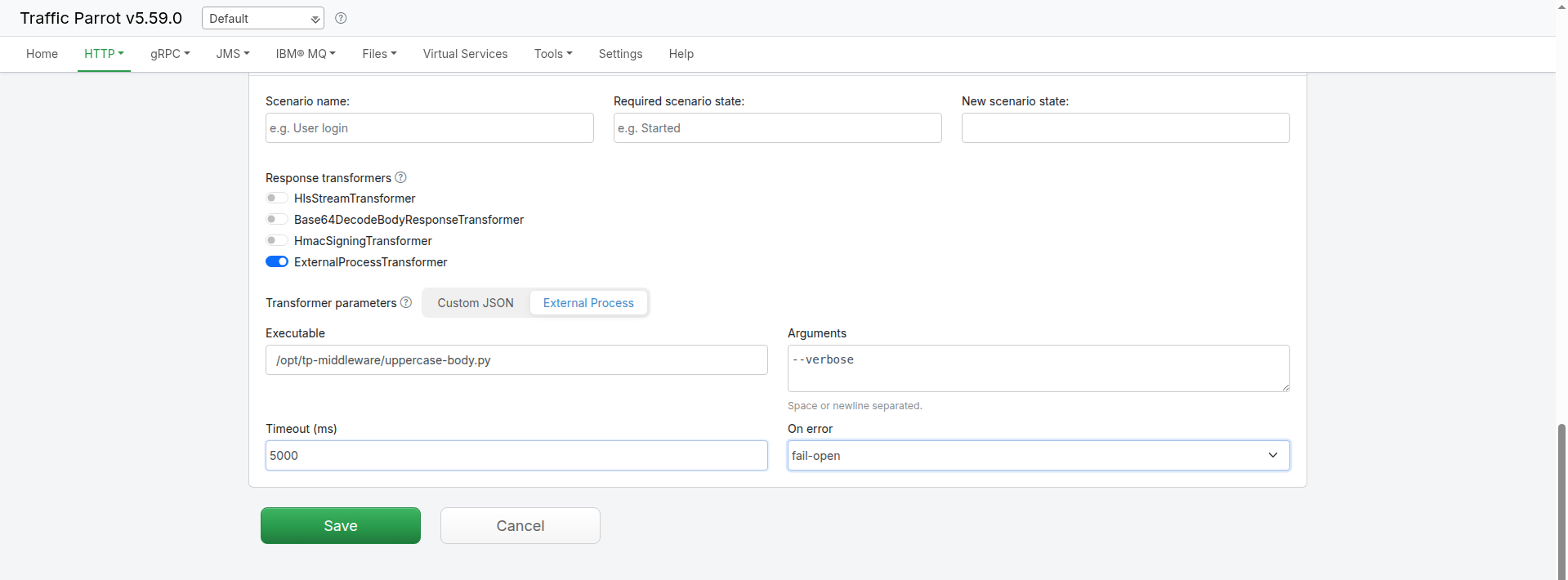
Toggle ExternalProcessTransformer on. An External Process tab then
appears in the Transformer parameters panel below, with a structured field for each
parameter:
- Executable — the path to the executable. Its canonical path must be under
allowedDir, otherwise the middleware is not invoked and onError is applied at
request time.
- Arguments — extra command-line arguments, space or newline
separated. They are stored as a JSON array. Leave it empty to pass no arguments (no
args key is written). Arguments that contain embedded spaces are not supported by this
field — use the Custom JSON tab for those.
- Timeout (ms) — the per-invocation timeout in milliseconds, stored as a JSON
number. Leave it empty to use the transformer's default of
5000.
- On error —
fail-open (pass the original response through
unchanged) or fail-closed (return an error). Leave it empty to use the default,
fail-open. See Failure handling.
Saving the mapping adds "external-process" to the response's transformers
list and writes the configuration to transformerParameters.external-process — the
exact same JSON shown under Configuring a mapping
above. The editor is a front end for the existing capability; it adds no new runtime behaviour. Re-opening
the mapping hydrates the fields back from the stored block (a stored block that omits
timeoutMs or onError re-opens with those fields empty, and the transformer's
defaults apply). The Custom JSON tab remains available for any configuration the structured
fields do not cover.
In this release
External-process middleware can be configured in the
HTTP mapping editor, in the mapping JSON on
disk, or via the WireMock Admin API — all three read and write the same JSON shape. It applies
to HTTP responses only: the executable may mutate the response (status,
headers, body), but
changes it makes to the meta or request sections of the envelope are
ignored — request mutation is not supported in this release.
Supported on Linux and macOS in this release. The transformer spawns
whatever executable you configure, so the mechanism itself is not OS-specific, but the
bundled example middleware is POSIX (Python and shell). On Windows you would need to
supply a Windows-native executable (for example a .bat/.cmd
wrapper or an .exe); first-class Windows examples and support are planned
for a later release.
The JSON envelope (version 1)
Traffic Parrot writes a single JSON object to the executable's stdin and expects the same object,
with the response section mutated, on stdout. The shape is versioned via
meta.contractVersion so middleware can refuse an envelope it does not understand.
{
  "meta": {
    "contractVersion": "1",
    "protocol": "http",
    "transformer": "external-process",
    "mappingId": "<stub uuid>"
  },
  "request": {
    "method": "GET",
    "url": "/api/widgets/42",
    "headers": { "Accept": ["application/json"] },
    "body": "",
    "bodyEncoding": "identity"
  },
  "response": {
    "status": 200,
    "headers": { "Content-Type": ["application/json"] },
    "body": "{\"name\":\"widget\"}",
    "bodyEncoding": "identity"
  }
}
| Field |
Description |
meta.contractVersion |
Always "1" in this release. Bumped on any breaking change — middleware should check it and refuse an unknown major version. |
meta.protocol |
Always "http" in this release. |
meta.transformer |
Always "external-process". |
meta.mappingId |
The stub mapping's UUID. Opaque to Traffic Parrot — provided for the middleware's own logging or routing. |
request |
The matched request as read-only context: method, url, headers (a multimap of name → array of values), body, and bodyEncoding. |
response |
The response about to be sent — the section the middleware mutates: status, headers (multimap), body, and bodyEncoding. |
bodyEncoding |
"identity" when the body is valid UTF-8 text; "base64" when the body is binary. A middleware that does not need to touch the body must echo it back unchanged, along with its bodyEncoding. |
The middleware mutates the response object only and prints the whole envelope back.
Traffic Parrot reads just the returned response — any changes to meta or
request are ignored.
A minimal middleware example
This Python script reads the envelope, uppercases the response body when it is identity-encoded
(leaving base64 binary bodies untouched), stamps a marker header, and writes the envelope back:
#!/usr/bin/env python3
import json, sys

env = json.load(sys.stdin)
resp = env["response"]
if resp.get("bodyEncoding", "identity") == "identity":
    resp["body"] = resp.get("body", "").upper()
resp.setdefault("headers", {})["X-Transformed-By"] = ["uppercase-body.py"]
json.dump(env, sys.stdout)
Save this as uppercase-body.py in your allowedDir, make it executable
(chmod +x), point a mapping's executable at it, and the matched response
body comes back uppercased with an X-Transformed-By header.
Failure handling
Four conditions count as a middleware failure: a non-zero exit code, a
timeout (the process is forcibly killed at timeoutMs), malformed
JSON on stdout, and a missing or disallowed executable (including a path that
does not resolve under allowedDir). Each is logged, and the onError setting
decides what the client receives:
onError |
Behaviour on failure |
fail-open (default) |
The original, unmodified response is returned — the middleware failure is invisible to the client. |
fail-closed |
An HTTP 500 is returned, so a broken middleware surfaces as a failed request rather than silently passing the original response through. |
Performance: one process per matched request
In this release Traffic Parrot spawns a fresh process for every matched request
on a mapping that uses the transformer. The dominant cost is interpreter/runtime startup, so a
lightweight script keeps the per-request overhead small. Because the transformer is opt-in per
mapping, this cost only lands on the mappings that use it — all other mappings are
unaffected.
Security and threat model
The middleware executable runs as a native OS process with the privileges of the Traffic Parrot
process and is not sandboxed — it can do anything that the operating-system user
running Traffic Parrot can do. Treat enabling this feature as granting code-execution rights to whoever
can edit mappings. To use it safely:
- Enable it only on trusted hosts; it is off by default for this reason.
- Point
allowedDir at a dedicated directory that holds only vetted middleware scripts an operator has reviewed, and keep that directory write-protected from untrusted users.
- Run Traffic Parrot as an unprivileged OS user so the blast radius of any middleware is limited.
- Use the per-invocation
timeoutMs to bound runaway processes, and apply operating-system resource limits (for example ulimit or cgroups) for memory and process caps — Traffic Parrot does not impose these itself.