
Traffic Parrot is a standalone mock and service virtualization server that is compatible with WireMock stub mappings. If you are coming from WireMock and searching for how to use an environment variable in a response mapping — for example, to inject a host name, a build identifier, or a per-environment URL into the body or a header that Traffic Parrot returns — this page is the Traffic Parrot answer.
The mechanism is the systemValue Handlebars helper. It reads from the process environment
(type='ENVIRONMENT') or from a JVM system property (type='PROPERTY') and writes the
value into the rendered response. Because Traffic Parrot enables
response templating for HTTP by default, the helper works in a plain
stub mapping with no extra configuration — you do not need to add a
"transformers": ["response-template"] array to the mapping.
There is one constraint that surprises most people, and it is the single most important thing on this page:
only keys whose name matches wiremock.* may be read. A request for any other key
renders an [ERROR: Access to … is denied] string instead of the value. The
allow-list section explains how to name your variables so that they
are permitted.
Suppose your deployment exports an environment variable that you want to surface in a mocked response. Because
of the allow-list described below, give it a name that starts with wiremock. Before starting
Traffic Parrot, export it in the same shell:
export wiremock_MY_VALUE=hello-from-env
./start.sh
The environment variable is inherited by the Traffic Parrot process, so it must be set before
Traffic Parrot starts. Now create an HTTP stub mapping that references it from both the response body and a
response header. The {{systemValue …}} expressions are templated automatically:
{
  "request": {
    "method": "GET",
    "url": "/env-value"
  },
  "response": {
    "status": 200,
    "body": "env={{systemValue type='ENVIRONMENT' key='wiremock_MY_VALUE'}} default={{systemValue type='ENVIRONMENT' key='wiremock_UNSET' default='fallback-value'}}",
    "headers": {
      "Content-Type": "text/plain",
      "X-Env": "{{systemValue type='ENVIRONMENT' key='wiremock_MY_VALUE'}}"
    }
  }
}
A request to the virtual service returns the resolved values in both the header and the body:
$ curl -i http://localhost:8081/env-value
HTTP/1.1 200 OK
Content-Type: text/plain
X-Env: hello-from-env

env=hello-from-env default=fallback-value
The first {{systemValue …}} resolved wiremock_MY_VALUE to
hello-from-env in both the X-Env header and the body. The second one asked for a key that
was not set (wiremock_UNSET) and so fell back to the supplied default='fallback-value'.
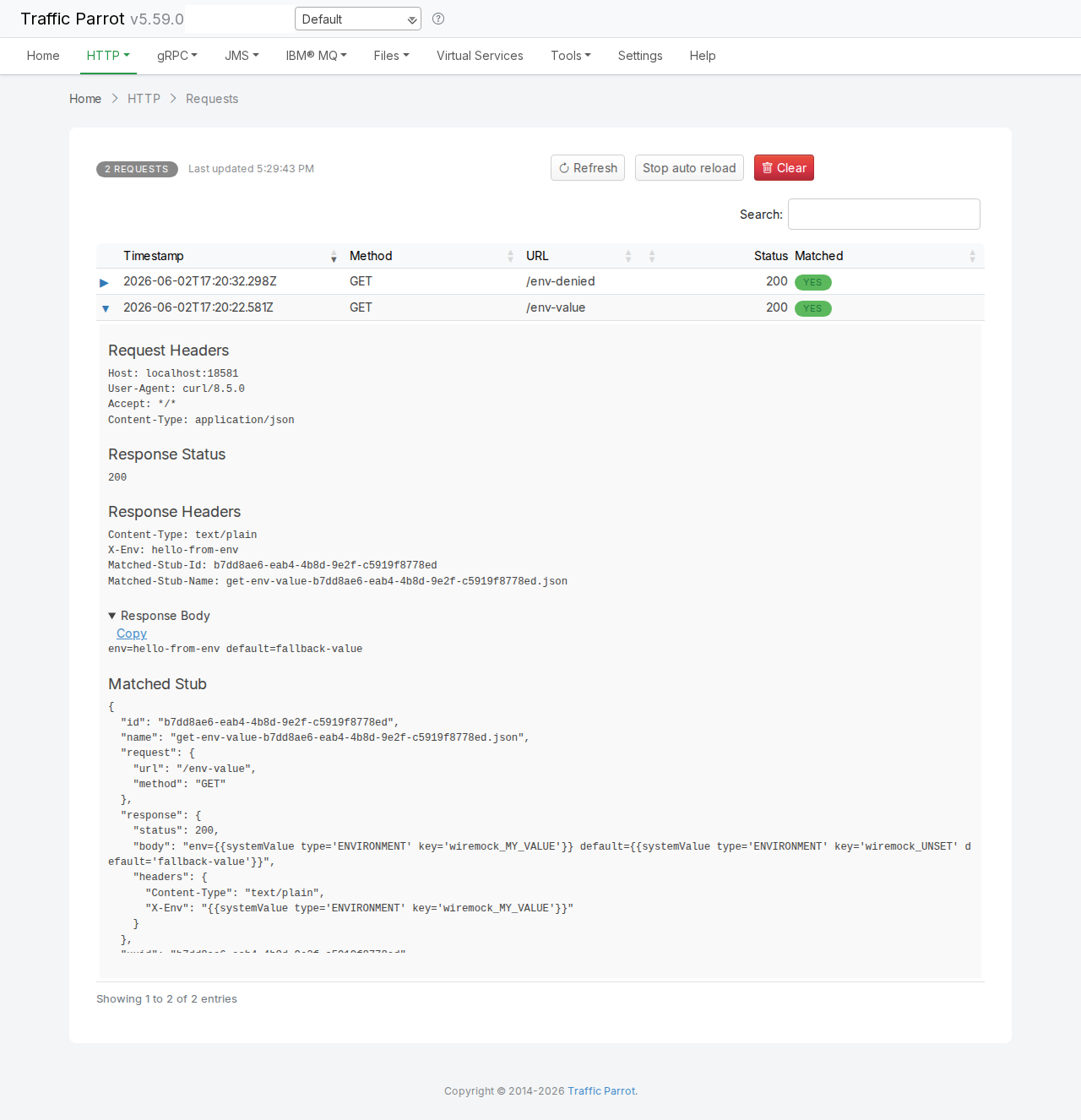
You can see the same thing in the web UI. The HTTP Request Log records every
request; expanding the matched /env-value request shows the resolved Response Headers
and Response Body at the top, and the original Matched Stub — with the raw
{{systemValue …}} templates still in place — further down:
The helper takes the following parameters:
| Parameter | Required | Description |
|---|---|---|
type |
Optional | Either 'ENVIRONMENT' to read an operating-system environment variable, or
'PROPERTY' to read a JVM system property. When omitted, type defaults to
'ENVIRONMENT'. |
key |
Required | The name of the environment variable or system property to read. The name must satisfy the allow-list. |
default |
Optional | A fallback value used when the key is not set (or resolves to nothing). When the key is set, the
default is ignored. |
Because the helper renders into the response text, you can use it anywhere a Handlebars template is evaluated — the response body, response headers, or a referenced template file. The example above used it in both a header and the body.
Use type='PROPERTY' to read a value passed to the Traffic Parrot JVM as a
-D system property. Add the property to the jvm.args file at the install root (the
global mechanism for passing JVM arguments — see JVM arguments):
-Dwiremock.my.prop=hello-from-propThen reference it from a response:
prop={{systemValue type='PROPERTY' key='wiremock.my.prop'}}which renders as:
prop=hello-from-prop
Unlike an environment variable, a system property name may contain dots, so wiremock.my.prop is a
valid property name (and it still matches the allow-list). The
naming rules section explains why the same is not true for environment
variables.
wiremock.* may be read. The match is
case-insensitive and applies to the whole name. A request for any key that does not match renders the literal
string [ERROR: Access to <key> is denied] in place of the value. There is no Traffic Parrot
property that widens this allow-list.
This is a deliberate safeguard: a response template should not be able to read arbitrary environment variables or
system properties from the host (which could leak credentials, paths, or other secrets the process happens to
hold). Restricting reads to a wiremock-prefixed namespace means only the values you explicitly opt in
by naming are exposed.
For example, referencing a key that does not start with wiremock:
{{systemValue type='ENVIRONMENT' key='MY_VALUE'}}renders as:
[ERROR: Access to MY_VALUE is denied]
even when MY_VALUE is set in the environment. The fix is always to name — or rename — the
variable so its name starts with wiremock, as described next.
Because of the allow-list, the practical naming rules differ slightly between environment variables and system properties:
Environment variable (type='ENVIRONMENT') |
System property (type='PROPERTY') |
|
|---|---|---|
| Name to use | Use an underscore, e.g. wiremock_MY_VALUE. Operating-system environment-variable names
cannot contain dots (a shell rejects export wiremock.X=…), so a dotted name is not an
option here. The dot in the wiremock.* allow-list pattern matches the underscore, so an
underscore-prefixed name is permitted. |
Dots are fine, e.g. wiremock.my.prop. A -D system-property name may contain
dots, which both reads naturally and matches the allow-list. |
| How to set it | Export it in the environment before Traffic Parrot starts — it is inherited by the
Traffic Parrot process:
|
Pass it to the JVM with -D by adding a line to the jvm.args file at the install
root, then restart:
|
The lone example in the Handlebars helpers list shows
key='wiremock.VARIABLE' with a dot. That dotted form is fine for a system property, but for an
environment variable you cannot create a dotted name — use the underscore form
wiremock_VARIABLE instead.
| Symptom | Cause and fix |
|---|---|
The response contains [ERROR: Access to … is denied] |
The key name does not match the wiremock.* allow-list.
Rename the variable so its name starts with wiremock (use wiremock_ for an
environment variable, wiremock. for a system property). |
The response is empty where the value should be, or shows the default |
The key is not set in the Traffic Parrot process. For an environment variable, confirm it was exported in
the same shell before start.sh ran. For a system property, confirm the
-D line is present in jvm.args. Restart after any change. |
The literal text {{systemValue …}} is returned, unrendered |
Response templating is on by default for HTTP. If it has been turned off, re-enable it — see
Handlebars helpers and the
Configuration Reference. The
working example needs no
"transformers" array. |
systemValue.This documentation is for an old version of Traffic Parrot. There is a more recent Traffic Parrot version available for download at trafficparrot.com