
The IBM® MQ CICS bridge (the CICS DPL bridge) lets an application call a CICS program by putting a message on a queue. The request carries an MQCIH header, the name of the program and the program's COMMAREA, in the EBCDIC text and packed-decimal layout the program's COBOL copybook describes. The bridge runs the program and puts the reply, an MQCIH and the program's output COMMAREA, on the request's reply-to queue, correlated to the request's message id.
Traffic Parrot stands in for the bridge and for the programs behind it. Replaying the bridge request queue, it reads each request, decodes the COMMAREA with the program's copybook, matches a mapping on the program name, the header fields and the decoded fields, and sends the reply the way the bridge sends it, with a COMMAREA encoded from JSON by the reply copybook. The application under test keeps its MQ client, its queues and its copybooks. Nothing runs on the mainframe, and no CICS region is needed.
You need a native IBM® MQ connection to the queue manager the application uses, the IBM® MQ client JAR in lib/external, a licence that includes native IBM® MQ, and the copybooks of the programs you virtualize. The walkthrough on the IBM® MQ developer container below runs the whole flow on a laptop in a few minutes.
Everything else a native IBM® MQ virtual service does applies: the connection to the queue manager, starting and stopping replay, mapping files under ibm-mq-mappings, the mapping editor, delays and the requests page are the ones the native IBM® MQ page describes.
The bridge is off by default. Set this property in trafficparrot.properties and restart Traffic Parrot:
trafficparrot.ibmmq.cicsBridge.enabled=true
With it off, a request with the format MQCICS arriving on a replayed queue is not answered, and the log says why:
Unsupported type: 'MQCICS'. To answer CICS DPL bridge requests, set trafficparrot.ibmmq.cicsBridge.enabled=true.
Traffic Parrot decodes and encodes a COMMAREA with the program's COBOL copybooks. Put them in a copybooks directory next to the ibm-mq-mappings directory of the scenario (the main Traffic Parrot directory for the default scenario), together with an index file, programs.json, that names the copybooks of each program:
trafficparrot-x.y.z/
|-- ibm-mq-mappings/
|   `-- acctbal.json
`-- copybooks/
    |-- programs.json
    |-- ACCTBAL-REQ.cpy
    `-- ACCTBAL-RPY.cpy
{
  "ACCTBAL": {
    "requestCopybook": "ACCTBAL-REQ.cpy",
    "replyCopybook": "ACCTBAL-RPY.cpy"
  }
}Group levels, PIC X and PIC A text, zoned decimal PIC 9 and PIC S9 (including SIGN SEPARATE), COMP-3 packed decimal, COMP, COMP-4 and BINARY big-endian binary, COMP-5, OCCURS, OCCURS DEPENDING ON, REDEFINES, FILLER and level 88 conditions. A copybook that uses something else is refused when the program is first requested, with a message in the log naming the copybook and the line.
A bridge request is matched as a JSON document: the user id from the MQMD, the MQCIH fields, the program name and the decoded COMMAREA. For a request to the ACCTBAL program of the walkthrough, with the copybook above, the view is:
{
  "MQMD" : {
    "UserIdentifier" : "app"
  },
  "MQCIH" : {
    "Version" : 2,
    "Encoding" : 785,
    "CodedCharSetId" : 37,
    "Format" : "",
    "Flags" : 0,
    "ReturnCode" : 0,
    "CompCode" : 0,
    "Reason" : 0,
    "UOWControl" : 273,
    "GetWaitInterval" : 0,
    "LinkType" : 1,
    "OutputDataLength" : -1,
    "FacilityKeepTime" : 0,
    "ADSDescriptor" : 0,
    "ConversationalTask" : 0,
    "TaskEndStatus" : 0,
    "Facility" : "0000000000000000",
    "Function" : "",
    "AbendCode" : "",
    "ReplyToFormat" : "",
    "RemoteSysId" : "",
    "RemoteTransId" : "",
    "TransactionId" : "",
    "FacilityLike" : "",
    "AttentionId" : "",
    "StartCode" : "",
    "CancelCode" : "",
    "NextTransactionId" : "",
    "CursorPosition" : 0,
    "ErrorOffset" : 0,
    "InputItem" : 0
  },
  "ProgramName" : "ACCTBAL",
  "COMMAREA" : {
    "ACCOUNT-NO" : "1234567890",
    "BRANCH-ID" : 42,
    "MIN-RATE" : 0.0000001
  }
}With trafficparrot.ibmmq.logger.logMessageBody at its default of true, every request is written to the log under CICS bridge request as Traffic Parrot matches it:, followed by this view, which is the quickest way to see what a mapping has to match. An unmatched request is listed on the IBM® MQ Requests page with the same view and its near misses when trafficparrot.messaging.diagnostics.enabled is true; the page shows the first part of the view, so the decoded fields are easiest to read in the log.
Every request body matcher runs against the JSON view, so equalToJson, matchesJsonPath, contains and the others work on a bridge request as they do on any JSON message, and and, or and not combine them. For example, with matchesJsonPath:
"bodyMatcher": {
  "and": [
    { "matchesJsonPath": { "expression": "$.ProgramName", "equalTo": "ACCTBAL" } },
    { "matchesJsonPath": { "expression": "$.COMMAREA.ACCOUNT-NO", "equalTo": "1234567890" } }
  ]
}matchesCicsField compares one field of the view by its path, with the comparison a copybook field needs: a number compares as a number, so 0042 in a PIC 9(4) equals 42, and a PIC X holding digits can be compared as a number too. The matcher value is a JSON object with a field path and exactly one comparison:
| Key | Meaning |
|---|---|
| field | The path of the field from the root of the view, names separated by dots, exactly as the copybook spells them: COMMAREA.ACCOUNT-NO, ProgramName, MQCIH.TransactionId, MQMD.UserIdentifier. An OCCURS element is picked by a zero-based index in brackets: COMMAREA.TXN-ENTRY[1].TXN-AMOUNT is the second entry's amount. |
| equalTo | Equal to the value: numbers by value, text exactly. |
| matches | A regular expression the whole value must match, numbers in their plain form. |
| greaterThan, greaterThanOrEqualTo, lessThan, lessThanOrEqualTo | Compare the field as a decimal; text that does not read as a number does not match. |
A path that reaches nothing, a null, a group or a table is no match. A mapping file combining several field matchers:
"bodyMatcher": {
  "and": [
    { "matchesCicsField": { "field": "ProgramName", "equalTo": "ACCTBAL" } },
    { "matchesCicsField": { "field": "MQCIH.TransactionId", "equalTo": "CKBP" } },
    { "matchesCicsField": { "field": "COMMAREA.BRANCH-ID", "greaterThan": 40 } },
    { "matchesCicsField": { "field": "COMMAREA.ACCOUNT-NO", "matches": "123.*" } }
  ]
}
In the IBM® MQ mapping editor, choose matches CICS field in the Request body dropdown and type the object, for example {"field": "COMMAREA.BRANCH-ID", "greaterThan": 40}, as the value. To combine several field matchers with and, or or not, write the mapping file, as the walkthrough does: the editor's sub-matcher lists do not offer the field matchers, so a mapping that combines them opens in the editor with those lists blank and is refused on Save with Must be constructed with at least two matchers, leaving the file as it is. The matcher's expected value can be kept in a file under __files like any other request body matcher value from a file.
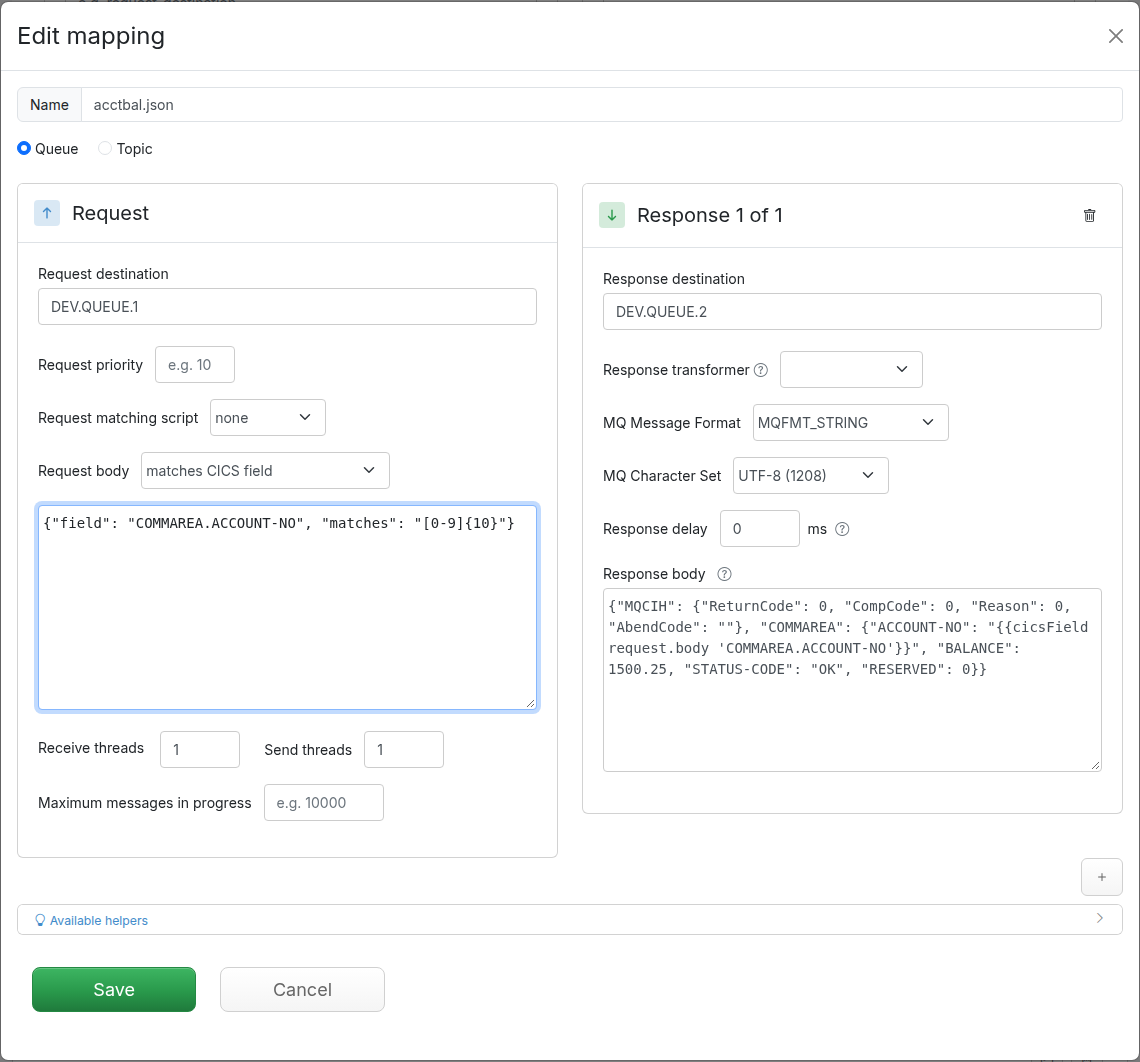
The mapping's response text is a JSON object with up to two keys:
{
  "MQCIH": { "ReturnCode": 0, "CompCode": 0, "Reason": 0, "AbendCode": "" },
  "COMMAREA": {
    "ACCOUNT-NO": "{{cicsField request.body 'COMMAREA.ACCOUNT-NO'}}",
    "BALANCE": 1500.25,
    "STATUS-CODE": "OK",
    "RESERVED": 0
  }
}An empty response text sends an MQCIH with no COMMAREA. The reply has the format MQCICS, the request's encoding and character set (the editor's Response Format and Character Set fields do not apply to a bridge reply, whatever they show), the message type reply, and a correlation id equal to the request's message id, and it goes to the request's reply-to queue, the bridge's own rule and the default routing of every IBM® MQ reply; the mapping's response destination is used when the request names no reply-to queue. To answer with an abend, as the real program would on its error path:
{ "MQCIH": { "ReturnCode": 5, "CompCode": 2, "AbendCode": "AEI0" } }which is MQCRC_APPLICATION_ABEND with MQCC_FAILED; the IBM® MQ documentation of the MQCIH structure lists the return codes.
{{cicsField request.body 'COMMAREA.ACCOUNT-NO'}} renders one field of the request view by the same path syntax matchesCicsField uses, so a reply can echo and compute from the request, beside the other response templating helpers, for example {{math (cicsField request.body 'COMMAREA.BRANCH-ID') '*' 10.5}}.
A response text that is not a JSON object, an unknown key, an MQCIH field that cannot be set, a COMMAREA for a program with no reply copybook, a value that does not fit its picture, or CommareaHex that is not hex, is logged as an error and answered the way the bridge reports its own failures: ReturnCode MQCRC_BRIDGE_ERROR, CompCode MQCC_FAILED, and the reason as text in place of the COMMAREA. The client's error handling runs, and the log names what to fix.
This walkthrough runs the whole flow on one machine with the free IBM® MQ for Developers container, a two-copybook sample program and a small Java client that puts a bridge request the way a CICS client does. You need Docker, a Traffic Parrot installation with the IBM® MQ client JAR in lib/external, and a JDK (version 17 or later; the client is run from its source file, which a JRE alone cannot do).
docker run --env LICENSE=accept --env MQ_QMGR_NAME=QM1 --env MQ_APP_PASSWORD=MQ_APP_PASSWORD --publish 1414:1414 --publish 9443:9443 --detach --name ibm-mq icr.io/ibm-messaging/mq:latest
The developer configuration creates queue manager QM1 with the queues DEV.QUEUE.1 and DEV.QUEUE.2, used here as the bridge request queue and the reply queue, and the channel DEV.APP.SVRCONN for the user app with the password you gave. The connection to it is the Local Docker MQ 9 entry of the example ibm-mq-connections.json; add it to yours if it is not there.
Create the copybooks directory in the main Traffic Parrot directory with these three files. The program, ACCTBAL, is a synthetic balance inquiry: the request carries an account number, a branch id and a packed rate, and the reply the account number, a packed balance, a status and a binary count.
copybooks/ACCTBAL-REQ.cpy
      * Balance inquiry request COMMAREA.
       01  BALANCE-REQUEST.
           05  ACCOUNT-NO             PIC X(10).
           05  BRANCH-ID              PIC 9(4).
           05  MIN-RATE               PIC SV9(7) COMP-3.
copybooks/ACCTBAL-RPY.cpy
      * Balance inquiry reply COMMAREA.
       01  BALANCE-REPLY.
           05  ACCOUNT-NO             PIC X(10).
           05  BALANCE                PIC S9(9)V99 COMP-3.
           05  STATUS-CODE            PIC X(2).
           05  RESERVED               PIC S9(4) COMP.
copybooks/programs.json
{
  "ACCTBAL": {
    "requestCopybook": "ACCTBAL-REQ.cpy",
    "replyCopybook": "ACCTBAL-RPY.cpy"
  }
}Save this as ibm-mq-mappings/acctbal.json. It matches any ACCTBAL request whose account number is ten digits, echoes the account number into the reply and answers a balance of 1500.25:
{
  "request": {
    "destination": { "name": "DEV.QUEUE.1", "type": "QUEUE" },
    "bodyMatcher": {
      "and": [
        { "matchesCicsField": { "field": "ProgramName", "equalTo": "ACCTBAL" } },
        { "matchesCicsField": { "field": "COMMAREA.ACCOUNT-NO", "matches": "[0-9]{10}" } }
      ]
    }
  },
  "response": {
    "destination": { "name": "DEV.QUEUE.2", "type": "QUEUE" },
    "text": "{\"MQCIH\": {\"ReturnCode\": 0, \"CompCode\": 0, \"Reason\": 0, \"AbendCode\": \"\"}, \"COMMAREA\": {\"ACCOUNT-NO\": \"{{cicsField request.body 'COMMAREA.ACCOUNT-NO'}}\", \"BALANCE\": 1500.25, \"STATUS-CODE\": \"OK\", \"RESERVED\": 0}}"
  }
}Set trafficparrot.ibmmq.cicsBridge.enabled=true in trafficparrot.properties, start Traffic Parrot, open IBM MQ, Replay, pick the Local Docker MQ 9 connection for the requests and the responses and click Start, as described under replaying IBM® MQ queues. The mapping appears on the IBM MQ mappings page.
Save this client as PutCicsRequest.java. It connects as the application would, puts one request for ACCTBAL on DEV.QUEUE.1 with DEV.QUEUE.2 as the reply-to queue, waits for the reply correlated to its message id and prints it. The COMMAREA bytes are what the COBOL program would send for account 1234567890, branch 42 and rate 0.0000001. The connection details can be overridden with the environment variables the code reads, so the same file runs against another queue manager.
import com.ibm.mq.MQGetMessageOptions;
import com.ibm.mq.MQMessage;
import com.ibm.mq.MQPutMessageOptions;
import com.ibm.mq.MQQueue;
import com.ibm.mq.MQQueueManager;
import com.ibm.mq.constants.CMQC;
import com.ibm.mq.headers.MQCIH;

import java.nio.charset.Charset;
import java.util.Hashtable;
import java.util.HexFormat;

/** Puts one CICS DPL bridge request for program ACCTBAL and prints the reply, as a client of the bridge would. */
public class PutCicsRequest {
    /** Big-endian integers and packed decimals: the z/OS encoding the bridge expects. */
    private static final int S390_ENCODING = CMQC.MQENC_INTEGER_NORMAL | CMQC.MQENC_DECIMAL_NORMAL | CMQC.MQENC_FLOAT_S390;
    private static final int EBCDIC_US = 37;
    private static final Charset IBM037 = Charset.forName("IBM037");
    /** ACCTBAL-REQ.cpy: ACCOUNT-NO "1234567890", BRANCH-ID 0042 and MIN-RATE 0.0000001 (packed), as COBOL lays them out. */
    private static final String REQUEST_COMMAREA_HEX = "F1F2F3F4F5F6F7F8F9F0" + "F0F0F4F2" + "0000001C";

    public static void main(String[] args) throws Exception {
        String requestQueue = env("MQ_REQUEST_QUEUE", "DEV.QUEUE.1");
        String replyQueue = env("MQ_REPLY_QUEUE", "DEV.QUEUE.2");
        Hashtable<String, Object> connection = new Hashtable<>();
        connection.put(CMQC.HOST_NAME_PROPERTY, env("MQ_HOST", "localhost"));
        connection.put(CMQC.PORT_PROPERTY, Integer.parseInt(env("MQ_PORT", "1414")));
        connection.put(CMQC.CHANNEL_PROPERTY, env("MQ_CHANNEL", "DEV.APP.SVRCONN"));
        connection.put(CMQC.USER_ID_PROPERTY, env("MQ_USER", "app"));
        connection.put(CMQC.PASSWORD_PROPERTY, env("MQ_PASSWORD", "MQ_APP_PASSWORD"));
        connection.put(CMQC.USE_MQCSP_AUTHENTICATION_PROPERTY, true);
        MQQueueManager queueManager = new MQQueueManager(env("MQ_QUEUE_MANAGER", "QM1"), connection);
        try {
            MQMessage request = bridgeRequest("ACCTBAL", HexFormat.of().parseHex(REQUEST_COMMAREA_HEX), replyQueue);
            MQQueue queue = queueManager.accessQueue(requestQueue, CMQC.MQOO_OUTPUT);
            MQPutMessageOptions putOptions = new MQPutMessageOptions();
            putOptions.options = CMQC.MQPMO_NEW_MSG_ID;
            queue.put(request, putOptions);
            queue.close();
            System.out.println("Put request " + HexFormat.of().withUpperCase().formatHex(request.messageId) + " on " + requestQueue);

            MQMessage reply = new MQMessage();
            reply.correlationId = request.messageId;
            MQGetMessageOptions getOptions = new MQGetMessageOptions();
            getOptions.options = CMQC.MQGMO_WAIT;
            getOptions.matchOptions = CMQC.MQMO_MATCH_CORREL_ID;
            getOptions.waitInterval = 10_000;
            queue = queueManager.accessQueue(replyQueue, CMQC.MQOO_INPUT_SHARED);
            queue.get(reply, getOptions);
            queue.close();

            MQCIH replyHeader = new MQCIH(reply, reply.encoding, reply.characterSet);
            byte[] commarea = new byte[reply.getDataLength()];
            reply.readFully(commarea);
            System.out.println("Reply format " + reply.format.trim() + ": return code " + replyHeader.getReturnCode()
                    + ", completion code " + replyHeader.getCompCode() + ", abend code '" + replyHeader.getAbendCode().trim() + "'");
            System.out.println("Reply COMMAREA as hex: " + HexFormat.of().withUpperCase().formatHex(commarea));
            System.out.println("Reply COMMAREA as EBCDIC text: " + new String(commarea, IBM037));
        } finally {
            queueManager.disconnect();
        }
    }

    /** MQMD format MQCICS, then an MQCIH, the program name padded to 8 characters and the COMMAREA, all EBCDIC. */
    private static MQMessage bridgeRequest(String program, byte[] commarea, String replyQueue) throws Exception {
        MQMessage message = new MQMessage();
        message.format = CMQC.MQFMT_CICS;
        message.encoding = S390_ENCODING;
        message.characterSet = EBCDIC_US;
        message.messageType = CMQC.MQMT_REQUEST;
        message.replyToQueueName = replyQueue;
        message.correlationId = CMQC.MQCI_NEW_SESSION.clone();
        MQCIH header = new MQCIH();
        header.setEncoding(S390_ENCODING);
        header.setCodedCharSetId(EBCDIC_US);
        header.setFormat(CMQC.MQFMT_NONE);
        header.setUOWControl(CMQC.MQCUOWC_ONLY);
        header.setLinkType(CMQC.MQCLT_PROGRAM);
        header.write(message, message.encoding, message.characterSet);
        message.write(String.format("%-8s", program).getBytes(IBM037));
        message.write(commarea);
        return message;
    }

    private static String env(String name, String defaultValue) {
        String value = System.getenv(name);
        return value == null || value.isEmpty() ? defaultValue : value;
    }
}
Run it from the main Traffic Parrot directory with two directories on the class path: lib/external, which holds the client JAR, and lib/trafficparrot/dependencies, which holds the org.json library the client JAR needs and Traffic Parrot ships. On Windows, separate the two with ; instead of :.
java -cp "lib/external/*:lib/trafficparrot/dependencies/*" PutCicsRequest.java
Java first prints a few SLF4J(W) lines, because that class path holds more than one logging provider; they mean nothing here. Then the client prints the reply Traffic Parrot sent:
Put request 414D5120514D31... on DEV.QUEUE.1
Reply format MQCICS: return code 0, completion code 0, abend code ''
Reply COMMAREA as hex: F1F2F3F4F5F6F7F8F9F000000150025CD6D20000
Reply COMMAREA as EBCDIC text: 1234567890  &*OK
The hex is the reply copybook's layout: the echoed account number, the balance 1500.25 packed with a positive sign, OK, and a two-byte zero. The packed balance and the binary count are not text, so the last line shows their bytes as control characters, which the terminal does not print, and the two printable characters the packed digits happen to decode to.
logs/trafficparrot.log holds the request as it was matched, under CICS bridge request as Traffic Parrot matches it:, the view shown above. Change the account number in the client to one that is not ten digits and run it again: no mapping matches, the client times out, and with trafficparrot.messaging.diagnostics.enabled=true the IBM MQ Requests page lists the request with the field the mapping missed on.
If your mainframe virtual services were built with DevTest's IBM MQ transport and copybook data protocol, Traffic Parrot for CA LISA / DevTest users maps each of its concepts onto what this page describes and says where the two tools' scope differs.