
Have a look at the quick start to Traffic Parrot. It covers HTTP only, but it will show you how to install the tool and explain a few basic concepts.
Traffic Parrot can simulate a WebSocket server: a client connects to the virtual service, sends text frames, and Traffic Parrot answers them from WebSocket mappings. It can also push a frame to a client as soon as it connects, and it can record the frames a real WebSocket backend sends so that they can be replayed later. To try it:
const socket = new WebSocket('ws://localhost:8081/ws/chat');
socket.onmessage = event => console.log('received: ' + event.data);
socket.onopen = () => socket.send('ping');
The console prints received: pong. The mapping you saved is a JSON file in the websocket-mappings directory, described under WebSocket mappings.
A developer or tester uses a web browser to access the console. The console manages the virtual service. The system under test (application under test) connects directly to the virtual service.
WebSocket connections share the virtual service HTTP port (trafficparrot.virtualservice.http.port, 8081 by default) with the HTTP virtual service. A client opens an ordinary HTTP request carrying the Connection: Upgrade and Upgrade: websocket headers, and Traffic Parrot upgrades that connection to a WebSocket. Every other request on the port is handled by the HTTP virtual service exactly as before, so there is no separate WebSocket port to configure or open in a firewall.
The path the client connects to (/ws/chat in ws://localhost:8081/ws/chat) is the channel. Each mapping names the channel it applies to, so one virtual service can simulate many WebSocket endpoints at once.
The console (http://localhost:8080 by default) provides the WebSocket menu with the Add/Edit, Record and Logs pages, and proxies the management API so that scripts and tests can create mappings and inspect the frame journal.
WebSocket support is switched off by default. To switch it on, set the following property in trafficparrot.properties and restart Traffic Parrot:
| Property | Default | Description |
|---|---|---|
| trafficparrot.websocket.enabled | false | When true, the virtual service HTTP port accepts WebSocket upgrade requests and the WebSocket menu appears in the console. When false, an upgrade request is answered by the HTTP virtual service like any other request, and the menu is hidden. |
See the WebSocket properties reference.
Mappings are JSON files, one file per mapping, in the websocket-mappings directory. The directory sits next to the mappings directory that holds HTTP mappings:
Traffic Parrot creates the directory at the root and in every scenario. Each file is named after the mapping id, for example 0738393e-45e7-435b-8fca-49a7d4474e26.json. Files saved from the console or the management API land in the directory of the currently selected scenario. You can also write or copy files into these directories by hand; they are picked up without a restart because the directory is read again for every frame, unless mapping caching is switched on:
| Property | Description |
|---|---|
| trafficparrot.virtualservice.mapping.cache.milliseconds | Mapping files can be cached in memory during replay to improve performance. The default value of 0 means do not cache at all. With a cache, a file written by hand is served once the cache expires; files saved from the console or the management API are served immediately. |
A mapping answers one thing on one channel: either a message the client sends, or the client connecting. This mapping replies pong whenever a client connected to /ws/chat sends ping:
{
  "id" : "0738393e-45e7-435b-8fca-49a7d4474e26",
  "name" : "chat ping",
  "trigger" : {
    "type" : "message",
    "channel" : {
      "type" : "websocket",
      "initiatingRequestPattern" : {
        "urlPath" : "/ws/chat",
        "method" : "ANY"
      }
    },
    "message" : {
      "body" : {
        "equalTo" : "ping"
      }
    }
  },
  "actions" : [ {
    "type" : "send",
    "message" : {
      "body" : "pong"
    },
    "channelTarget" : {
      "type" : "originating"
    }
  } ]
}
This mapping sends Welcome to the chat to every client as soon as it connects to /ws/chat. It has no message pattern, and the tp.onConnect metadata flag is what makes it fire on connect:
{
  "id" : "b592801c-297d-4923-bbd2-b81bad436151",
  "name" : "chat welcome",
  "trigger" : {
    "type" : "message",
    "channel" : {
      "type" : "websocket",
      "initiatingRequestPattern" : {
        "urlPath" : "/ws/chat",
        "method" : "ANY"
      }
    }
  },
  "actions" : [ {
    "type" : "send",
    "message" : {
      "body" : "Welcome to the chat"
    },
    "channelTarget" : {
      "type" : "originating"
    }
  } ],
  "metadata" : {
    "tp.onConnect" : true
  }
}
| Field | Description |
|---|---|
| id | A UUID that also names the file. Generated when a mapping is created without one. |
| name | Optional. A label for people; it is not used for matching. |
| priority | Optional, 5 when absent. When more than one mapping matches a frame, the lowest number wins, as for HTTP mappings. |
| trigger.type | Always message. |
| trigger.channel | Which connections the mapping applies to. type is websocket and initiatingRequestPattern is matched against the HTTP request that opened the connection, using the same request matchers as an HTTP mapping: urlPath for an exact path, urlPathPattern for a regular expression, url or urlPattern to include the query string, and headers or queryParameters to match the upgrade request's headers or query parameters. Omit initiatingRequestPattern to match every channel. method is added automatically as ANY. |
| trigger.message.body | Optional. A body matcher applied to the text of the incoming frame, for example equalTo, contains, matches, equalToJson or matchesJsonPath. Omit message to match every frame on the channel. |
| actions | The frames to send, in order, each with type send and the frame text in message.body. channelTarget is added automatically as originating, meaning the frame goes back to the client whose frame or connection fired the mapping. |
| metadata | Optional. "tp.onConnect": true makes the mapping an on-connect mapping. Other keys are stored and returned unchanged. |
When you create a mapping you only need to provide the fields you care about. Traffic Parrot fills in the id, method and channelTarget when it saves the file:
{
  "name": "chat ping",
  "trigger": {
    "type": "message",
    "channel": {"type": "websocket", "initiatingRequestPattern": {"urlPath": "/ws/chat"}},
    "message": {"body": {"equalTo": "ping"}}
  },
  "actions": [{"type": "send", "message": {"body": "pong"}}]
}
A mapping fires on exactly one of two things:
A channel that greets the client on connect and then answers two different messages is three mappings that share the same channel, not one mapping with three rules.
When a text frame arrives, Traffic Parrot considers every message mapping whose channel matches the connection and whose body matcher, if any, matches the frame. Among the candidates the mapping with the lowest priority number wins; when two candidates share a priority, the one that was added first wins. The winner's frames are sent back on the same connection and both the incoming frame and the reply are written to the message journal.
A frame that matches no mapping gets no reply. The connection stays open, and the frame is written to the journal as unmatched, so a silent client is the first thing to check there. For example, with a mapping that answers a JSON subscription on /ws/orders at the default priority and a catch-all mapping on the same channel at priority 10:
| Client sends | Traffic Parrot replies |
|---|---|
| {"action":"subscribe","orderId":1234} | {"orderId":1234,"status":"SHIPPED"} from the mapping whose body matcher is contains "action":"subscribe" |
| {"action":"cancel"} | {"error":"unknown action"} from the catch-all mapping, because it is the only candidate |
Only text frames are matched. A binary frame sent by a client is ignored.
WebSocket mappings follow the selected scenario. While a scenario is selected, Traffic Parrot serves the mappings in that scenario's websocket-mappings directory and the Add/Edit page lists and saves mappings there. Selecting a different scenario changes what is served straight away, including on connections that are already open. When no scenario is selected, the websocket-mappings directory at the traffic files root serves.
A composite scenario serves no WebSocket mappings, and a virtual service running on its own dedicated ports serves the WebSocket mappings of the scenario selected in the console rather than its own. Scenario cleanup copies HTTP mappings only, so WebSocket mappings stay in the scenario they were saved in.
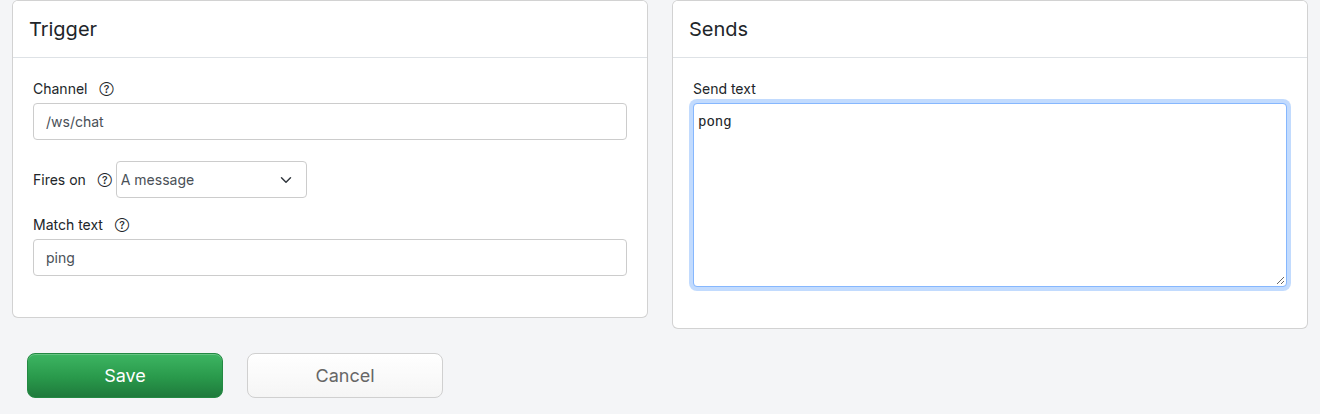
Go to WebSocket > Add/Edit. The form at the top of the page creates one mapping:
Click Save. The mapping is written to the websocket-mappings directory of the selected scenario and appears in the Mappings table below the form.
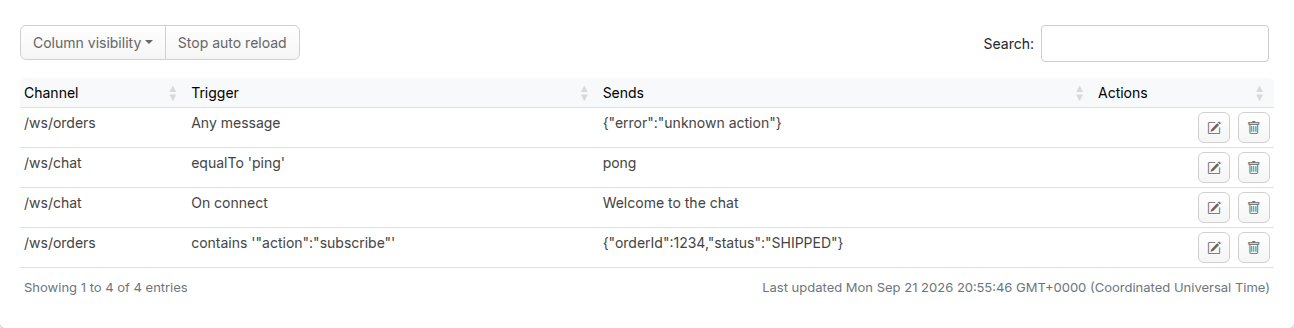
The table shows each mapping's channel, what it fires on (On connect, Any message, or the body matcher such as equalTo 'ping') and what it sends. It lists the mappings of the selected scenario and refreshes itself, so a mapping created over the management API or copied into the directory appears here too.
Clicking the edit button  on a row opens the mapping in a
dialog with the same fields as the form. Clicking the delete button removes the mapping and its file.
on a row opens the mapping in a
dialog with the same fields as the form. Clicking the delete button removes the mapping and its file.
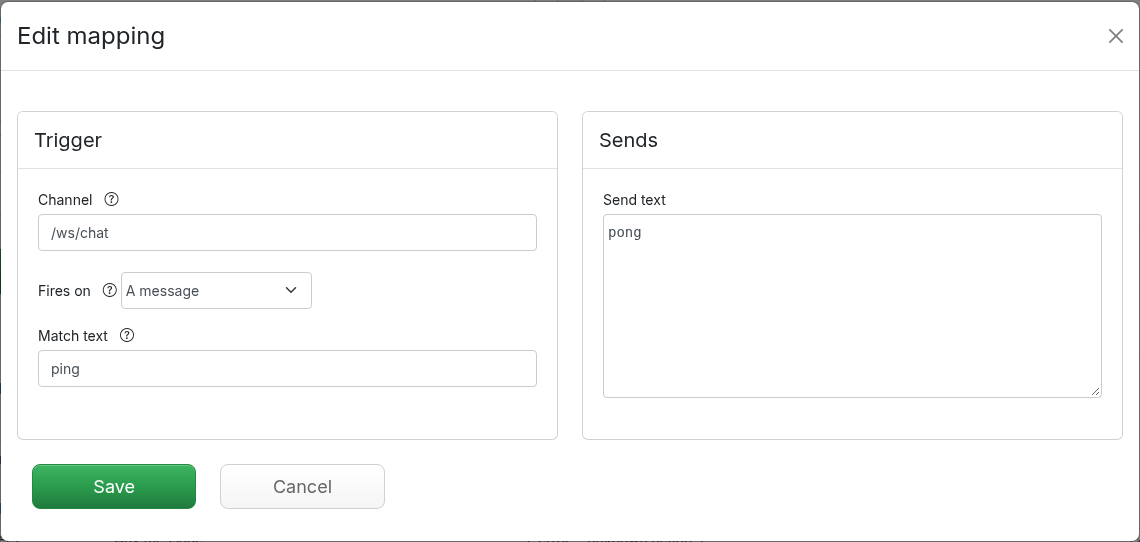
The form edits the simple shape of a mapping: an exact channel path, an exact match text and a text frame to send. A mapping written by hand or over the management API can use more than that, for example a contains body matcher or a urlPathPattern channel. The dialog shows such values as they are, and saving keeps them unless you change the field, so opening and saving a richer mapping does not simplify it. The mapping's id, name, priority and any other metadata are kept as well.
WebSocket > Logs links to the application logs and lists the log files, which is where a frame that matched nothing, a refused recording or a backend that could not be reached is reported. The frames themselves are kept in the message journal, which is read over the management API.
Instead of writing mappings by hand, you can record them from a real WebSocket backend. While recording is on, Traffic Parrot proxies every WebSocket connection to the backend you name: each frame the client sends is forwarded to the backend, each frame the backend sends is forwarded to the client, and each pair is saved as a mapping. After you stop recording, and with the backend switched off, the same frames are answered from the recorded mappings.
Recording works frame by frame. Traffic Parrot pairs each frame from the backend with the most recent frame the client sent on that connection and saves the pair as a message mapping whose match text is the client frame and whose send text is the backend frame. A frame the backend sends before the client has sent anything is saved as an on-connect mapping.
Recorded mappings are saved into the websocket-mappings directory of the scenario selected when the frame arrived, so select the scenario you want to record into before you start. Here a backend that greets each client and answers ping and hello has produced three mappings on /ws/echo:
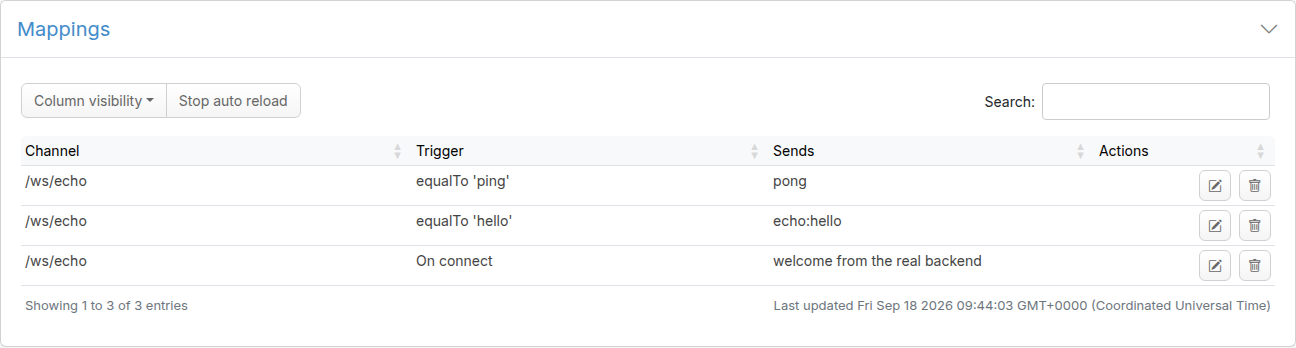
Recording a client frame that a mapping on that channel already matches exactly replaces that mapping, so re-running a test does not pile up duplicates. A mapping you wrote with a contains or regular expression matcher on that channel is left alone.
While recording is on, every WebSocket connection is proxied and no mapping is served. If the backend cannot be reached, the client's connection is closed and the reason is written to the application log, rather than serving mappings while the page says it is recording. Clicking Stop recording stops capturing at once, including on connections that are still open; those connections keep being proxied until they close, and new connections are served from mappings.
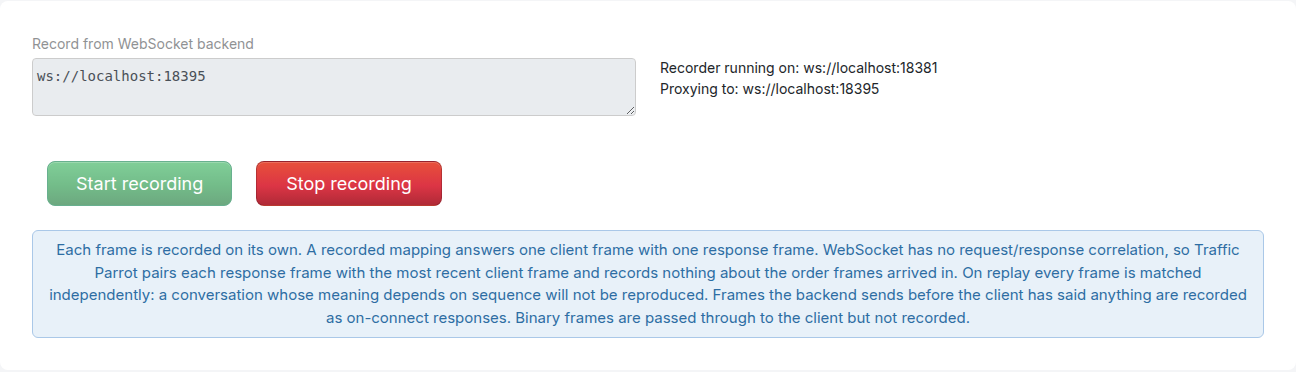
Each frame is recorded on its own. A recorded mapping answers one client frame with one response frame. WebSocket has no request/response correlation, so Traffic Parrot pairs each response frame with the most recent client frame and records nothing about the order frames arrived in. On replay every frame is matched independently: a conversation whose meaning depends on sequence will not be reproduced. Frames the backend sends before the client has said anything are recorded as on-connect responses. Binary frames are passed through to the client but not recorded.
In particular:
If your streaming API needs a stateful conversation rather than independent frames, consider modelling it as gRPC bidirectional streaming, where Traffic Parrot records and replays whole streams.
The WebSocket management API is served under /websocket/management on the console port, for example http://localhost:8080/websocket/management/mappings. It is also available on the virtual service management port, trafficparrot.virtualservice.http.management.port (8083 by default), which is the same API without going through the console. Responses are JSON, and a mapping or a message pattern is sent as a JSON request body.
| Method and path | Description |
|---|---|
| GET /websocket/management/mappings | Lists the mappings of the selected scenario as a JSON array. |
| POST /websocket/management/mapping | Creates a mapping from the JSON body and returns it as saved, with its id. |
| GET /websocket/management/mapping/{id} | Returns one mapping. |
| PUT /websocket/management/mapping/{id} | Replaces one mapping with the JSON body. The id in the URL wins over any in the body. |
| DELETE /websocket/management/mapping/{id} | Deletes one mapping and its file. Returns {"result":"deleted"}. |
To create the ping mapping from the example above:
curl -X POST -H 'Content-Type: application/json' http://localhost:8080/websocket/management/mapping -d '{
  "name": "chat ping",
  "trigger": {
    "type": "message",
    "channel": {"type": "websocket", "initiatingRequestPattern": {"urlPath": "/ws/chat"}},
    "message": {"body": {"equalTo": "ping"}}
  },
  "actions": [{"type": "send", "message": {"body": "pong"}}]
}'
To create an on-connect mapping, add the metadata flag and leave out the message pattern:
curl -X POST -H 'Content-Type: application/json' http://localhost:8080/websocket/management/mapping -d '{
  "name": "chat welcome",
  "trigger": {
    "type": "message",
    "channel": {"type": "websocket", "initiatingRequestPattern": {"urlPath": "/ws/chat"}}
  },
  "actions": [{"type": "send", "message": {"body": "Welcome to the chat"}}],
  "metadata": {"tp.onConnect": true}
}'
To list, change and delete mappings:
curl http://localhost:8080/websocket/management/mappings
curl -X PUT -H 'Content-Type: application/json' http://localhost:8080/websocket/management/mapping/0738393e-45e7-435b-8fca-49a7d4474e26 -d '{ ... }'
curl -X DELETE http://localhost:8080/websocket/management/mapping/0738393e-45e7-435b-8fca-49a7d4474e26
Traffic Parrot keeps a journal of every text frame it receives and every frame it sends from a mapping, so a test can verify what the system under test sent. The journal is in memory and is not limited in size, so reset it between tests.
| Method and path | Description |
|---|---|
| GET /websocket/management/messages | All journal events, newest first. |
| GET /websocket/management/message/{id} | One journal event. |
| POST /websocket/management/messages/find | The events matching the message pattern in the body, oldest first. {} matches everything. |
| POST /websocket/management/messages/count | How many events match the message pattern in the body, as {"count": n}. |
| DELETE /websocket/management/messages | Empties the journal. Returns {"result":"reset"}. |
A message pattern has the same shape as a mapping's trigger.message: a body matcher, optionally with a channel request pattern to restrict it to one channel. To count how many times ping was received and to fetch the events for a subscription:
curl -X POST -H 'Content-Type: application/json' http://localhost:8080/websocket/management/messages/count -d '{"body": {"equalTo": "ping"}}'
curl -X POST -H 'Content-Type: application/json' http://localhost:8080/websocket/management/messages/find -d '{"body": {"contains": "subscribe"}}'
Each event records the direction, the frame, the connection it travelled on and, for a received frame that was matched, the mapping that answered it. A received frame that matched nothing has "wasMatched": false and no stubMapping:
{
  "id" : "6ed47582-3d47-49dd-8347-2c555d44b665",
  "eventType" : "received",
  "channel" : {
    "type" : "websocket",
    "id" : "e81d801c-b657-448d-a534-d0756db94e53",
    "open" : true,
    "initiatingRequest" : {
      "url" : "/ws/chat",
      "absoluteUrl" : "http://localhost:8081/ws/chat",
      "method" : "GET",
      "headers" : {
        "Host" : "localhost:8081",
        "Connection" : "Upgrade",
        "Upgrade" : "websocket",
        "Sec-WebSocket-Key" : "qY15nAvIPNCftBdM0vYmXw==",
        "Sec-WebSocket-Version" : "13",
        "Sec-WebSocket-Extensions" : "permessage-deflate; client_max_window_bits"
      },
      "loggedDate" : 1790024962369,
      "scheme" : "http",
      "host" : "localhost",
      "port" : 8081,
      "loggedDateString" : "2026-09-21T21:09:22.369Z"
    }
  },
  "message" : "ping",
  "stubMapping" : {
    "id" : "0738393e-45e7-435b-8fca-49a7d4474e26",
    "name" : "chat ping",
    ...
  },
  "wasMatched" : true,
  "timestamp" : "2026-09-21T21:09:22.979091727Z"
}
| Field | Description |
|---|---|
| eventType | received for a frame from the client, sent for a frame Traffic Parrot sent from a mapping. |
| channel | The connection: its own id, whether it is still open, and the HTTP request that opened it, including the path and the headers. |
| message | The text of the frame. |
| wasMatched | true when a mapping answered the frame, or for every sent event. false for a received frame that matched nothing. |
| stubMapping | The mapping that answered a received frame. Absent on sent events and on unmatched frames. |
| timestamp | When the frame was received or sent. |
| Method and path | Description |
|---|---|
| POST /websocket/management/startRecording | Starts recording. Takes a form parameter proxy-url naming the backend, which must start with ws:// or wss://. |
| POST /websocket/management/stopRecording | Stops recording. |
| GET /websocket/management/currentRecordingStatus | Whether recording is on and, if so, where to. Clients connect to the virtual service HTTP port to be recorded, so currentRecordingPort reports that port. |
curl -X POST http://localhost:8080/websocket/management/startRecording --data 'proxy-url=ws://backend.example.com:9000'
curl http://localhost:8080/websocket/management/currentRecordingStatus
curl -X POST http://localhost:8080/websocket/management/stopRecording
While recording, the status reads:
{
  "recordingOn" : true,
  "currentProxyUrl" : "ws://backend.example.com:9000",
  "currentProxyBaseUrl" : "ws://backend.example.com:9000",
  "currentRecordingPort" : "8081",
  "currentRecordingPath" : "",
  "recordRequestHeadersForMatching" : ""
}
Every error is a JSON object with a result message:
| Status | When | Example |
|---|---|---|
| 400 Bad Request | The id in the URL is not a UUID, the mapping or pattern in the body cannot be parsed, or the recording backend URL is not a WebSocket URL. | {"result":"not a valid mapping id: 'not-a-uuid'"} |
| 404 Not Found | No mapping or event with that id, or a path the API does not serve. | {"result":"not found: 11111111-2222-3333-4444-555555555555"} |
| 405 Method Not Allowed | The path exists but not for that method. The Allow header names the methods it does serve. | {"result":"'/mapping' does not support this method (allowed: POST)"} |
| 409 Conflict | A PUT arrived for a mapping that the selected scenario's directory no longer holds, for example because it was deleted or the scenario was switched between reading and saving. |