curl and see how Traffic Parrot decides which of an operation's responses to return, switch that decision to a request header, and turn on the fetching that lets an example kept in an external file (externalValue) be downloaded at import time. Finally you will run the same import from the command line, so a pipeline can rebuild the mock from the spec on every run.
externalValue examples not being fetched until you allow it, and quotes the messages that rule produces.curl on your PATH.The spec is usually the first artefact an API has. It is agreed before the provider has written a line of the implementation, and the teams consuming the API want to start building against it straight away. A mock generated from the spec gives them something that answers on every documented path with every documented response, weeks before the real service exists, and gives the provider a cheap check that the spec reads the way they meant it.
Writing that mock by hand duplicates what the spec already says: the paths, the methods, the status codes, the content types and the examples. Every change to the spec then has to be copied into the mappings, and the two drift apart. Importing instead keeps one source of truth. Traffic Parrot reads OpenAPI 3 and Swagger 2 documents in JSON or YAML, as well as RAML, and creates one mapping per documented response, with the body taken from the example in the spec. Importing the same file again replaces the mappings it created last time, so the mock follows the spec rather than lagging behind it.
Two details make an imported mock more than a set of canned 200s. An operation usually documents several responses, and a useful mock has to be able to return the 404 as well as the 200: Traffic Parrot has two ways of choosing between them, and this how-to shows both. And an example does not have to be inline. OpenAPI lets an example point at a separate file with externalValue, which is common for large payloads kept next to the spec, and Traffic Parrot can fetch that file while importing.
Save the document below as orders-api.yaml, or download it from files/generate-api-mock-from-openapi-spec/orders-api.yaml. It describes an orders API with three operations: list today's orders, place an order, and fetch one order by id.
openapi: 3.0.3
info:
  title: Orders API
  version: 1.0.0
  description: >-
    A small orders API used by the Traffic Parrot tutorial
    "How to generate an API mock from an OpenAPI spec".
servers:
  - url: http://localhost:8081
paths:
  /orders:
    get:
      summary: List today's orders
      operationId: listOrders
      responses:
        '200':
          description: The orders placed today, newest first
          content:
            application/json:
              schema:
                type: array
                items:
                  $ref: '#/components/schemas/Order'
              examples:
                today:
                  summary: Two orders placed today
                  externalValue: https://trafficparrot.com/tutorials/files/generate-api-mock-from-openapi-spec/orders.json
    post:
      summary: Place an order
      operationId: placeOrder
      requestBody:
        required: true
        content:
          application/json:
            schema:
              $ref: '#/components/schemas/NewOrder'
            example:
              customerId: cus_42
              items:
                - sku: TULIP-RED
                  quantity: 12
      responses:
        '201':
          description: The order was accepted
          content:
            application/json:
              schema:
                $ref: '#/components/schemas/Order'
              example:
                id: "1003"
                customerId: cus_42
                status: accepted
                items:
                  - sku: TULIP-RED
                    quantity: 12
                total: "30.00"
  /orders/{orderId}:
    get:
      summary: Fetch one order
      operationId: getOrder
      parameters:
        - name: orderId
          in: path
          required: true
          description: The order id, as returned when the order was placed
          schema:
            type: string
            example: "1001"
      responses:
        '200':
          description: The order
          content:
            application/json:
              schema:
                $ref: '#/components/schemas/Order'
              examples:
                settled:
                  $ref: '#/components/examples/SettledOrder'
        '404':
          description: There is no order with that id
          content:
            application/json:
              schema:
                $ref: '#/components/schemas/Error'
              example:
                error: order_not_found
                message: There is no order with that id
components:
  schemas:
    Order:
      type: object
      required: [id, customerId, status, items, total]
      properties:
        id:
          type: string
          example: "1001"
        customerId:
          type: string
          example: cus_42
        status:
          type: string
          enum: [accepted, settled, cancelled]
        items:
          type: array
          items:
            $ref: '#/components/schemas/OrderLine'
        total:
          type: string
          description: Decimal amount in GBP
          example: "42.00"
    OrderLine:
      type: object
      required: [sku, quantity]
      properties:
        sku:
          type: string
          example: TULIP-RED
        quantity:
          type: integer
          minimum: 1
          example: 12
    NewOrder:
      type: object
      required: [customerId, items]
      properties:
        customerId:
          type: string
        items:
          type: array
          items:
            $ref: '#/components/schemas/OrderLine'
    Error:
      type: object
      properties:
        error:
          type: string
        message:
          type: string
  examples:
    SettledOrder:
      summary: An order that has been paid for and shipped
      value:
        id: "1001"
        customerId: cus_42
        status: settled
        items:
          - sku: TULIP-RED
            quantity: 12
          - sku: ROSE-WHITE
            quantity: 6
        total: "42.00"
Four details decide what the import produces:
externalValue points at orders.json, a file published alongside this page. The Example Object allows either value or externalValue, never both.201, with inline example values for both the request body and the response.200 and a 404. The 200 example is a $ref into components/examples, which the importer resolves; the 404 example is inline.servers names the port the virtual service listens on, 8081 by default, so a client that reads its base URL from the spec talks to the mock without further configuration.Two things the spec does not exercise are worth knowing. A response with no example at all is still imported, with a body generated from its schema. And when a response lists several named examples, the importer creates one mapping per example and adds the example name to the mapping name.
Start Traffic Parrot and open the web console at http://localhost:8080. From the HTTP menu in the top navigation bar choose Import, press Select files... and pick orders-api.yaml. Traffic Parrot parses the file and, before it changes anything, shows a preview: one row per mapping the import would create, with the method, host, path and status code, and a Duplicate column that reads New for every row here because the mock is empty.
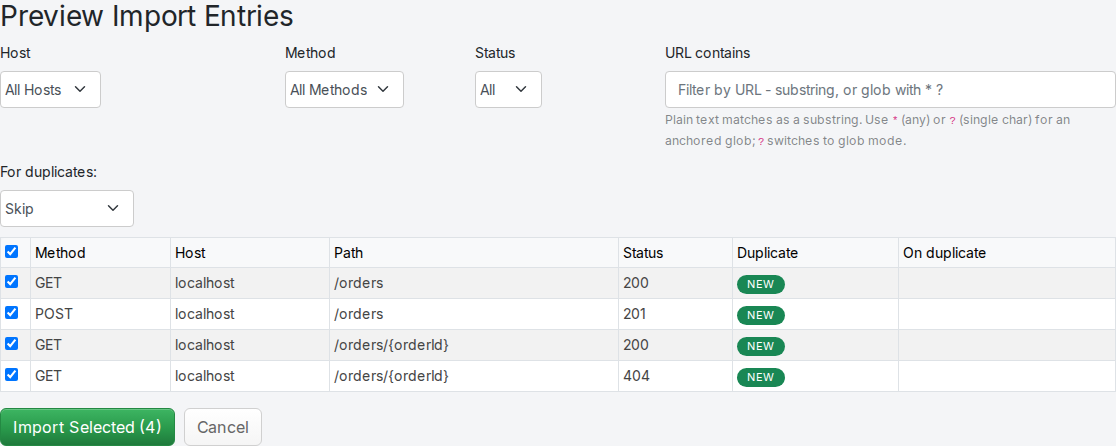
Leave every row ticked and press Import Selected. The four mappings are created and listed in the Mappings Imported table.
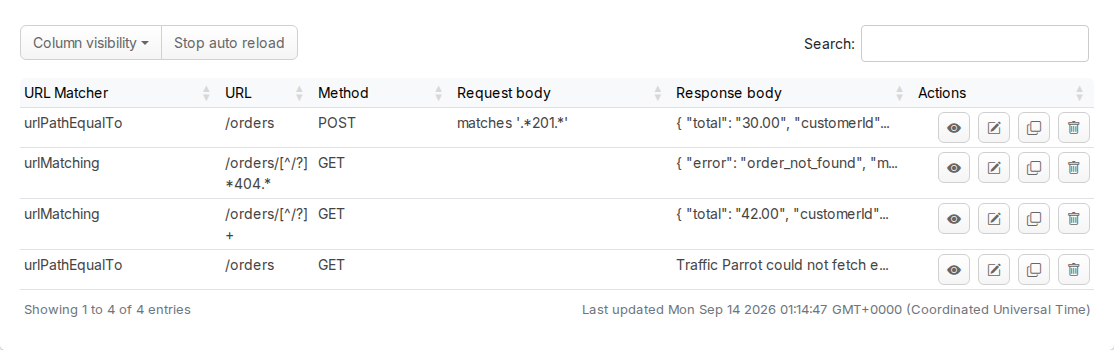
These are ordinary Traffic Parrot mappings. You can open any of them on the Add/Edit page of the HTTP menu and change the response, or read them all from the management API on port 8080. The request side is where the interesting part is, so here it is with the response bodies trimmed:
$ curl -s http://localhost:8080/__admin/mappings
{
  "mappings" : [ {
    "id" : "430a616f-f931-4a80-aea7-60601bfba4ee",
    "name" : "[Orders API] 201 POST /orders application/json",
    "request" : {
      "urlPath" : "/orders",
      "method" : "POST",
      "bodyPatterns" : [ {
        "matches" : ".*201.*"
      } ]
    },
    "response" : { ... },
    "priority" : 1,
    "metadata" : {
      "tp.import.source" : "orders-api.yaml",
      ...
    }
  }, {
    "id" : "ae893d13-fd02-4bed-8c92-8f5064cfb8b1",
    "name" : "[Orders API] 404 GET /orders/{orderId} application/json",
    "request" : {
      "urlPattern" : "/orders/[^/?]*404.*",
      "method" : "GET"
    },
    "response" : { ... },
    "priority" : 1,
    ...
  }, {
    "id" : "eda27550-fba8-4b67-b9f1-72209862ac32",
    "name" : "[Orders API] 200 GET /orders/{orderId} application/json",
    "request" : {
      "urlPattern" : "/orders/[^/?]+",
      "method" : "GET"
    },
    "response" : { ... },
    "priority" : 6,
    ...
  }, {
    "id" : "719c4ecc-712f-4a40-a779-d1f996cbc7ac",
    "name" : "[Orders API] 200 GET /orders application/json",
    "request" : {
      "urlPath" : "/orders",
      "method" : "GET"
    },
    "response" : { ... },
    "priority" : 6,
    ...
  } ],
  "meta" : {
    "total" : 4
  }
}
The 200 for GET /orders/{orderId} matches any single path segment after /orders/, at the importer's default priority of 6. The 404 for the same operation matches only when that segment contains 404, at priority 1, the highest, so it wins whenever it applies. The 201 for POST /orders likewise requires the request body to contain 201. This is Traffic Parrot's default way of letting one mock return every documented response: the 200 answers ordinary requests, and any other status is selected by putting its code into the request, in a path parameter, in the body of an operation that takes one, or in a required query parameter. The regular expressions are standard WireMock matchers, described in the
WireMock request matching documentation, and every mapping also records where it came from in tp.import.source, which is what a later import of the same file uses to find and replace them.
The virtual service listens on port 8081. Fetch an order, and the 200 mapping answers with the example the spec referenced through components/examples. Traffic Parrot adds a Matched-Stub-Name header to every response, so you can always tell which mapping produced it:
$ curl -i http://localhost:8081/orders/1001
HTTP/1.1 200 OK
Vary: Origin
Content-Type: application/json
Matched-Stub-Id: eda27550-fba8-4b67-b9f1-72209862ac32
Matched-Stub-Name: [Orders API] 200 GET /orders/{orderId} application/json
Content-Length: 224

{
  "total": "42.00",
  "customerId": "cus_42",
  "id": "1001",
  "items": [
    {
      "quantity": 12,
      "sku": "TULIP-RED"
    },
    {
      "quantity": 6,
      "sku": "ROSE-WHITE"
    }
  ],
  "status": "settled"
}
The example was rendered through the Order schema rather than copied verbatim, which is why the properties come out in a different order from the YAML. Put the status code in the path segment and the 404 mapping wins on priority:
$ curl -i http://localhost:8081/orders/404
HTTP/1.1 404 Not Found
Vary: Origin
Content-Type: application/json
Matched-Stub-Id: ae893d13-fd02-4bed-8c92-8f5064cfb8b1
Matched-Stub-Name: [Orders API] 404 GET /orders/{orderId} application/json
Content-Length: 79

{
  "error": "order_not_found",
  "message": "There is no order with that id"
}
Now list the orders. The body is not the two orders from orders.json:
$ curl -i http://localhost:8081/orders
HTTP/1.1 200 OK
Vary: Origin
Content-Type: application/json
Matched-Stub-Id: 719c4ecc-712f-4a40-a779-d1f996cbc7ac
Matched-Stub-Name: [Orders API] 200 GET /orders application/json
Content-Length: 186

Traffic Parrot could not fetch externalValue: https://trafficparrot.com/tutorials/files/generate-api-mock-from-openapi-spec/orders.json (Importing a specification from a URL is disabled)
Fetching anything from a URL is off by default, because the request would be made from the machine Traffic Parrot runs on. Rather than fail the import, the importer created the mapping with a placeholder body that names the reason, so the problem shows up where you will look for it: in the response. You will fix it in the next section.
Finally, place an order:
$ curl -i -X POST http://localhost:8081/orders -H "Content-Type: application/json" -d '{"customerId":"cus_42","items":[{"sku":"TULIP-RED","quantity":12}]}'
HTTP/1.1 900 900
Transfer-Encoding: chunked

Traffic Parrot Virtual Service: No responses matched the given request
900 is the status Traffic Parrot returns when no mapping matched. The only response the spec documents for POST /orders is a 201, and in the default mode a status other than 200 is selected by its code appearing in the request, so a request body without 201 in it matches nothing. Put the digits anywhere in the body and the mapping answers:
$ curl -i -X POST http://localhost:8081/orders -H "Content-Type: application/json" -d '{"customerId":"cus_42","items":[{"sku":"TULIP-RED","quantity":201}]}'
HTTP/1.1 201 Created
Vary: Origin
Content-Type: application/json
Matched-Stub-Id: 430a616f-f931-4a80-aea7-60601bfba4ee
Matched-Stub-Name: [Orders API] 201 POST /orders application/json
Content-Length: 151

{
  "total": "30.00",
  "customerId": "cus_42",
  "id": "1003",
  "items": [{
    "quantity": 12,
    "sku": "TULIP-RED"
  }],
  "status": "accepted"
}
That works, but it means an unmodified client cannot place an order against this mock. The default mode suits an API where every operation has a 200 and the error cases are provoked on demand from a test. For an API whose success responses are 201s and 202s, the second mode is the better fit, and switching to it takes one property.
Both changes are properties in trafficparrot.properties, in the directory you extracted Traffic Parrot into. Set these three:
trafficparrot.http.importfromurl.enabled=true
trafficparrot.http.importfromurl.allowedHosts=trafficparrot.com
trafficparrot.openapi.import.mode=SELECT_RESPONSE_STATUS
trafficparrot.http.importfromurl.enabled is the master switch for fetching over the network. With it on, the Import page gains a URL field, and externalValue examples are downloaded during an import.trafficparrot.http.importfromurl.allowedHosts is the allow-list, a comma-separated list of host or host:port entries. It is empty by default, and an empty list permits nothing even when the switch is on. A listed host is still refused if its address resolves to a loopback, link-local, private or cloud metadata address, only http and https are fetched, redirects are not followed, and a response is capped at 5 MB. The list is the whole of your exposure, so keep it to the hosts your specs and examples actually live on.trafficparrot.openapi.import.mode chooses how an imported mock picks between an operation's responses. SELECT_RESPONSE_STATUS returns the 200, or the operation's only success response, to a request that carries no x-traffic-parrot-select-response-status header, and uses that header to select any other documented status.All three are described in the Traffic Parrot properties documentation. Restart Traffic Parrot for them to take effect: run stop.sh then start.sh (stop.cmd and start.cmd on Windows), as described under Start and stop in the user guide. Note that the import mode is applied when a spec is imported, not when a request arrives: the four mappings from the first import keep their magic-value matchers until you import the spec again, which is the next step.
Open the Import page of the HTTP menu again. With fetching enabled the page has a second row under the Select files... button: a URL field and a Fetch & preview button.
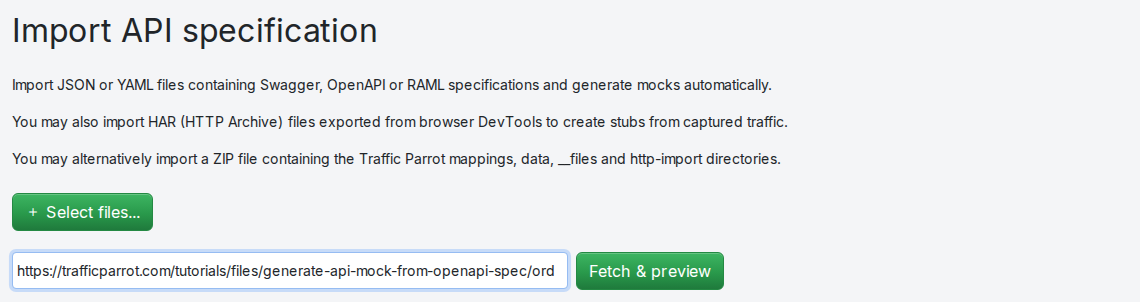
trafficparrot.http.importfromurl.enabled=true.Paste https://trafficparrot.com/tutorials/files/generate-api-mock-from-openapi-spec/orders-api.yaml and press Fetch & preview. Traffic Parrot downloads the spec, which it may do because trafficparrot.com is on the allow-list, and shows the same preview panel as before. This time there are eight rows rather than four, all New: in this mode each of the three operations gets a mapping for requests without the header, each of the four documented responses gets a mapping that requires the header to equal its status, and one catch-all is added for header values the spec does not document. Press Import Selected.
The import is recorded under the file name at the end of the URL, orders-api.yaml, which is the name of the file you uploaded earlier, so the four mappings from the first import are removed and replaced rather than left alongside the new ones. That rule is what makes importing again after a spec change safe, and it applies whether the spec arrives as an upload, from a URL or from the command line.
This time the externalValue example was fetched during the import, and the list of orders is the contents of orders.json:
$ curl -s http://localhost:8081/orders
[
  {
    "id": "1002",
    "customerId": "cus_17",
    "status": "accepted",
    "items": [
      {
        "sku": "LILY-PINK",
        "quantity": 3
      }
    ],
    "total": "9.00"
  },
  {
    "id": "1001",
    "customerId": "cus_42",
    "status": "settled",
    "items": [
      {
        "sku": "TULIP-RED",
        "quantity": 12
      },
      {
        "sku": "ROSE-WHITE",
        "quantity": 6
      }
    ],
    "total": "42.00"
  }
]
An external example is stored exactly as fetched, so unlike the inline examples it is not rendered through the schema. The fetch happens once, at import time; the mock does not contact the URL again when it answers requests.
Read the mappings again and the shape of the second mode is clear. For each operation there is a mapping that requires the header to be absent and returns the 200, or the operation's only success response; one mapping per documented status that requires the header to equal that status; and a single catch-all at priority 7 that answers any other header value with an explanation:
$ curl -s http://localhost:8080/__admin/mappings
{
  "mappings" : [ {
    "name" : "[Orders API] 201 POST /orders application/json",
    "request" : {
      "urlPattern" : "/orders([?&].*)*",
      "method" : "POST",
      "headers" : {
        "x-traffic-parrot-select-response-status" : {
          "absent" : true
        }
      }
    },
    "response" : { "status" : 201, ... },
    "priority" : 6,
    ...
  }, {
    "name" : "[Orders API] 404 GET /orders/{orderId} application/json",
    "request" : {
      "urlPattern" : "/orders/[^/?]+([?&].*)*",
      "method" : "GET",
      "headers" : {
        "x-traffic-parrot-select-response-status" : {
          "equalTo" : "404"
        }
      }
    },
    "response" : { "status" : 404, ... },
    "priority" : 6,
    ...
  }, {
    "name" : "[Orders API] x-traffic-parrot-select-response-status unknown",
    "request" : {
      "urlPattern" : ".*",
      "method" : "ANY",
      "headers" : {
        "x-traffic-parrot-select-response-status" : {
          "matches" : ".*"
        }
      }
    },
    "response" : {
      "status" : 900,
      "body" : "Unrecognized x-traffic-parrot-select-response-status value: {{ request.headers.x-traffic-parrot-select-response-status }}\nThe OpenAPI specification imported for {{ request.method }} {{ request.path }} did not contain this status code.\n"
    },
    "priority" : 7
  },
  ...
  ],
  "meta" : {
    "total" : 8
  }
}
Placing an order now works with an ordinary request, because the 201 is the operation's only success response:
$ curl -i -X POST http://localhost:8081/orders -H "Content-Type: application/json" -d '{"customerId":"cus_42","items":[{"sku":"TULIP-RED","quantity":12}]}'
HTTP/1.1 201 Created
Vary: Origin
Content-Type: application/json
Matched-Stub-Id: 22bfe39b-5863-4794-b4b9-23002e24c793
Matched-Stub-Name: [Orders API] 201 POST /orders application/json
Content-Length: 151

{
  "total": "30.00",
  "customerId": "cus_42",
  "id": "1003",
  "items": [{
    "quantity": 12,
    "sku": "TULIP-RED"
  }],
  "status": "accepted"
}
To get the 404, ask for it by header. The path can be a perfectly good order id; the header alone decides:
$ curl -i -H "x-traffic-parrot-select-response-status: 404" http://localhost:8081/orders/1001
HTTP/1.1 404 Not Found
Vary: Origin
Content-Type: application/json
Matched-Stub-Id: 1ebaf624-7d31-46bd-ac99-ec1bc8be6bc0
Matched-Stub-Name: [Orders API] 404 GET /orders/{orderId} application/json
Content-Length: 79

{
  "error": "order_not_found",
  "message": "There is no order with that id"
}
And a status the spec does not document is refused by the catch-all, with a message that says which operation and which status it looked for:
$ curl -i -H "x-traffic-parrot-select-response-status: 500" http://localhost:8081/orders/1001
HTTP/1.1 900 900
Vary: Origin
Matched-Stub-Id: 5822b379-e93d-4da8-a100-18cff7c77efc
Matched-Stub-Name: [Orders API] x-traffic-parrot-select-response-status unknown
Content-Length: 154

Unrecognized x-traffic-parrot-select-response-status value: 500
The OpenAPI specification imported for GET /orders/1001 did not contain this status code.
Which mode to use comes down to who controls the requests. The default mode needs nothing from the client, and a test that wants an error response steers it there through the data, which is natural for a 404 and awkward for a 201. The header mode gives every documented response an ordinary request shape and lets a test choose failure cases explicitly, at the price of setting one header, which most HTTP clients make easy. If the client under test is yours to configure, use the header mode.
Everything the Import page does goes through the management API on port 8080, and you can call it directly. This is the same multipart upload the Select files... button makes, and it answers with the ids of the mappings it created:
$ curl -s -F "files[]=@orders-api.yaml" http://localhost:8080/http/management/importMappings
{"mappings": ["719c4ecc-712f-4a40-a779-d1f996cbc7ac","430a616f-f931-4a80-aea7-60601bfba4ee","eda27550-fba8-4b67-b9f1-72209862ac32","ae893d13-fd02-4bed-8c92-8f5064cfb8b1","5b2d7e91-0c4a-4f3e-b8d6-1a9c3e7f5d20","c8e1f4a6-2b9d-4c07-a3e5-6f8b0d2c9e14","0f7a3c5e-9d1b-4a8c-b6e2-4d7f1a9c3b58","e3b9d6f2-7a4c-4e1b-9c0d-8f2a5b7e4c61"]}
It applies the same replace-by-source rule as the console, so a pipeline that runs this line before its integration tests keeps the mock in step with the spec in the repository, with no preview and no clicking. The endpoint takes a file, so if the spec lives at a URL, download it in the pipeline first. For an environment that starts Traffic Parrot fresh each time, there is also an import-on-startup option, trafficparrot.openapi.import.on.startup, described with the other OpenAPI properties in the
properties documentation.
Traffic Parrot could not fetch externalValue: ... (...). The reason is in the brackets. Importing a specification from a URL is disabled means trafficparrot.http.importfromurl.enabled is still false; Host 'trafficparrot.com' is not in the allowed hosts means it is missing from trafficparrot.http.importfromurl.allowedHosts; HTTP 404 means the host answered but the file is not at that URL. Fix the cause, restart if you changed a property, and import the spec again: the fetch happens at import time, so changing a property alone changes nothing.900. You are in the default mode and the request body does not contain 201. Either put the code in the body, or set trafficparrot.openapi.import.mode=SELECT_RESPONSE_STATUS, restart and import again.trafficparrot.openapi.import.mode the mock behaves as before. The mode is applied when a spec is imported. Import the spec again after the restart.Did not find any mappings to import in orders-api.yaml! The document parsed but no operation had a response to turn into a mapping. Check that paths: is at the top level and that each operation has a responses: block; a file holding only components:, from a spec split across files, imports nothing on its own.Unsupported file type. The importer recognises an OpenAPI document by its top-level openapi: (or, for Swagger 2, swagger:) key. Make sure the file starts with one, and that it is the spec itself rather than a page that links to it.The generated mappings are ordinary mappings, so everything you can do to a hand-written one applies to them. Continue with Chapter 3: Dynamic responses to make an imported response echo values from the request instead of returning a fixed example, and read the Import section of the Traffic Parrot HTTP documentation for the other formats the same page accepts, including Swagger 2, RAML, HAR recordings and Pact files.