Overview

This data sheet describes Traffic Parrot v5.x.x, a product of Traffic Parrot Ltd. Traffic Parrot is an API and service simulation (service virtualization) platform. It provides test doubles that support the testing phase of the software development lifecycle (SDLC) by simulating the APIs, services, and systems your application depends on.

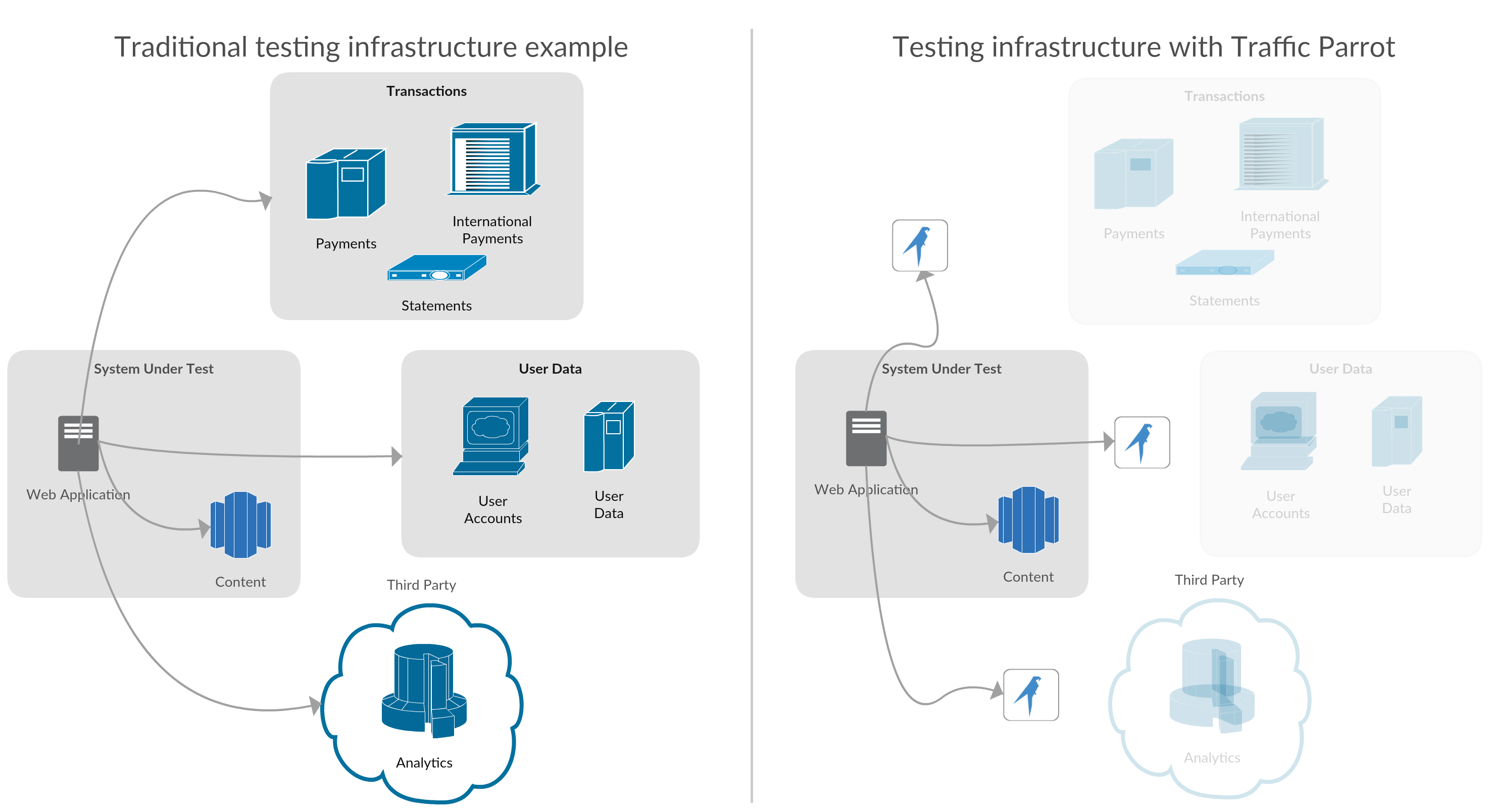
Where does Traffic Parrot fit in?

Traffic Parrot will be used to decouple from the dependencies in the testing phase of your SDLC. Depending on your infrastructure and test plans it can virtualize up to 100% of the test HTTP(S) traffic.

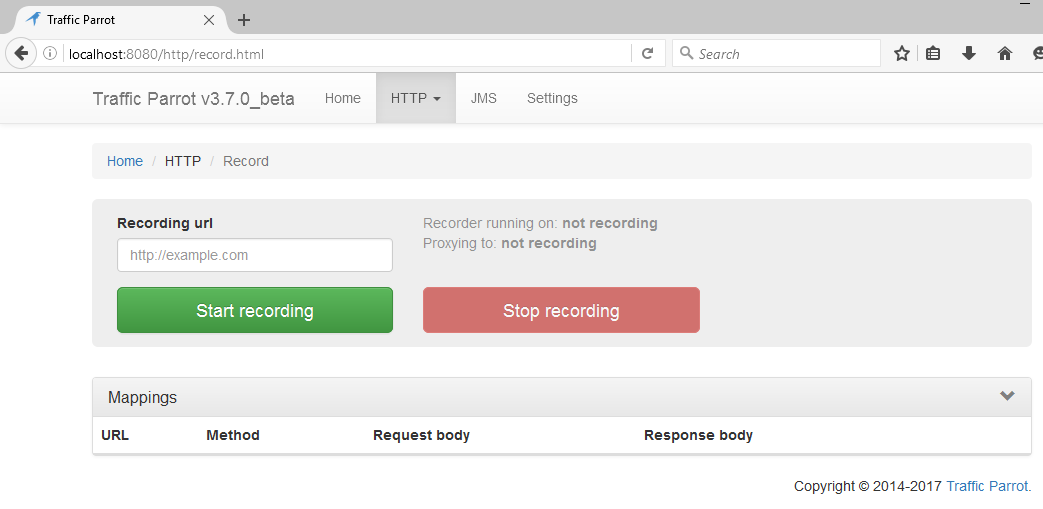
Administration console

The administrator console is accessed by a modern web browser.
screenshot

Components

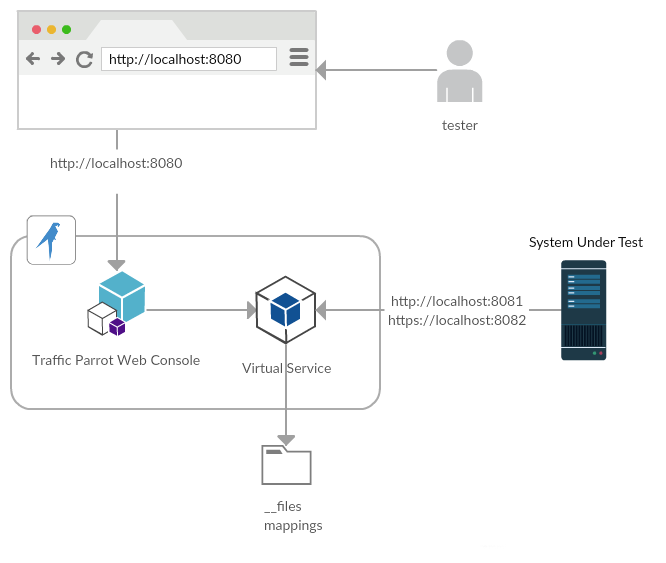
Each Traffic Parrot instance contains an administration console accessible via an HTML web page and a virtual service that the System Under Test will connect to. They run in separate JVM processes.
screenshot
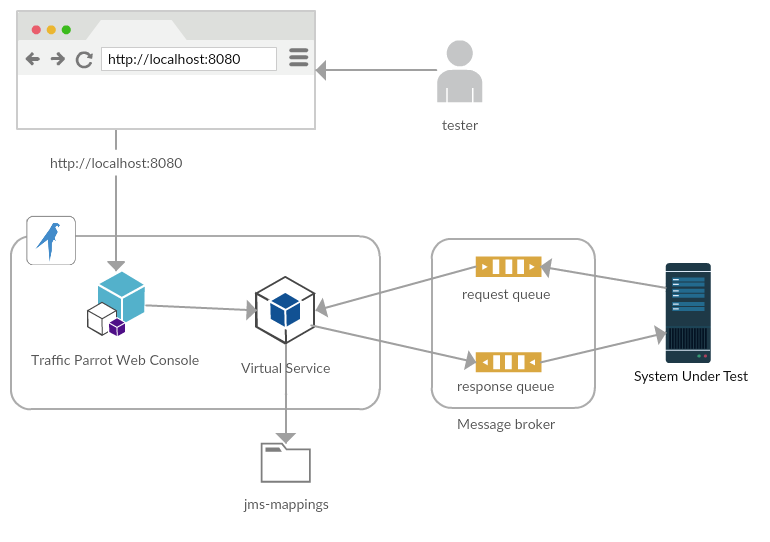
Traffic Parrot also supports JMS and native IBM® MQ APIs.
screenshot

Features and capabilities

Traffic Parrot Enterprise provides a range of functionalities to help you with API and service simulation:
  1. HTTP and HTTPS API and service simulation
  2. gRPC API and service simulation
  3. JMS API and service simulation - ActiveMQ TCP, ActiveMQ AMQP 1.0, Azure AMQP 1.0, RabbitMQ AMQP 0.9.1, IBM® WebSphere MQ 7.5+ (more coming soon - contact us)
  4. Native IBM® WebSphere MQ 7.5+ API and service simulation
  5. Thrift API and service simulation
  6. File transfers
  7. Record and playback traffic for HTTP(S), JMS, Native MQ and File transfers
  8. Edit recorded traffic
  9. Add mappings manually
  10. Group mappings by test case
  11. Persisting the mappings on local filesystem in an easy to version control JSON format
  12. Adding and editing request/response pairs by manually entering details
  13. Request matching
    • JSON, XML, SOAP, REST, Protobuf, Java Serialized objects, or other body content
    • XPath matching
    • JSONPath matching
    • Regular expression matching
    • Header value matching
    • Request URLs and path matching
  14. HTTP Passthrough mode
  15. Recording proxied HTTPS traffic
  16. Response templates with many types of extensions for generating dynamic responses
  17. Generating responses based on data from CSV, XLS, Database (MySQL, MariaDB, PostgreSQL, Oracle, Microsoft SQL Server MSSQL, and any other database that has a JDBC driver)
  18. Simulating delayed responses
  19. Simulating error and faulty HTTP responses and network faults
  20. Filtering recording by content type
  21. Logs access via browser
  22. Importing RAML/Swagger/OpenAPI into HTTP mappings
  23. Importing Protobuf into gRPC mappings
  24. Importing traffic from other service virtualization tools (on request)
  25. Running in Docker, Kubernetes, OpenShift
  26. User interface accessible by web browser
  27. Configurable secure access credentials
  28. And many more, explore the documentation for more details

Supported platforms

Traffic Parrot requires Java 17 or above. Traffic Parrot runs on most hardware platforms and operating systems supporting Java. That includes most server, desktop and laptop hardware providers as well as most operating systems like Windows, Linux and other UNIX systems.

You can choose to download Traffic Parrot with the Java JRE bundled in, which comes as a standard package with every release. That way these JVM and Java details will not concern you as the necessary dependencies are already bundled in the ZIP package you download.

Although Traffic Parrot is based on JVM and Java it can be used with a variety of technologies as it works over the wire and there is no need to know Java (except for advanced use-cases i.e. if you want to write Traffic Parrot plugins/extensions). For example, you can use Traffic Parrot to mock GoLang or .NET C# microservice APIs.

Hardware requirements

Traffic Parrot ships with a small default Java heap — -Xmx128m in the install's jvm.args file — which you raise for larger recordings, larger datasets, or multiple virtual services per instance (see JVM arguments). The figures below are sized for that default configuration; high request rates and performance testing need more — see Performance testing for sizing guidance.

Minimum Recommended
Memory (RAM) 512 MB (with the default -Xmx128m heap) 1 GB or more (raise -Xmx to 512m or higher for larger workloads)
Disk space ~200 MB without a bundled Java runtime ~350 MB for the download that bundles a Java runtime; allow extra for recordings and logs

Software requirements

Java runtime Java 17 or above — or choose the download that bundles a Java runtime, so no separate installation is required
Operating system Windows, Linux, macOS, or any other operating system with a supported Java runtime
Web browser A current version of Chrome, Firefox, Microsoft Edge, or Safari