/users/{id} is best matched with a regular-expression pattern rather than one literal stub per id. The
MDN guide to regular expressions is a good primer if you need one.
Recording is the fastest way to build an API mock, but it captures traffic exactly as it happened. Imagine a generic REST API with two resources, /users/{id} and /orders/{id}. While recording, your application happens to fetch users 1 through 20 and a handful of orders. Traffic Parrot dutifully records one stub for every distinct request, naming each mapping file <method>-<url>-<uuid>.json:
GET /users/1     -> 200  (get-users1-8ee16f88-38fe-45a5-b8b8-6e33fe11bf9a.json)
GET /users/2     -> 200  (get-users2-3d2f0a17-9c4b-4e88-bf1a-0b7e6d2c5a41.json)
GET /users/3     -> 200  (get-users3-c71a4e90-2f6d-4b3a-8e57-1d9f8a04c662.json)
...
GET /orders/1001 -> 200  (get-orders1001-5a9c3b21-7e84-4f0d-9a16-2c8b5e7f1d03.json)
GET /orders/1002 -> 200  (get-orders1002-b4f8e602-1a73-4c95-8d20-6f3e9b1a7c58.json)
Each of those stubs also matches on the exact request body it saw and replays every response header the real server returned — Date, Server, Connection, and so on. The result is a scenario with dozens of stubs that all do essentially the same thing. When a teammate opens it, they cannot tell at a glance what the API does, and a single change (say, adjusting the user response shape) means editing twenty stubs by hand.
What you actually want is one stub per resource: a single mapping matching /users/[0-9]+ and a single mapping matching /orders/[0-9]+. That is exactly what cleanup produces.
Before you run anything, two facts make cleanup safe to try:
CleanupConfiguration.defaultConfig(). There are no tunable parameters or rule toggles to configure — the only input is the name of the target scenario. This keeps the workflow predictable: the same recording always produces the same cleaned result.With your noisy recording loaded as the current scenario, open a web browser and navigate to http://localhost:8080. From the HTTP menu in the top navigation bar, choose Cleanup (the page also lives at /http/cleanup.html).
The page shows the current scenario, how many mappings it contains, and a short summary of what the standard cleanup will do. The Target scenario name field is pre-filled with a suggestion — the current scenario name with _cleaned appended — which you can change to anything you like.
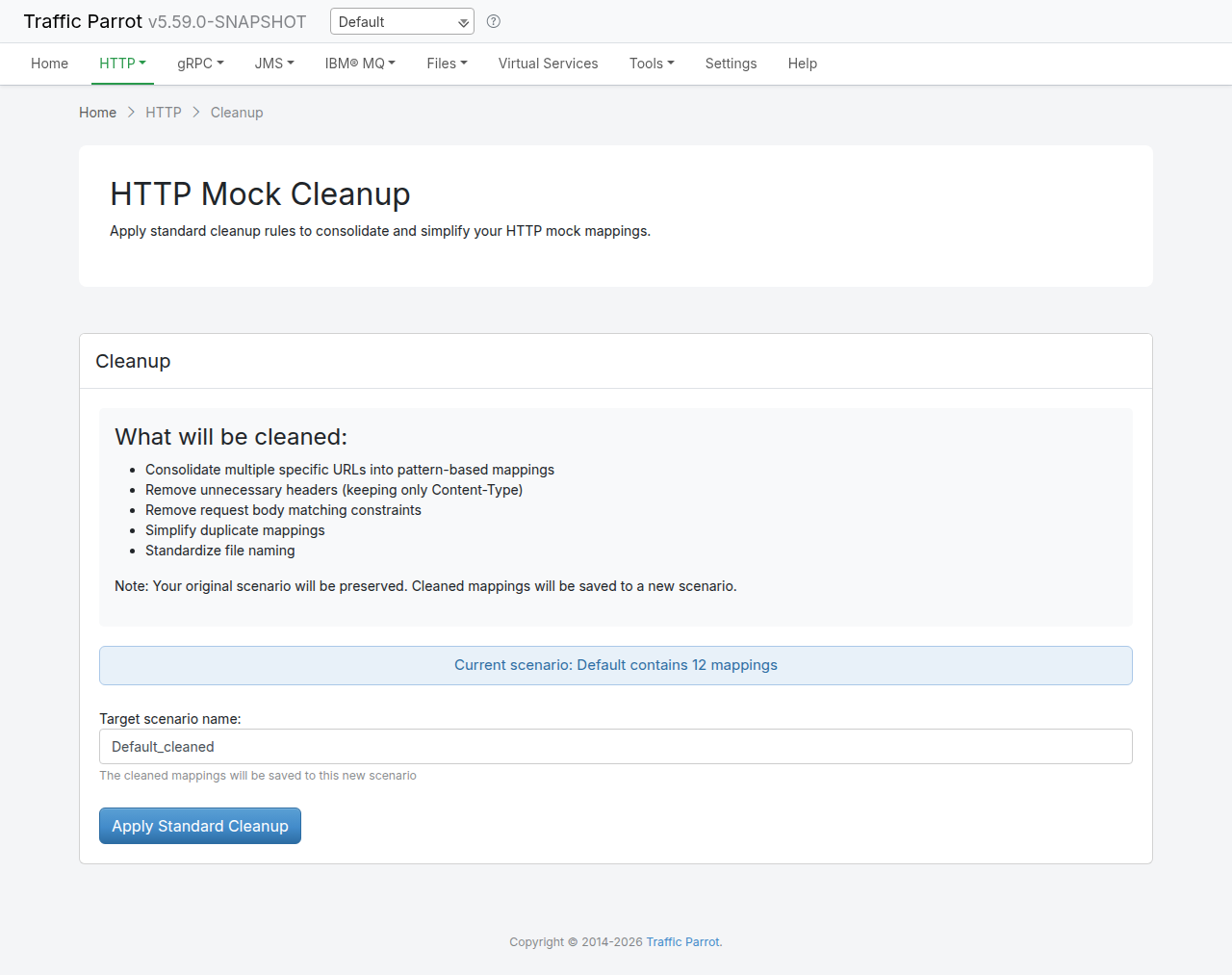
Before the results panel appears, the page lists what the standard cleanup will clean. The live page surfaces a five-item summary:
Content-Type and id-style headers.These five bullets are what the GUI shows. Standard cleanup actually applies two further response-body transforms behind the scenes — making absolute response URLs portable and inserting dynamic response templates. For the full field-by-field breakdown, see the Mapping cleanup section of the Traffic Parrot HTTP documentation.
Confirm (or edit) the target scenario name and click Apply Standard Cleanup. Traffic Parrot reads every mapping in the current scenario, applies the conventions, and writes the cleaned mappings into the new scenario. Your original recording is not touched.
The Results panel then summarises what happened. The GUI shows six counters:
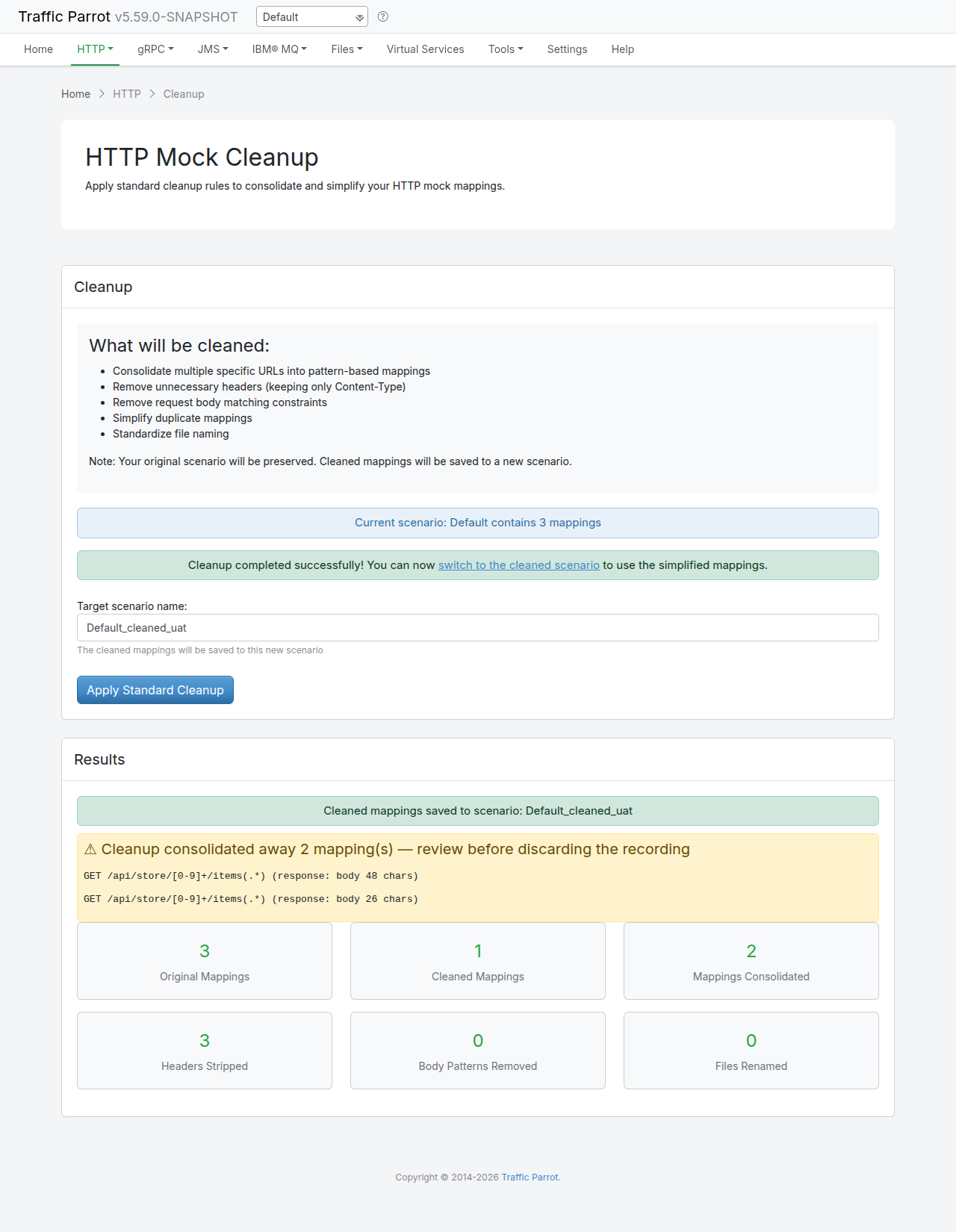
When cleanup merges near-duplicate mappings (same method and URL pattern, keeping only the smallest-body response), a warning panel lists exactly which mappings were consolidated away. Review that list before you discard the original recording, in case a consolidated-away mapping carried a response you still need. The original scenario is still on disk, so nothing is lost — the warning just tells you where to look.
To make the numbers concrete, suppose your recording of the generic /users/{id} and /orders/{id} API contained 42 mappings. Running standard cleanup on it produces a cleaned scenario with 18 mappings — and the results panel reports how it got there:
| Counter | Value | What it means |
|---|---|---|
| Original Mappings | 42 | The per-id stubs the recording captured. |
| Cleaned Mappings | 18 | The consolidated, convention-following stubs. |
| Mappings Consolidated | 20 | Per-id stubs merged into /users/[0-9]+ and /orders/[0-9]+ patterns (and duplicates removed). |
| Headers Stripped | 15 | Mappings whose noisy response headers were trimmed. |
| Body Patterns Removed | 8 | Over-strict request body matchers dropped. |
| Files Renamed | 5 | Response body files renamed to the standard convention. |
Behind the GUI's six counters, the cleanup result also records that 12 response URLs were replaced with the portable {{request.baseUrl}} template. That counter (and the dynamic-template counter) is part of the result JSON rather than the GUI panel; the
HTTP cleanup documentation lists every field the REST API returns.
The headline is the first two rows: 42 → 18. Twenty-four near-identical stubs collapsed into a handful of patterns that any teammate can read at a glance.
The counters tell you how much shrank, but it helps to see the actual JSON before and after. Suppose the recording captured these two per-id stubs — one for /users/1 and one for /users/2. Each uses the literal "url" field, replays every header the real server returned, and matches on the exact request body it saw:
// get-users1-8ee16f88-38fe-45a5-b8b8-6e33fe11bf9a.json
{
  "request": {
    "url": "/users/1",
    "method": "GET",
    "bodyPatterns": [ { "equalToJson": "{\"include\":\"profile\"}" } ]
  },
  "response": {
    "status": 200,
    "bodyFileName": "get-users1-8ee16f88-response.json",
    "headers": {
      "Content-Type": "application/json",
      "Date": "Tue, 09 Jun 2026 10:14:52 GMT",
      "Server": "nginx/1.25.3"
    }
  }
}

// get-users2-3d2f0a17-9c4b-4e88-bf1a-0b7e6d2c5a41.json
{
  "request": {
    "url": "/users/2",
    "method": "GET",
    "bodyPatterns": [ { "equalToJson": "{\"include\":\"profile\"}" } ]
  },
  "response": {
    "status": 200,
    "bodyFileName": "get-users2-3d2f0a17-response.json",
    "headers": {
      "Content-Type": "application/json",
      "Date": "Tue, 09 Jun 2026 10:14:53 GMT",
      "Server": "nginx/1.25.3"
    }
  }
}
Standard cleanup collapses both of these (and every other /users/<id> stub) into a single pattern mapping:
// one consolidated mapping, users-ANY.json, named after the /users/[0-9]+ pattern
{
  "request": {
    "urlPattern": "/users/[0-9]+(.*)",
    "method": "GET"
  },
  "response": {
    "status": 200,
    "bodyFileName": "users-ANY_response.json",
    "headers": {
      "Content-Type": "application/json"
    }
  }
}
Four transforms are visible in that one diff:
url becomes urlPattern. The two literal per-id paths /users/1 and /users/2 are replaced by one regular-expression match, /users/[0-9]+(.*). The numeric id segment becomes [0-9]+, and a trailing (.*) is appended so the stub still matches when the caller adds query parameters.Date and Server headers (which change on every request and have no bearing on the mock) are removed, leaving just Content-Type.bodyPatterns constraint is removed, so the consolidated stub matches the request regardless of its body.These are the same transforms catalogued in the “What cleanup does” table of the Traffic Parrot HTTP documentation. The JSON above is illustrative; your own ids, headers, and body matchers will differ.
In the results panel, click switch to the cleaned scenario to make the cleaned mappings active. Traffic Parrot now serves stubs from the new scenario you named.
Verify that the consolidated stubs still serve the same requests. Send a couple of requests that hit different ids — the single /users/[0-9]+ stub answers all of them, just as the twenty individual stubs did before:
$ curl http://localhost:8081/users/7
$ curl http://localhost:8081/users/19
$ curl http://localhost:8081/orders/1001
Each request matches the relevant pattern stub and returns a response. Because cleanup also makes response URLs portable and (where applicable) echoes the requested id back through a template, the responses stay consistent with what the per-id stubs returned. You can switch back to the original scenario at any time — it is still there, exactly as you recorded it.
Need a recording to clean up first? Work through Chapter 2: How to record and replay HTTP and SOAP requests and responses, then come back and run cleanup. For the full transform table, the REST API, and every result field, see the Mapping cleanup section of the Traffic Parrot HTTP documentation.