request and response blocks, bodyFileName, and the mappings/ and __files/ directory layout. The
WireMock stubbing guide covers all of it if you need a refresher.curl or a similar HTTP client to hand. Every request below is shown as a curl command; any client works.Traffic Parrot's HTTP virtual service is built on the WireMock engine, so the migration is a file copy rather than a translation. The parts of a WireMock project you have already invested in all come across:
url, urlPath, urlPathPattern, header matchers, bodyPatterns such as matchesJsonPath), response status, headers, inline body, jsonBody, bodyFileName, priority and fixedDelayMilliseconds are read as they are. The WireMock request matching reference is the reference for Traffic Parrot's matchers too.bodyFileName exactly as before.{{jsonPath request.body '$.sku'}} and {{randomValue length=6 type='NUMERIC'}} render in Traffic Parrot too, with one difference in when they render that is covered below.What you do not have to do is rewrite anything by hand. If the migration below takes you more than a few minutes, something is wrong and the troubleshooting section is where to look.
The project you will migrate is a three-stub mock of an orders API. It is deliberately small, but it uses the features that trip people up in a migration. There is a body served from __files/, a templated response, a JSONPath body matcher, a priority-ordered regex fallback and a fixed delay.
wiremock-orders/
├── mappings/
│   ├── get-order.json
│   ├── create-order.json
│   └── order-not-found.json
└── __files/
    └── order-1001.json
get-order.json serves one order from a file in __files/:
{
  "name": "Get order 1001",
  "request": {
    "method": "GET",
    "urlPath": "/orders/1001"
  },
  "response": {
    "status": 200,
    "headers": { "Content-Type": "application/json" },
    "bodyFileName": "order-1001.json"
  }
}
create-order.json accepts a JSON body that carries a sku and echoes it back through Handlebars, with a random six-digit order id:
{
  "name": "Create an order",
  "request": {
    "method": "POST",
    "url": "/orders",
    "headers": { "Content-Type": { "contains": "application/json" } },
    "bodyPatterns": [ { "matchesJsonPath": "$.sku" } ]
  },
  "response": {
    "status": 201,
    "headers": { "Content-Type": "application/json" },
    "body": "{\"id\":\"{{randomValue length=6 type='NUMERIC'}}\",\"sku\":\"{{jsonPath request.body '$.sku'}}\",\"quantity\":{{jsonPath request.body '$.quantity'}},\"status\":\"CREATED\"}",
    "transformers": ["response-template"]
  }
}
order-not-found.json is the catch-all for any other numeric order id. Its priority of 10 ranks below the default of 5, since lower numbers win, so both WireMock and Traffic Parrot prefer the specific /orders/1001 stub when both match:
{
  "name": "Order not found",
  "priority": 10,
  "request": {
    "method": "GET",
    "urlPathPattern": "/orders/[0-9]+"
  },
  "response": {
    "status": 404,
    "headers": { "Content-Type": "application/json" },
    "jsonBody": { "error": "order_not_found" },
    "fixedDelayMilliseconds": 250
  }
}
Finally, __files/order-1001.json is the body the first stub serves:
{ "id": "1001", "sku": "TP-MUG-01", "quantity": 2, "status": "SHIPPED" }
If you would rather use your own project, everything below works the same way. The only requirement is that the ZIP contains a mappings/ directory and, if any stub uses bodyFileName, a __files/ directory next to it.
Traffic Parrot imports WireMock projects as a ZIP archive. Create one from inside the project directory so that mappings/ and __files/ sit at the root of the archive:
$ cd wiremock-orders
$ zip -r ../wiremock-orders.zip mappings __files
A leading folder in the archive is fine as well. The importer looks for the mappings/ and __files/ path segments anywhere inside each entry's path, so a ZIP created with zip -r wiremock-orders.zip wiremock-orders from the parent directory imports the same three stubs.
Start Traffic Parrot, open http://localhost:8080 and choose Import from the HTTP menu in the top navigation bar (the page lives at /http/import.html). Click Choose File and pick wiremock-orders.zip. The import runs as soon as the file is selected, and the page confirms how many mappings arrived:
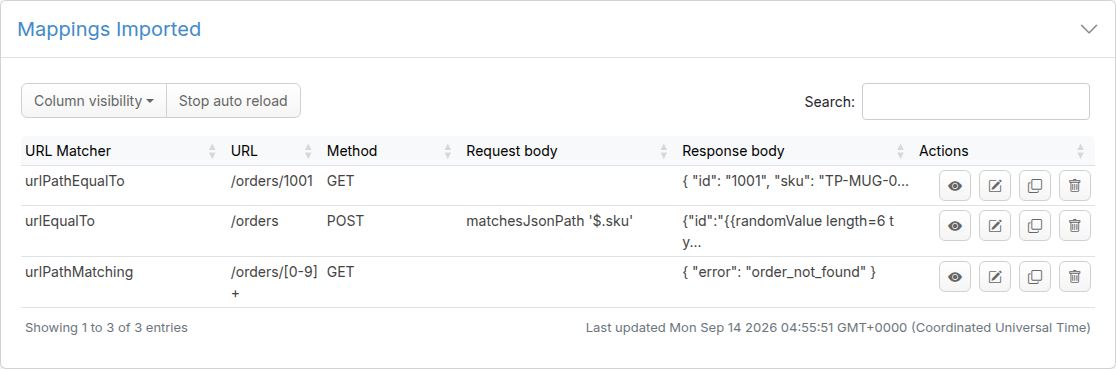
The same import is one curl call when you want it in a script. Post the ZIP as a multipart upload named files[] to the console port:
$ curl -F "files[]=@wiremock-orders.zip" http://localhost:8080/http/management/importMappings
{"mappings":["6ff53b6d-1e4c-4a7d-9c58-2f3d0b7e1a9c","b2c8d4e0-7f61-4b3a-8d25-9c1e6a0f4b73","0a7e4c19-3d5b-4f82-a6c1-8e2b9d7f5c04"]}
The response lists the id Traffic Parrot assigned to each imported mapping. Ids are freshly generated on import, and each mapping is tagged with the name of the ZIP it came from, so importing a ZIP of the same name again replaces the mappings the earlier import registered rather than adding a second copy.
Open Add/Edit from the HTTP menu (/http/stub.html) and the three stubs are listed by the name each mapping file carried:
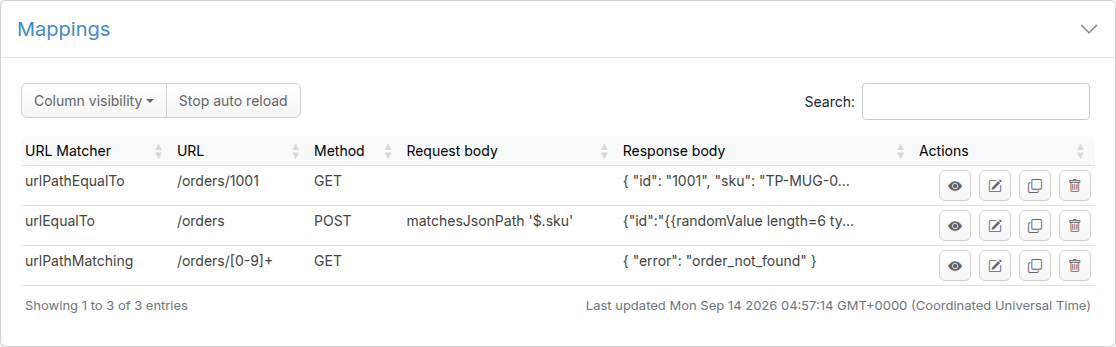
name field in each WireMock mapping file.
Click the pencil icon on the /orders/1001 row to open the editor. The response body shows the content of __files/order-1001.json, and the editor notes that the body is served from a file, which is the bodyFileName reference kept intact:
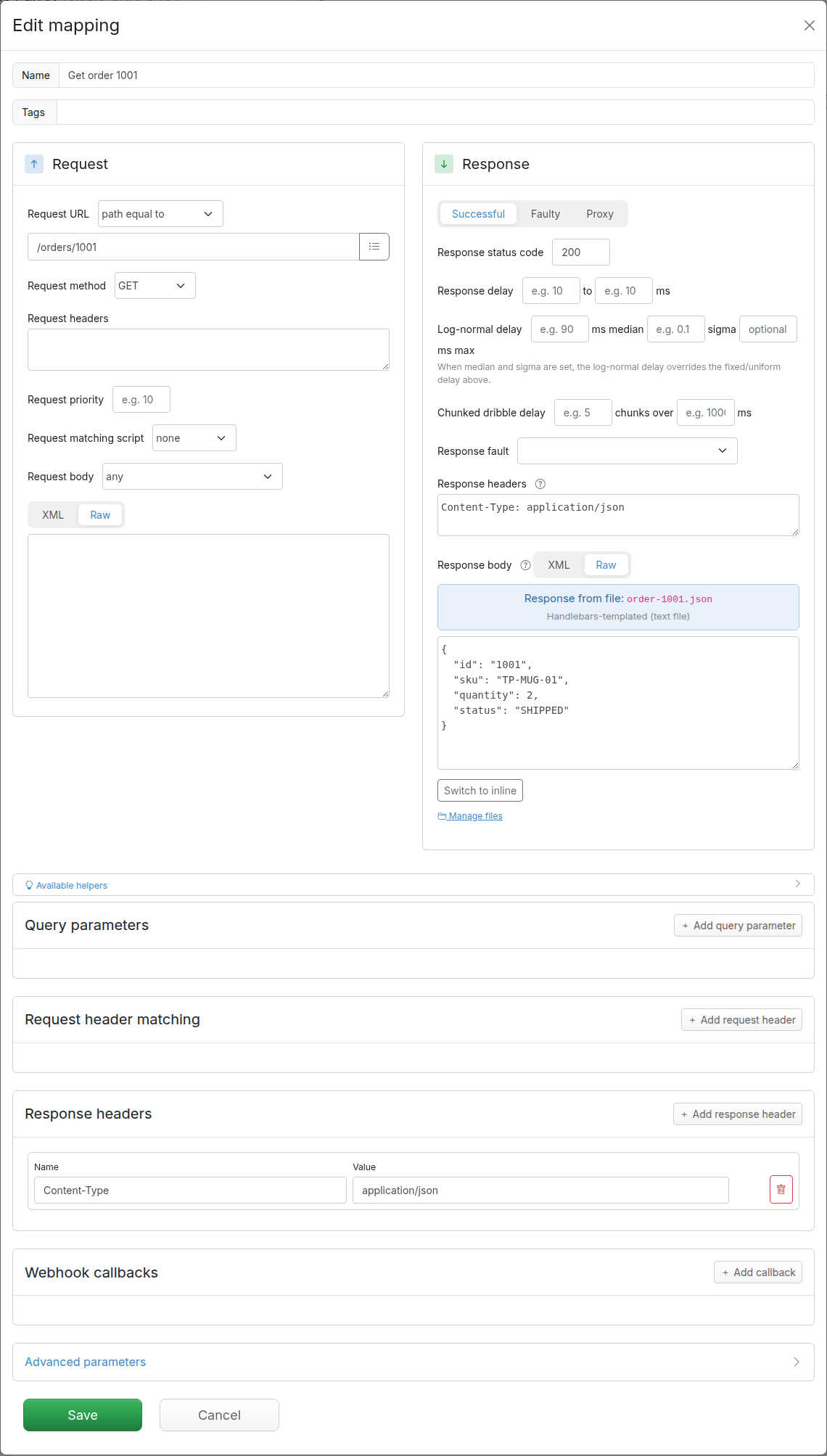
On disk, the import is written to the current scenario's mappings/ and __files/ directories, one <name>.json per stub. For the Default scenario those are the directories in the Traffic Parrot install folder, so a restart keeps the migrated stubs.
WireMock serves stubs and its admin API on one port. Traffic Parrot splits them: the console and management APIs are on 8080, the virtual service that your application talks to is on 8081. Point your client at 8081 and the three stubs answer exactly as they did under WireMock.
The file-backed stub returns the body from __files/. Traffic Parrot adds two headers naming the stub that matched, which are handy when you are checking a migration:
$ curl -i http://localhost:8081/orders/1001
HTTP/1.1 200 OK
Content-Type: application/json
Matched-Stub-Id: 6ff53b6d-1e4c-4a7d-9c58-2f3d0b7e1a9c
Matched-Stub-Name: Get order 1001

{"id":"1001","sku":"TP-MUG-01","quantity":2,"status":"SHIPPED"}
The templated stub renders its Handlebars helpers against the incoming request:
$ curl -i -H "Content-Type: application/json" \
       -d '{"sku":"TP-MUG-01","quantity":3}' \
       http://localhost:8081/orders
HTTP/1.1 201 Created
Content-Type: application/json
Matched-Stub-Name: Create an order

{"id":"483920","sku":"TP-MUG-01","quantity":3,"status":"CREATED"}
And the low-priority fallback catches any other numeric id, after the 250 millisecond delay the mapping asked for:
$ curl -i http://localhost:8081/orders/2002
HTTP/1.1 404 Not Found
Content-Type: application/json
Matched-Stub-Name: Order not found

{"error":"order_not_found"}
A request that matches nothing gets HTTP status 900 rather than WireMock's 404, so an unmatched request is never confused with a stubbed 404 like the one above. The console's Requests page, under the HTTP menu, shows the near misses for it; How to debug unmatched requests with near misses covers that page in detail.
Scripts that relied on the WireMock admin API keep working against the virtual service port:
$ curl http://localhost:8081/__admin/mappingsFour things are worth knowing before you point a real test suite at the migrated mock.
response-template transformer. Traffic Parrot renders every HTTP response body through Handlebars, so the transformers line is accepted but not required, and a stub you never marked as templated will be templated now. A body that must contain a literal {{ needs templating switched off for HTTP: set trafficparrot.http.handlebars.enabled=false in trafficparrot.properties and restart, as described in the dynamic responses documentation. That is a global switch, so templated and literal-brace stubs cannot share one instance.The scenario model is also a step up from a single WireMock root. Each Traffic Parrot scenario is a directory under scenarios/ with its own mappings/ and __files/, so a second WireMock project can be migrated by copying it into scenarios/<name>/ while Traffic Parrot is running. It appears in the scenario drop-down at the top of every console page straight away, and selecting it there makes those stubs the live ones. The scenarios section of the user guide explains the model.
Migration is not a one-way door. Whatever you edit in the Traffic Parrot console can be exported as a WireMock-compatible ZIP, either with the Download Mappings button on the Export page under the HTTP menu, or with one call to the console port:
$ curl -o exported.zip http://localhost:8080/http/management/exportMappings
$ unzip -l exported.zip
  mappings/Get order 1001.json
  mappings/Create an order.json
  mappings/Order not found.json
  __files/order-1001.json
  data/README.md
  data/data.csv
Each mapping is written as mappings/<mapping name>.json, with __files/ alongside it and a data/ directory holding the CSV data files Traffic Parrot's own helpers can read. Re-importing that ZIP into Traffic Parrot works as it is, and because every entry carries the .json extension WireMock's file loader reads them too: unzip it and exported/ is a WireMock root directory again, with the mapping JSON in the same format you started with.
unzip -l: every mapping entry must include mappings/ somewhere in its path, for example mappings/get-order.json or wiremock-orders/mappings/get-order.json.bodyFileName path does not match the file's path under __files/. Re-zip with both directories and import again into an empty scenario.Now that your WireMock stubs run in Traffic Parrot, make them smarter with Chapter 3: Dynamic responses, which covers the Handlebars helpers available to every response body. For the import and export APIs, the multipart format and the scenario directory layout, see the HTTP import and export section of the Traffic Parrot documentation.