Authorization: Bearer header; a fallback for the same URL that returns 401 Unauthorized when that header is missing or malformed; and a JWKS endpoint (GET /.well-known/jwks.json) that publishes the public key, so the client you are testing can verify the signature. By the end you will have driven the whole flow from curl: fetch a token, call the API with it and get 200, call it without and get 401. Everything runs inside Traffic Parrot, offline, with no identity provider and no shared test credentials.
curl on your PATH. jq is optional: it is used once, to pull the token out of a JSON response.Authorization header (RFC 6750). You do not need to know how the signature is computed; Traffic Parrot signs the tokens for you.
Most APIs you integrate with expect a bearer token on every call. Your client fetches a token from an authorisation server, caches it, sends it as Authorization: Bearer <token>, and reacts to a 401 by fetching a new one. That client-side flow is code you own and need to test, and testing it against the real identity provider is the slow way to do it: it needs credentials that every developer and every pipeline must share, it is rate-limited, and a token minted at the start of a long test run expires halfway through.
A mock gives you the same flow without any of that. Tokens are issued instantly and deterministically, the “authorisation server” is a mapping you control, and you can hand out awkward tokens on demand: one that expired years ago, one for the wrong audience, one without the scope your code checks for. Those are exactly the cases that are hardest to provoke from a real provider and easiest to get wrong in a client.
Traffic Parrot bundles the WireMock JWT extension, so a response template can mint a signed token with the {{jwt}} helper and publish the matching public key with {{jwks}}. It is switched on by default (trafficparrot.http.jwt.enabled=true in trafficparrot.properties), and the signing keys are generated the first time the virtual service starts without any, so there is nothing to configure before you begin. Both helpers are listed with the other WireMock helpers in the
Traffic Parrot dynamic responses documentation.
One thing the mock deliberately does not do is verify the signature of tokens that arrive on requests. Request matching in Traffic Parrot is about the shape of the request, so the protected endpoint in this how-to checks that the Authorization header holds something that looks like a bearer JWT, or, when you want a strict test, equals one exact expected token. That is the right division of labour: verifying signatures is the job of the client you are testing, and the point of this mock is to feed that client real signed tokens and a key set to verify them against.
Start Traffic Parrot and open the web console at http://localhost:8080. From the HTTP menu in the top navigation bar choose Add/Edit. The blank form at the top of that page creates a mapping, and the Mappings list further down shows what you have saved. Fill the form in as follows and press Save:
Content-Type: application/json.{{jwt …}} helper is replaced with a freshly signed token every time the mapping responds.{"access_token":"{{jwt alg='RS256' iss='https://auth.example.test/' aud='https://payments.example.test/' sub='payments-client' maxAge='60 minutes' scope='payments:read'}}","token_type":"Bearer","expires_in":3600}Each parameter maps onto the token:
alg='RS256' signs with the RSA key pair Traffic Parrot generated, so clients verify it with a public key. Leave it out and the token is signed with HS256 using the shared hs256Secret instead.iss, aud and sub set the standard issuer, audience and subject claims. Use the values your client is configured to expect.maxAge='60 minutes' sets exp relative to the time of issue. The unit must be spelled seconds, minutes, hours or days. For an absolute expiry use exp=(parseDate '2020-01-01T00:00:00Z'), which is also how you mint an already-expired token to exercise your client's refresh path.scope='payments:read' adds a scope claim. Lists work too: roles=(claims 'admin' 'billing').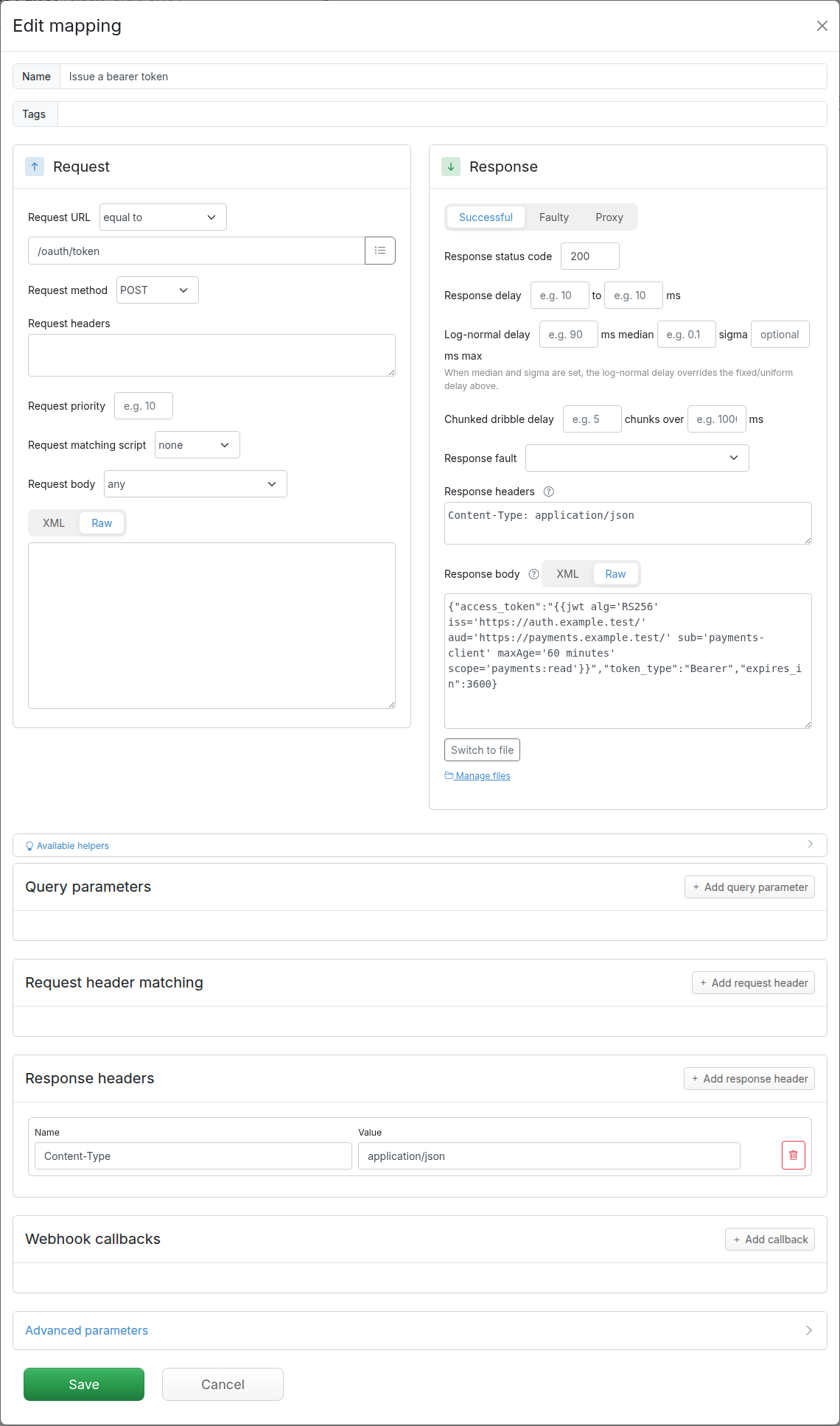
{{jwt}} helper and its parameters.If you prefer a file to a form, here is the same mapping as JSON. Traffic Parrot stores every mapping in this WireMock-compatible format, and the management API on port 8080 accepts it directly:
{
  "name": "Issue a bearer token",
  "request": {
    "method": "POST",
    "url": "/oauth/token"
  },
  "response": {
    "status": 200,
    "headers": {
      "Content-Type": "application/json"
    },
    "body": "{\"access_token\":\"{{jwt alg='RS256' iss='https://auth.example.test/' aud='https://payments.example.test/' sub='payments-client' maxAge='60 minutes' scope='payments:read'}}\",\"token_type\":\"Bearer\",\"expires_in\":3600}"
  }
}
$ curl -X POST http://localhost:8080/api/http/mappings -H "Content-Type: application/json" -d @issue-token.jsonEither way, call the new endpoint on the virtual service port, 8081 by default:
$ curl -s -X POST http://localhost:8081/oauth/token
{"access_token":"eyJraWQiOiJ0NXo5cnVwNjVwNVpxZHRIZVl2czVnUHVPNGhaVk8iLCJhbGciOiJSUzI1NiIsInR5cCI6IkpXVCJ9.eyJleHAiOjE3ODkzNDk1NDQs…","token_type":"Bearer","expires_in":3600}
Decode the token (paste it into any JWT debugger, or use the one-liner in the last section) and you will see a header naming the key and the algorithm, and a payload carrying your claims:
{"kid":"t5z9rup65p5ZqdtHeYvs5gPuO4hZVO","alg":"RS256","typ":"JWT"}
{"exp":1789349544,"iat":1789345944,"iss":"https://auth.example.test/","aud":"https://payments.example.test/","sub":"payments-client","alg":"RS256","maxAge":"60 minutes","scope":"payments:read"}
exp is exactly 3600 seconds after iat. You will also notice alg and maxAge in the payload: the bundled extension copies every helper parameter, including its own, into the claim set. That is harmless for a conforming client, because RFC 7519 requires validators to ignore claims they do not understand, but do not be surprised to see them.
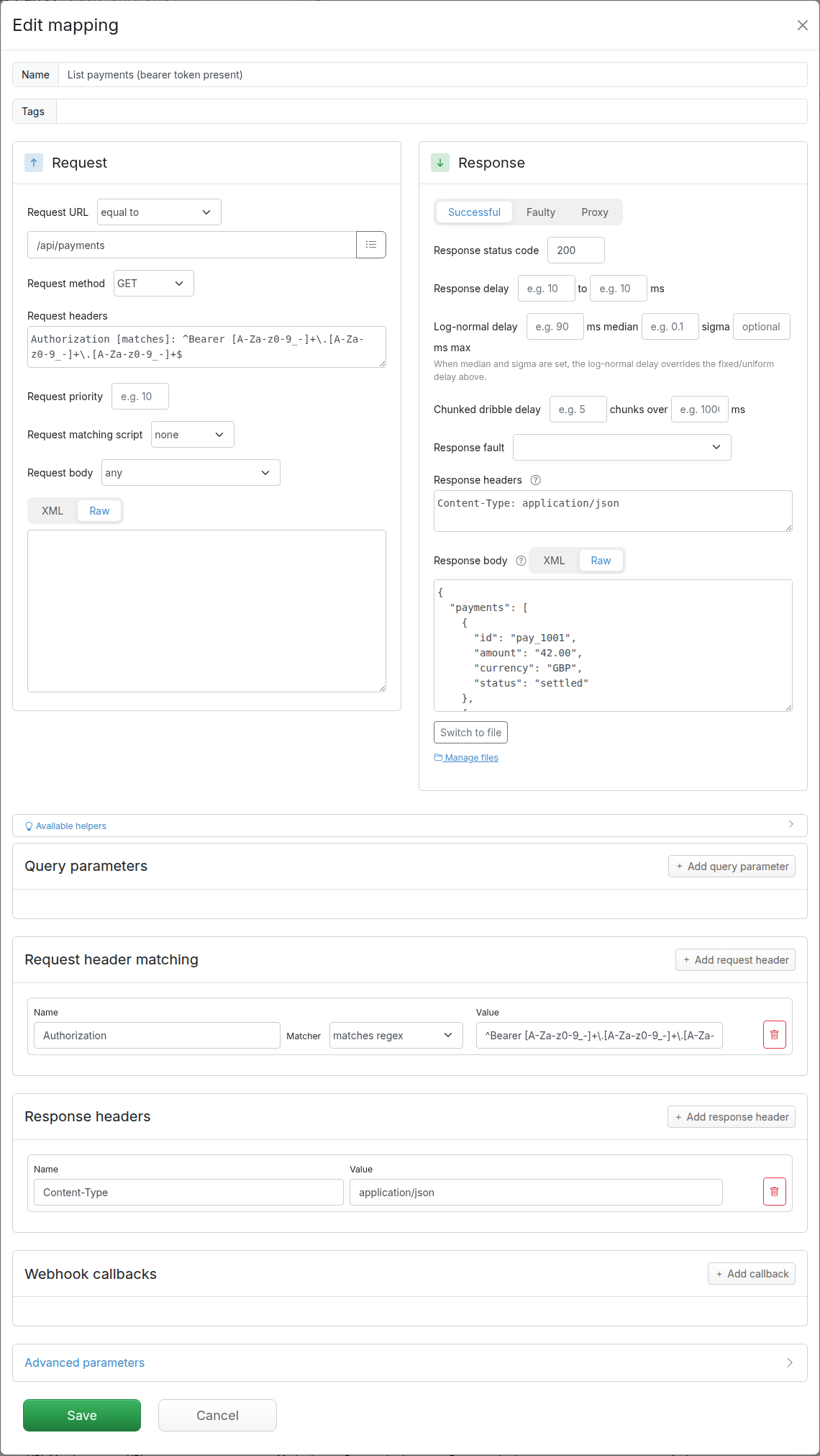
Now the endpoint your client calls with the token. Add a second mapping: Request URL equal to /api/payments, Request method GET, Response status code 200, Response headers Content-Type: application/json, and a response body with a couple of payments. The part that makes it a guarded endpoint is the header matcher: scroll down to Request header matching, press Add request header, and enter the name Authorization, the matcher matches regex, and this value:
^Bearer [A-Za-z0-9_-]+\.[A-Za-z0-9_-]+\.[A-Za-z0-9_-]+$
The pattern accepts the Bearer scheme followed by three base64url segments separated by dots, which is the shape of every JWT, and rejects everything else: a missing header, a Basic credential, or a bearer value that is not a JWT. Two variations are worth knowing. If you want the mapping to respond only to one specific token, switch the matcher to equal to and paste the exact expected value. If you want it looser, contains Bearer is enough to tell authenticated calls from anonymous ones. Every matcher Traffic Parrot offers for headers is described in the
WireMock request matching documentation, which is the engine underneath.
Then add the fallback: a third mapping with the same URL and method, no header matcher, Request priority 10, Response status code 401, a response header WWW-Authenticate: Bearer realm="payments", error="invalid_token" (the challenge RFC 6750 says a resource server should send with a 401), and a short JSON error body. Priority decides which mapping answers when more than one matches: 1 is the highest and the default is 5, so the guarded mapping at 5 wins whenever its header matcher passes, and the fallback at 10 catches everything else. The rule is explained under
Priority in the Traffic Parrot HTTP documentation.
As JSON, the two mappings are:
{
  "name": "List payments (bearer token present)",
  "request": {
    "method": "GET",
    "url": "/api/payments",
    "headers": {
      "Authorization": {
        "matches": "^Bearer [A-Za-z0-9_-]+\\.[A-Za-z0-9_-]+\\.[A-Za-z0-9_-]+$"
      }
    }
  },
  "response": {
    "status": 200,
    "headers": {
      "Content-Type": "application/json"
    },
    "jsonBody": {
      "payments": [
        { "id": "pay_1001", "amount": "42.00", "currency": "GBP", "status": "settled" },
        { "id": "pay_1002", "amount": "18.50", "currency": "GBP", "status": "pending" }
      ]
    }
  }
}
{
"name": "List payments (no or malformed bearer token)",
"priority": 10,
"request": {
"method": "GET",
"url": "/api/payments"
},
"response": {
"status": 401,
"headers": {
"Content-Type": "application/json",
"WWW-Authenticate": "Bearer realm=\"payments\", error=\"invalid_token\""
},
"jsonBody": {
"error": "invalid_token",
"error_description": "A valid bearer token is required"
}
}
}
A client that verifies RS256 tokens needs the public key, and the standard way to hand it over is a JSON Web Key Set (RFC 7517) served from a well-known URL. That is one more mapping: Request URL equal to /.well-known/jwks.json, method GET, status 200, Content-Type: application/json, and a response body of just {{jwks}}.
{
  "name": "JSON Web Key Set",
  "request": {
    "method": "GET",
    "url": "/.well-known/jwks.json"
  },
  "response": {
    "status": 200,
    "headers": {
      "Content-Type": "application/json"
    },
    "body": "{{jwks}}"
  }
}
$ curl -s http://localhost:8081/.well-known/jwks.json
{"keys":[{"kty":"RSA","kid":"t5z9rup65p5ZqdtHeYvs5gPuO4hZVO","use":"sig","alg":"RS256","n":"0gVMjyyHlFtaaEWJEab9LM_wE6ZFe53QgmlCJt5tYJr_pVTyVexkrg9yGGnKlZFWa3azejAQwkhbVwIJUd481K_KaQ2J5-uk6Dcc6j00khBPoh2yJDx8E_6btnSigu-TmXFM5Puwzhilu…","e":"AQAB"}]}
The kid in the key set is the same as the kid in the token header, which is how a client picks the right key when a set holds several. Point the client you are testing at http://localhost:8081/.well-known/jwks.json as its JWKS URL, and at the issuer and audience you used in the token mapping, and it will verify tokens issued by the mock exactly as it verifies real ones.
The keys themselves live in the virtual service's settings, alongside the HS256 secret, and you can read them from the management port:
$ curl -s http://localhost:8080/api/http/__admin/settings
{
  "settings" : {
    "extended" : {
      "jwt" : {
        "hs256Secret" : "…",
        "rs256PublicKeyId" : "t5z9rup65p5ZqdtHeYvs5gPuO4hZVO",
        "rs256PublicKey" : "-----BEGIN RSA PUBLIC KEY-----\n…\n-----END RSA PUBLIC KEY-----\n",
        "rs256PrivateKey" : "-----BEGIN RSA PRIVATE KEY-----\n…\n-----END RSA PRIVATE KEY-----\n"
      }
    },
    "proxyPassThrough" : true
  }
}
Those values are unique to your installation, so read yours rather than copying them from this page, and if your client caches its key set, have it fetch the JWKS from the mock at the start of a test run rather than pinning a key in configuration.
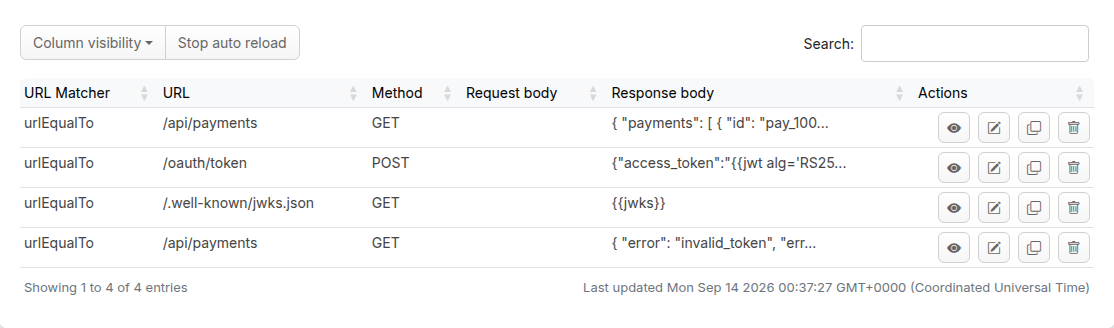
With all four mappings saved, the Mappings list on the Add/Edit page looks like this:
Now play the client. A call with no token gets the 401 from the fallback. The Matched-Stub-Name header is added by Traffic Parrot to every response, and it tells you which mapping answered:
$ curl -i http://localhost:8081/api/payments
HTTP/1.1 401 Unauthorized
Vary: Origin
Content-Type: application/json
WWW-Authenticate: Bearer realm="payments", error="invalid_token"
Matched-Stub-Id: 9722097c-6655-4136-b171-f80d6108b2cf
Matched-Stub-Name: List payments (no or malformed bearer token)
Content-Length: 80

{"error":"invalid_token","error_description":"A valid bearer token is required"}
Fetch a token, keep it in a shell variable, and decode its payload. The decode line uses GNU coreutils; on other platforms paste the token into any JWT debugger instead:
$ TOKEN=$(curl -s -X POST http://localhost:8081/oauth/token | jq -r .access_token)
$ echo "$TOKEN" | cut -d. -f2 | tr '_-' '/+' | base64 -d 2>/dev/null; echo
{"exp":1789350668,"iat":1789347068,"iss":"https://auth.example.test/","aud":"https://payments.example.test/","sub":"payments-client","alg":"RS256","maxAge":"60 minutes","scope":"payments:read"}
Send it as a bearer token and the guarded mapping answers with the payments:
$ curl -i -H "Authorization: Bearer $TOKEN" http://localhost:8081/api/payments
HTTP/1.1 200 OK
Vary: Origin
Content-Type: application/json
Matched-Stub-Id: 2a7d4670-e68d-4678-a3be-2509a34561a6
Matched-Stub-Name: List payments (bearer token present)
Content-Length: 156

{"payments":[{"id":"pay_1001","amount":"42.00","currency":"GBP","status":"settled"},{"id":"pay_1002","amount":"18.50","currency":"GBP","status":"pending"}]}
Finally, a bearer value that is not a JWT fails the shape check and falls through to the 401 again, and so does any other scheme, such as Basic:
$ curl -i -H "Authorization: Bearer not-a-jwt" http://localhost:8081/api/payments
HTTP/1.1 401 Unauthorized
Vary: Origin
Content-Type: application/json
WWW-Authenticate: Bearer realm="payments", error="invalid_token"
Matched-Stub-Id: 9722097c-6655-4136-b171-f80d6108b2cf
Matched-Stub-Name: List payments (no or malformed bearer token)
Content-Length: 80

{"error":"invalid_token","error_description":"A valid bearer token is required"}
That is the complete loop: anonymous call refused, token obtained, authenticated call served, garbage refused. Point the real client you are testing at http://localhost:8081 and run its integration tests against the same four mappings. To test the refresh path, add a second token endpoint whose {{jwt}} uses exp=(parseDate '2020-01-01T00:00:00Z'): the client gets a syntactically perfect, correctly signed token that every validator rejects as expired, which is the case a real provider will never hand you on purpose.
access_token contains the literal text {{jwt …}}. Response templating or the JWT helper is switched off. Both are on by default; check trafficparrot.http.handlebars.enabled=true and trafficparrot.http.jwt.enabled=true in trafficparrot.properties, then restart Traffic Parrot.access_token reads [ERROR: maxAge unit must be one of: seconds, minutes, hours, days]. The unit is spelled differently from those four words. maxAge='1 hour' fails; maxAge='60 minutes' works. For an absolute time use exp=(parseDate '…') instead.401, even with a token. Compare what the client sent with the pattern: the header must be named Authorization, the value must start with Bearer followed by one space, and the token must have three dot-separated segments. If the client did send the right header, check the two /api/payments mappings do not share a priority: with both at the default 5 the most recently saved one wins, so set the fallback to 10. Open HTTP → Requests and expand the row to see the field-by-field comparison; How-to: Debug unmatched HTTP requests with near-miss diffs walks through reading it.iss and aud you put in the token mapping. The keys are unique to each installation, so a key copied from another environment, or from this page, will never verify a token your instance issued.exp is computed from the Traffic Parrot host's time, and a client running on a machine whose clock is ahead treats a fresh maxAge='60 minutes' token as expired. Increase maxAge while you investigate.
The token endpoint is a response template, and templates can do far more than mint tokens: continue with Chapter 3: Dynamic responses to build responses out of request data, and read the WireMock helpers section of the Traffic Parrot dynamic responses documentation for every {{jwt}} parameter, the {{jwks}} helper, and the settings that hold the keys.