PENDING_PAYMENT and an attempt to ship it is refused with 409. Paying it moves the scenario to PAID, after which the same GET reports PAID, and shipping is accepted and moves it on to SHIPPED. By the end you will have driven that flow from curl, watched it in the request log, and read, set and reset the state through the management API, so every test starts from a known place. No code, no database, and no change to the client you are testing.
curl on your PATH. jq is optional: it is used once, to shorten a listing.A mock that always answers the same way covers a lot of testing, and it is what most mock servers give you. It stops being enough the moment your client's behaviour depends on what it did earlier. A checkout that polls an order until it is paid, a client that retries a job until it finishes, a wizard that must not skip a step: to test those you need a mock that remembers, so that the same request can be answered differently depending on what came before.
Traffic Parrot gives you that without writing any code, through the scenario state machine of its underlying WireMock engine, described in the WireMock stateful behaviour documentation. A mapping can name a scenario, say which state that scenario must be in for the mapping to match, and say which state to move to once it has responded. Group a few mappings under one scenario name and you have modelled a workflow: each request is answered by the mapping whose required state is the current state, and the transitions are the mappings that carry a new state. Every scenario starts in the state Started, and the management API lets a test read the current state, jump straight to a state, or reset everything, so a test suite never depends on the order its tests happen to run in.
One word of warning about the word itself. Traffic Parrot also has scenarios of a different kind: the folders under scenarios/ that hold whole sets of mappings, which you switch between in the web console or through /api/scenarios, and which the request log shows in its Scenario column (Default in the figures below). This how-to is about the stub-level state machine, and the two are independent: switching folders does not change any state, and changing state does not switch folders. The folders are described under Testing with scenarios in the user guide, and the Traffic Parrot dynamic responses documentation uses the same three fields you are about to meet to make a streaming mock switch quality mid-session.
Before touching Traffic Parrot, write down the states and what each request should do in each of them. For an order that is paid and then shipped, the table is small:
| Current state | GET /api/orders/1001 | POST /api/orders/1001/payments | POST /api/orders/1001/shipments |
|---|---|---|---|
Started | 200, status PENDING_PAYMENT | 202, moves to PAID | 409, refused |
PAID | 200, status PAID | no mapping | 202, moves to SHIPPED |
SHIPPED | 200, status SHIPPED plus a tracking number | no mapping | no mapping |
Three states, two transitions, and a few cells left empty on purpose. Every cell with an answer becomes one mapping, so six mappings in all. The two transition mappings carry a new scenario state as well as a required one; the other four carry only a required state. The 409 in the first row is what makes the mock honest: a client that ships before paying is told so, exactly as the real service would tell it. The empty cells are covered too, in the other direction: a request nothing matches gets Traffic Parrot's 900 no-match response, which you will see at the end of the walkthrough.
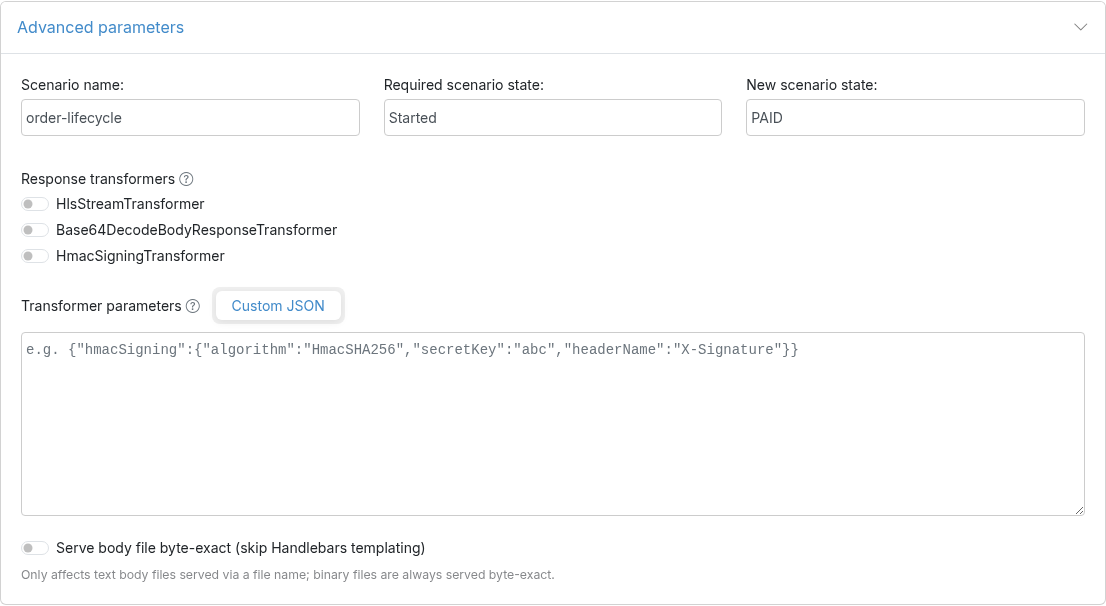
Start Traffic Parrot and open the web console at http://localhost:8080. From the HTTP menu choose Add/Edit. The three scenario fields live at the bottom of the form, under Advanced parameters, which is collapsed until you click it. For the first mapping fill in Request URL equal to /api/orders/1001, Request method GET, Response status code 200, a response header Content-Type: application/json, the response body {"orderId": "1001", "status": "PENDING_PAYMENT"}, and then under Advanced parameters a Scenario name of order-lifecycle and a Required scenario state of Started. Leave New scenario state empty, because reading an order changes nothing, and press Save.
The payment mapping is the first transition: Request URL equal to /api/orders/1001/payments, method POST, status 202, the same content type, a body of {"orderId": "1001", "status": "PAID"}, Scenario name order-lifecycle, Required scenario state Started, and this time a New scenario state of PAID:
The other four mappings follow the same pattern, so rather than click through them all, here they are as JSON. Traffic Parrot stores every mapping in this WireMock-compatible format, and the management API on port 8080 accepts it directly, so you can save the six files below and load them in one loop. The first two are the mappings you just saw in the form:
{
  "name": "Order 1001 status while payment is pending",
  "scenarioName": "order-lifecycle",
  "requiredScenarioState": "Started",
  "request": { "method": "GET", "url": "/api/orders/1001" },
  "response": {
    "status": 200,
    "headers": { "Content-Type": "application/json" },
    "jsonBody": { "orderId": "1001", "status": "PENDING_PAYMENT" }
  }
}
{
"name": "Pay for order 1001",
"scenarioName": "order-lifecycle",
"requiredScenarioState": "Started",
"newScenarioState": "PAID",
"request": { "method": "POST", "url": "/api/orders/1001/payments" },
"response": {
"status": 202,
"headers": { "Content-Type": "application/json" },
"jsonBody": { "orderId": "1001", "status": "PAID" }
}
}{
"name": "Order 1001 status once paid",
"scenarioName": "order-lifecycle",
"requiredScenarioState": "PAID",
"request": { "method": "GET", "url": "/api/orders/1001" },
"response": {
"status": 200,
"headers": { "Content-Type": "application/json" },
"jsonBody": { "orderId": "1001", "status": "PAID" }
}
}{
"name": "Ship order 1001",
"scenarioName": "order-lifecycle",
"requiredScenarioState": "PAID",
"newScenarioState": "SHIPPED",
"request": { "method": "POST", "url": "/api/orders/1001/shipments" },
"response": {
"status": 202,
"headers": { "Content-Type": "application/json" },
"jsonBody": { "orderId": "1001", "status": "SHIPPED", "trackingNumber": "TP0000123456" }
}
}{
"name": "Order 1001 status once shipped",
"scenarioName": "order-lifecycle",
"requiredScenarioState": "SHIPPED",
"request": { "method": "GET", "url": "/api/orders/1001" },
"response": {
"status": 200,
"headers": { "Content-Type": "application/json" },
"jsonBody": { "orderId": "1001", "status": "SHIPPED", "trackingNumber": "TP0000123456" }
}
}{
"name": "Refuse to ship order 1001 before it is paid",
"scenarioName": "order-lifecycle",
"requiredScenarioState": "Started",
"request": { "method": "POST", "url": "/api/orders/1001/shipments" },
"response": {
"status": 409,
"headers": { "Content-Type": "application/json" },
"jsonBody": { "error": "Order 1001 cannot be shipped: payment is pending" }
}
}
Save them as 01-get-order-pending.json through 06-post-shipment-unpaid.json in one directory and load them from there. Each 201 is one mapping created:
$ for f in 0*.json; do curl -s -X POST http://localhost:8080/api/http/mappings -H "Content-Type: application/json" -d @"$f" -o /dev/null -w "$f HTTP %{http_code}\n"; done
01-get-order-pending.json HTTP 201
02-post-payment.json HTTP 201
03-get-order-paid.json HTTP 201
04-post-shipment.json HTTP 201
05-get-order-shipped.json HTTP 201
06-post-shipment-unpaid.json HTTP 201
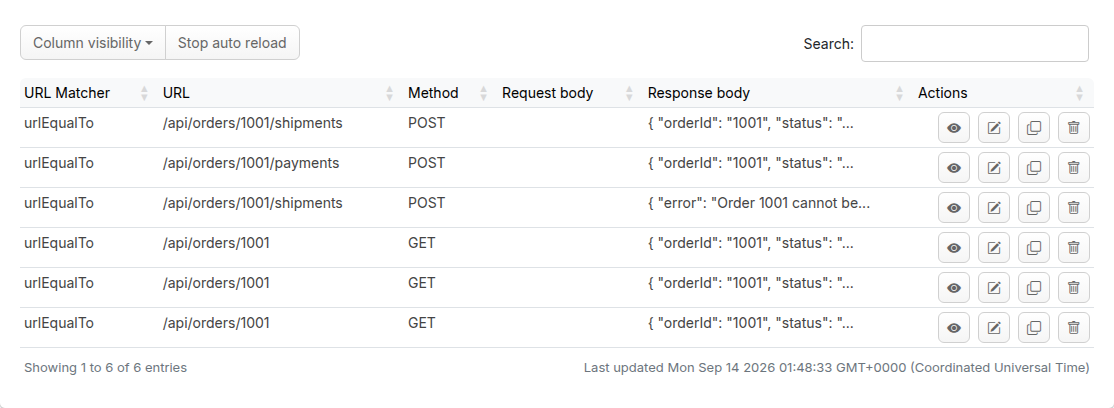
Whichever way you created them, the Mappings list on the Add/Edit page now shows all six. It lists method and URL, so the three GET /api/orders/1001 rows look identical there: the required state is what tells them apart, and you can see it by opening any row with the edit button.
Now play the client against the virtual service port, 8081 by default. The scenario is in Started, so the order is pending, and the Matched-Stub-Name header that Traffic Parrot adds to every response tells you which mapping answered:
$ curl -i http://localhost:8081/api/orders/1001
HTTP/1.1 200 OK
Vary: Origin
Content-Type: application/json
Matched-Stub-Id: 0af51922-0300-45ba-8bfc-4907a70a2cf6
Matched-Stub-Name: Order 1001 status while payment is pending
Content-Length: 45

{"orderId":"1001","status":"PENDING_PAYMENT"}
Try to ship it before paying, and the guard mapping refuses:
$ curl -i -X POST http://localhost:8081/api/orders/1001/shipments
HTTP/1.1 409 Conflict
Vary: Origin
Content-Type: application/json
Matched-Stub-Id: 6a8c4e4f-2492-495f-a5fc-a05b56a5a3b7
Matched-Stub-Name: Refuse to ship order 1001 before it is paid
Content-Length: 60

{"error":"Order 1001 cannot be shipped: payment is pending"}
Pay. The response is served and, because this mapping carries a new scenario state, the scenario moves to PAID as it is served. The next read of the very same URL is answered by a different mapping:
$ curl -i -X POST http://localhost:8081/api/orders/1001/payments
HTTP/1.1 202 Accepted
Vary: Origin
Content-Type: application/json
Matched-Stub-Id: 9b256862-5991-41d6-8f7c-3c246d87774f
Matched-Stub-Name: Pay for order 1001
Content-Length: 34

{"orderId":"1001","status":"PAID"}

$ curl -i http://localhost:8081/api/orders/1001
HTTP/1.1 200 OK
Vary: Origin
Content-Type: application/json
Matched-Stub-Id: 5bcc013b-eab7-49f4-b2d7-9ba8e67f0057
Matched-Stub-Name: Order 1001 status once paid
Content-Length: 34

{"orderId":"1001","status":"PAID"}
Shipping is now allowed, moves the scenario to SHIPPED, and the order reports a tracking number from then on:
$ curl -i -X POST http://localhost:8081/api/orders/1001/shipments
HTTP/1.1 202 Accepted
Vary: Origin
Content-Type: application/json
Matched-Stub-Id: 7ba87ce7-c181-46df-b347-f13376d9da83
Matched-Stub-Name: Ship order 1001
Content-Length: 69

{"orderId":"1001","status":"SHIPPED","trackingNumber":"TP0000123456"}

$ curl -i http://localhost:8081/api/orders/1001
HTTP/1.1 200 OK
Vary: Origin
Content-Type: application/json
Matched-Stub-Id: 74e32336-57f7-4117-9197-444900182a75
Matched-Stub-Name: Order 1001 status once shipped
Content-Length: 69

{"orderId":"1001","status":"SHIPPED","trackingNumber":"TP0000123456"}
Finally, one of the empty cells from the table. Paying a second time has no mapping in the SHIPPED state, so nothing matches and Traffic Parrot answers with its 900 no-match status rather than pretending:
$ curl -i -X POST http://localhost:8081/api/orders/1001/payments
HTTP/1.1 900 900
Transfer-Encoding: chunked

Traffic Parrot Virtual Service: No responses matched the given request
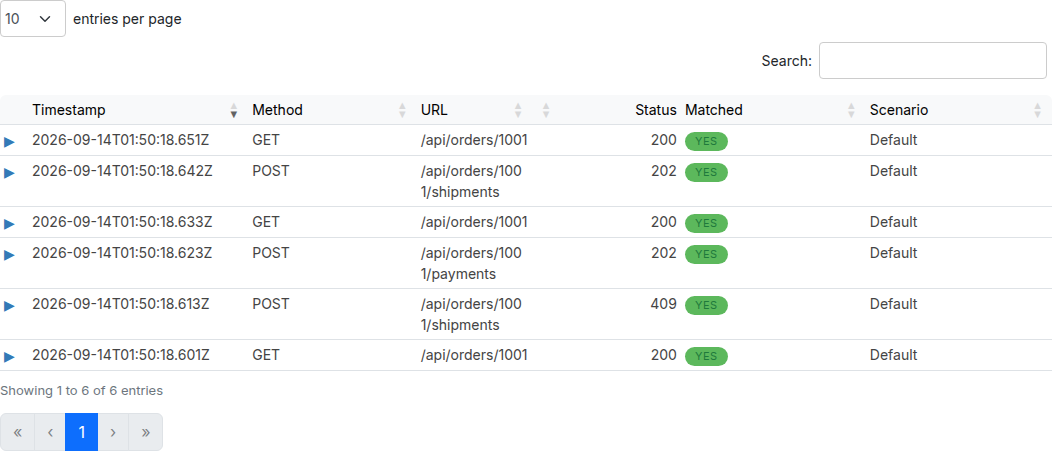
Open HTTP → Requests in the web console and the whole run is there, newest first. Three reads of one URL answered with three different bodies, and the same POST refused once and accepted once: that is stateful API mocking with scenarios doing its job.
A test suite cannot rely on every test walking the order from the beginning, so the management port gives you three levers. The first is a listing of every scenario with its current state and the states its mappings declare. The full document also embeds every mapping in the scenario, which is more than a test needs, so here it is trimmed with jq:
$ curl -s http://localhost:8080/api/http/__admin/scenarios | jq '.scenarios[] | {name, state, possibleStates}'
{
  "name": "order-lifecycle",
  "state": "SHIPPED",
  "possibleStates": [
    "Started",
    "PAID",
    "SHIPPED"
  ]
}
The second lever jumps a scenario straight to a state, which is how a test of the shipping step avoids replaying the payment step first. The order reads as paid immediately, without any payment request having been made:
$ curl -s -X PUT http://localhost:8080/api/http/__admin/scenarios/order-lifecycle/state -H 'Content-Type: application/json' -d '{"state": "PAID"}'
{}
$ curl -s http://localhost:8081/api/orders/1001
{"orderId":"1001","status":"PAID"}
The third resets every scenario to Started. Call it in your test setup, before each test, and no test can be affected by the one that ran before it:
$ curl -s -X POST http://localhost:8080/api/http/__admin/scenarios/reset
{}
$ curl -s http://localhost:8080/api/http/__admin/scenarios | jq '.scenarios[] | {name, state}'
{
  "name": "order-lifecycle",
  "state": "Started"
}
$ curl -s http://localhost:8081/api/orders/1001
{"orderId":"1001","status":"PENDING_PAYMENT"}
All three calls go to the Traffic Parrot GUI/API port, 8080, under the /api/http/__admin/ prefix, which is the same write-through that the programmatic setup how-to uses for mappings. Only states that some mapping in the scenario names, as either its required or its new state, can be set; anything else is refused, and the state is left as it was:
$ curl -s -X PUT http://localhost:8080/api/http/__admin/scenarios/order-lifecycle/state -H 'Content-Type: application/json' -d '{"state": "REFUNDED"}'
{
  "errors" : [ {
    "code" : 11,
    "title" : "Scenario order-lifecycle does not support state REFUNDED"
  } ]
}
With those three calls in your test helpers, the mock becomes a fixture you can put into any state in one line. Point the client you are testing at http://localhost:8081, reset before each test, jump to the state the test is about, and assert on what the client does next.
900, No responses matched the given request. The scenario has moved on and no mapping matches the request in its current state. Read the state with the listing above, then either add the missing mapping for that state or reset the scenario. HTTP → Requests shows the near-miss comparison for the unmatched request; How-to: Debug unmatched HTTP requests with near-miss diffs explains how to read it.Started forever. The listing shows every scenario Traffic Parrot knows about, so a stray name is easy to spot there.422, does not support state. The state is not named by any mapping in that scenario. Add a mapping that requires it or moves to it, and it appears in possibleStates.The responses here are fixed text; continue with Chapter 3: Dynamic responses to build them out of the request instead, so one mapping per state can serve any order number. The Traffic Parrot dynamic responses documentation shows the same three scenario fields driving a streaming mock, and the Testing with scenarios section of the user guide covers the folder-based scenarios that share the name.