
When Traffic Parrot receives a request via any protocol or technology like HTTP, JMS, gRPC and others, it will try to simulate the system it is replacing by sending back a response to the client that sent the request.
To decide which response to send, it will go through all the request to response mappings it has available to find the response to be returned.
A request to response mapping defines which response to return given a request.
For example, in HTTP, you could say:
For any request to URL '/hello' that is a GET request return a response with body 'Hello World!'
The way you do that in Traffic Parrot is by using the user interface to record mappings, import them or add them manually.
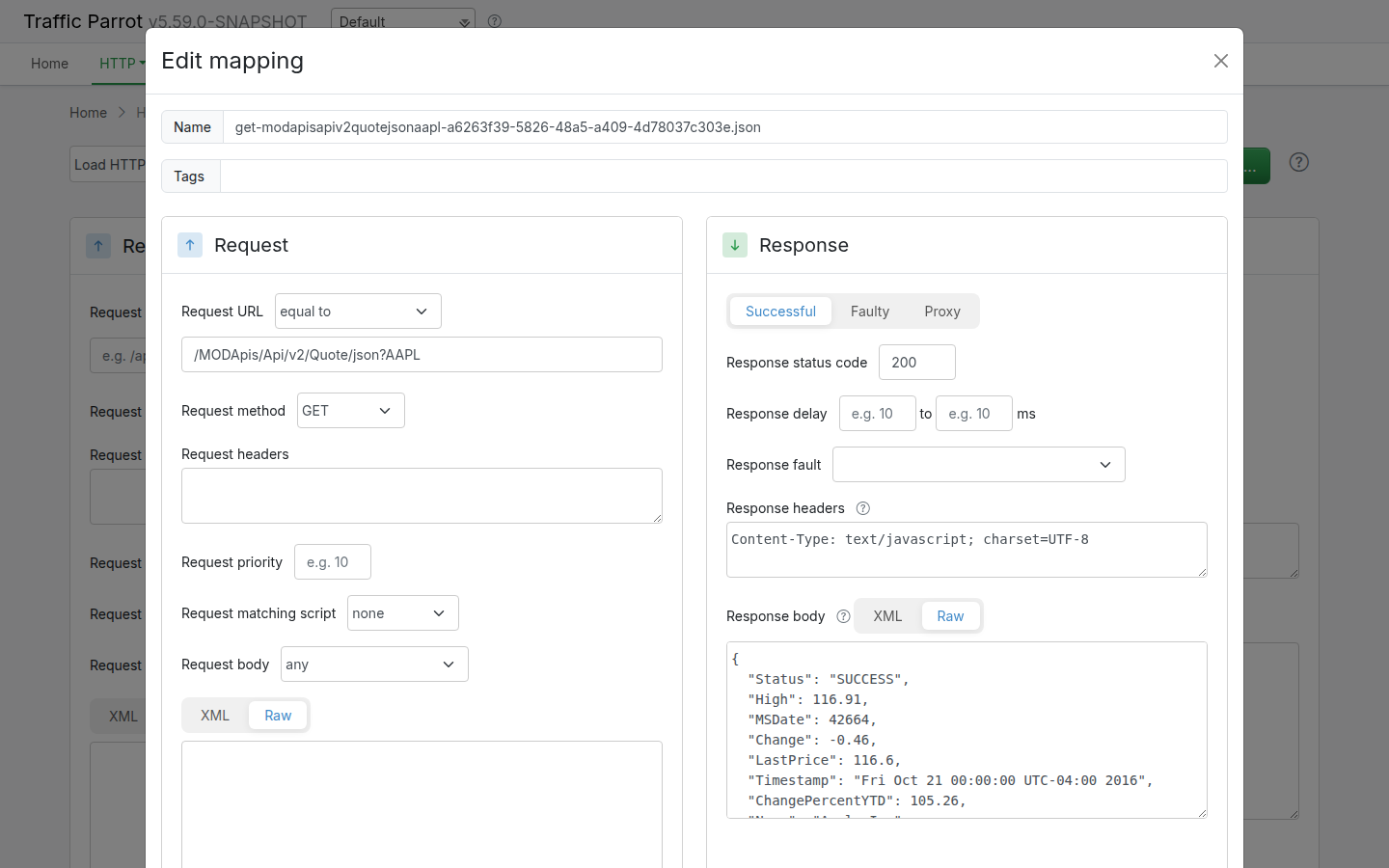
{
  "id" : "a6263f39-5826-48a5-a409-4d78037c303e",
  "request" : {
    "url" : "/MODApis/Api/v2/Quote/json?AAPL",
    "method" : "GET"
  },
  "response" : {
    "status" : 200,
    "body" : "{\r\n  \"Status\": \"SUCCESS\",\r\n  \"High\": 116.91,\r\n  \"MSDate\": 42664,\r\n  \"Change\": -0.46,\r\n  \"LastPrice\": 116.6,\r\n  \"Timestamp\": \"Fri Oct 21 00:00:00 UTC-04:00 2016\",\r\n  \"ChangePercentYTD\": 105.26,\r\n  \"Name\": \"Apple Inc\",\r\n  \"Open\": 116.81,\r\n  \"Volume\": 23192665,\r\n  \"Low\": 116.28,\r\n  \"ChangeYTD\": 105.26,\r\n  \"ChangePercent\": -0.3929608748,\r\n  \"MarketCap\": 628292453800\r\n}",
    "headers" : {
      "Content-Type" : "text/javascript; charset=UTF-8"
    }
  },
  "uuid" : "a6263f39-5826-48a5-a409-4d78037c303e"
}
Traffic Parrot support matching attributes of requests using the following matchers.
For the complete cross-protocol list of every matcher and its mapping JSON options, including matchers that are not shown in the editor dropdowns, see the matchers reference further down this page.
| Protocol/technology | Matchers available |
|---|---|
| HTTP(S) | list of HTTP(S) matchers |
| JMS | list of JMS matchers |
| Native IBM MQ | list of MQ matchers |
| gRPC | list of gRPC matchers |
| Thrift | list of Thrift matchers |
| Files | list of files matchers |
Here is a collection of matcher examples that cover typical request matching use cases.
| Use case | JSON to match | JSONPath |
|---|---|---|
| Has field that exists, even if it contains a null value | {
"field" : null
} |
$[?(@.field)] |
| Does not have a particular field at all | {
"other" : "any"
} |
$[?(!(@.field))] |
| Has field matching regular expression | {
"name" : "John"
} |
$[?(@.name =~ /^J[a-z]+$/)] |
| Has field not matching regular expression | {
"name" : "Other"
} |
$[?(!(@.name =~ /^J[a-z]+$/))] |
| Has field with value equal to | {
"name" : "John"
} |
$[?(@.name == 'John')] |
| Has multiple fields with value equal to | {
"name" : "John",
"lastName" : "Smith"
} |
$[?(@.name == 'John' && @.lastName == 'Smith')] |
| Has field with value equal to either | {
"name" : "Bob"
}{
"name" : "John"
} |
$[?(@.name == 'John' || @.name == 'Bob')] |
| Has array containing field with value equal to | {
"root" : {
"items" : [
{
"id": "1"
}
]
}
} |
$.root[?('1' in @.items[*].id)] |
| Has array containing fields with values equal to | {
"root" : {
"items" : [
{
"id": "1"
},
{
"id": "2"
}
]
}
} |
$.root[?('1' in @.items[*].id && '2' in @.items[*].id)] |
| Has fields at multiple depths | {
"id": 1,
"items": [
{
"id": 2,
}
]
} |
$[?(@.id == 1 && 2 in @.items[*].id)] |
When the system under test sends signed callbacks to a mocked partner API, a request matcher script can accept only the correctly signed ones, so a broken signing implementation is caught by the mock instead of passing unnoticed. The script renders true or false. The {{hmacMatches}} helper recomputes the signature over the request body, compares it in constant time, and renders false, never an error, for a missing or malformed signature, so an unsigned request simply falls through to the next mapping.
A GitHub-style signature, sha256=<lower case hex HMAC-SHA256 of the body> in the X-Hub-Signature-256 header:
{
  "priority": 1,
  "request": {
    "method": "POST",
    "url": "/partner/events",
    "customMatcher": {
      "name": "requestMatchers",
      "parameters": {
        "matchesScript": {
          "type": "handlebars",
          "script": "{{hmacMatches request.body signature=request.headers.[X-Hub-Signature-256] key='my-webhook-secret' prefix='sha256='}}"
        }
      }
    }
  },
  "response": { "status": 202 }
}
Give the signed mapping a higher priority (a lower number) than a catch-all for the same URL that answers 401, and an unsigned or wrongly signed request receives the 401:
{
  "priority": 10,
  "request": { "method": "POST", "url": "/partner/events" },
  "response": { "status": 401, "body": "invalid signature" }
}
A Stripe-style header, t=<timestamp>,v1=<hex HMAC-SHA256 of "<timestamp>.<body>">, needs the timestamp and the signature pulled out first. regexExtract stores the capture groups in a variable, and stringFormat composes the signed text:
{{regexExtract request.headers.[Stripe-Signature] 't=([0-9]+),v1=([0-9a-f]+)' 'sig'}}{{hmacMatches (stringFormat '%s.%s' sig.0 request.body) signature=sig.1 key='whsec_test'}}
The pattern takes the first v1 value when the header carries several. To
verify a body byte for byte rather than as UTF-8 text, pass
request.bodyAsBase64 with valueEncoding='base64' instead of
request.body. The same script goes in the editor's matching script field,
which writes the customMatcher block for you.
A request to response mapping uses one or more matchers to decide whether an incoming request matches. This section is the complete reference of every matcher Traffic Parrot understands in mapping JSON, together with a copy-ready example for each.
The mapping editor in the web user interface offers a subset of the available matchers through its dropdown menus, the most common ones for each protocol. Additional matchers, inherited from the bundled request-matching engine, are not shown in those dropdowns but can still be used by editing the mapping JSON directly (on disk in the mappings folder, or through the import and API surfaces). Those are listed in the JSON-only matchers section and are each labelled JSON-only.
Matchers marked Traffic Parrot extension are added by Traffic Parrot on top of the bundled engine. The remaining matchers are inherited from the bundled request-matching engine.
Where each matcher applies. Not every matcher makes sense on every
protocol, so each entry below has an Applies to note. In the examples,
body matchers appear inside a bodyPatterns array on the
request and URL matchers appear as top-level request
fields, which is how they are stored in the mapping JSON.
These matchers are available from the dropdown menus in the mapping editor. The Applies to column shows which editor surfaces offer each one. A matcher may still be usable in mapping JSON for a protocol where the editor does not list it, but the column reflects what the editor exposes.
| Matcher (JSON key) | Description | Applies to |
|---|---|---|
any / anything | Matches any body, including an empty one. The editor shows this as any; in JSON the HTTP and gRPC forms use anything via an empty body-patterns list, while the messaging form uses the anything key. | HTTP body, JMS, Native IBM MQ, gRPC payload |
equalTo | Exact, character-for-character string equality. | HTTP body, JMS, Native IBM MQ, File name |
contains | The body contains the given substring. | HTTP body, JMS, Native IBM MQ, gRPC payload, File name |
doesNotContain | The body does not contain the given substring. | HTTP body, JMS, Native IBM MQ, gRPC payload, File name |
matches | The body matches the given regular expression. | HTTP body, JMS, Native IBM MQ, gRPC payload, File name |
doesNotMatch | The body does not match the given regular expression. | HTTP body, JMS, Native IBM MQ, gRPC payload, File name |
equalToJson | Semantic JSON equality: the body and the expected value represent the same JSON document regardless of formatting. | HTTP body, JMS, Native IBM MQ, gRPC payload |
matchesJson Traffic Parrot extension | Semantic JSON comparison with the expected value supplied as inline JSON rather than an escaped string. | HTTP body, JMS, Native IBM MQ, gRPC payload |
matchesGraphQL Traffic Parrot extension | Compares the canonical form of an incoming GraphQL query against the expected query, so queries that differ only in insignificant whitespace, field order or argument order match. | HTTP body |
matchesJsonPath | A JSONPath expression selects a value from the body; the request matches when the expression resolves. | HTTP body, JMS, Native IBM MQ, gRPC payload |
equalToXml | Semantic XML equality, ignoring insignificant whitespace and attribute order. | HTTP body, JMS, Native IBM MQ |
matchesXml Traffic Parrot extension | Matches an XML body against an XML template, comparing element and attribute values. | HTTP body, JMS, Native IBM MQ |
matchesXPath | An XPath expression selects a node from the XML body; the request matches when the node is present (optionally with a value sub-matcher). | HTTP body, JMS, Native IBM MQ |
matchesSwiftField Traffic Parrot extension | Extracts a SWIFT financial-message field by tag and matches its value against a regular expression. | JMS, Native IBM MQ |
matchesFixField Traffic Parrot extension | Extracts a FIX financial-protocol field by tag number and matches its value against a regular expression. | JMS, Native IBM MQ |
binaryEqualTo | Byte-for-byte equality against a Base64-encoded expected value, for binary message bodies. | JMS only |
matchesJsonSchema | Matches when the body is JSON that validates against the given JSON Schema. The editor offers the schema string; the optional schemaVersion sibling stays JSON-only. | HTTP body |
absent | Matches when the body is absent (no request body present). | HTTP body |
The logical operators and, or and not are
offered in the request body matcher dropdown too, on every protocol whose editor
has one. They compose the matchers above rather than matching a body themselves,
so they are documented under
Logical operators.
HTTP requests also support five URL matchers, chosen from the Request URL
dropdown. These are top-level request fields rather than body patterns.
| Matcher (JSON key) | WireMock Java DSL | Description | Applies to |
|---|---|---|---|
url | urlEqualTo | The full URL, including query string, equals the given value. | HTTP URL |
urlPattern | urlMatching | The full URL, including query string, matches the given regular expression. | HTTP URL |
urlPath | urlPathEqualTo | The URL path, ignoring the query string, equals the given value. | HTTP URL |
urlPathPattern | urlPathMatching | The URL path, ignoring the query string, matches the given regular expression. | HTTP URL |
urlPathTemplate | urlPathTemplate | The URL path, ignoring the query string, matches a path template with named variables such as /orders/{orderId}. Chosen as path template in the dropdown. | HTTP URL |
In an HTTP or gRPC mapping each body matcher is one entry in the bodyPatterns
array. The HTTP examples below show the matcher in a minimal mapping; a JMS, Native IBM MQ
or file message mapping takes the same matcher object as its single
request.bodyMatcher instead.
equalTo{
"request": {
"method": "POST",
"url": "/orders",
"bodyPatterns": [
{ "equalTo": "expected request body" }
]
},
"response": { "status": 200 }
}contains{
"request": {
"bodyPatterns": [
{ "contains": "ORDER-" }
]
},
"response": { "status": 200 }
}doesNotContain{
"request": {
"bodyPatterns": [
{ "doesNotContain": "DRAFT" }
]
},
"response": { "status": 200 }
}matches{
"request": {
"bodyPatterns": [
{ "matches": "ORDER-[0-9]{6}" }
]
},
"response": { "status": 200 }
}doesNotMatch{
"request": {
"bodyPatterns": [
{ "doesNotMatch": ".*TEST.*" }
]
},
"response": { "status": 200 }
}equalToJson{
"request": {
"bodyPatterns": [
{ "equalToJson": "{ \"id\": 1, \"name\": \"Widget\" }" }
]
},
"response": { "status": 200 }
}matchesJson Traffic Parrot extensionThe expected value is supplied as inline JSON, so it does not need to be escaped into a string.
{
  "request": {
    "bodyPatterns": [
      { "matchesJson": { "id": 1, "name": "Widget" } }
    ]
  },
  "response": { "status": 200 }
}
matchesGraphQL Traffic Parrot extension
Matches a GraphQL request body (a JSON document with a query field) by
comparing the canonical form of the incoming query against the expected query, so two
queries that differ only in insignificant whitespace, field order or argument order
are treated as equal. GraphQL requests are typically sent as an HTTP POST body.
{
  "request": {
    "method": "POST",
    "url": "/graphql",
    "bodyPatterns": [
      { "matchesGraphQL": "query { user(id: 1) { name email } }" }
    ]
  },
  "response": { "status": 200 }
}matchesJsonPath{
"request": {
"bodyPatterns": [
{ "matchesJsonPath": "$.customer.id" }
]
},
"response": { "status": 200 }
}equalToXml{
"request": {
"bodyPatterns": [
{ "equalToXml": "<order><id>1</id></order>" }
]
},
"response": { "status": 200 }
}matchesXml Traffic Parrot extension{
"request": {
"bodyPatterns": [
{ "matchesXml": "<order><id>1</id></order>" }
]
},
"response": { "status": 200 }
}matchesXPath{
"request": {
"bodyPatterns": [
{ "matchesXPath": "//order/id/text()" }
]
},
"response": { "status": 200 }
}matchesSwiftField Traffic Parrot extensionAvailable on the JMS and Native IBM MQ message body. The field is the SWIFT field tag; matches is a regular expression applied to that field's value.
{
  "request": {
    "bodyPatterns": [
      { "matchesSwiftField": { "field": "20", "matches": "TXNREF.*" } }
    ]
  },
  "response": { "status": 200 }
}
matchesFixField Traffic Parrot extensionAvailable on the JMS and Native IBM MQ message body. The field is the FIX tag number; matches is a regular expression applied to that tag's value.
{
  "request": {
    "bodyPatterns": [
      { "matchesFixField": { "field": "35", "matches": "D" } }
    ]
  },
  "response": { "status": 200 }
}binaryEqualToOffered by the JMS editor for binary (bytes) message bodies. The expected value is Base64-encoded.
{
  "request": {
    "bodyPatterns": [
      { "binaryEqualTo": "AQIDBA==" }
    ]
  },
  "response": { "status": 200 }
}matchesJsonSchemaThe body is JSON that validates against the given JSON Schema. Enter the schema in the editor's request body field; for the optional schemaVersion sibling, see the JSON-only matchers section.
{
  "request": {
    "bodyPatterns": [
      { "matchesJsonSchema": "{ \"type\": \"object\", \"required\": [\"id\"] }" }
    ]
  },
  "response": { "status": 200 }
}absent{
"request": {
"url": "/health",
"bodyPatterns": [
{ "absent": true }
]
},
"response": { "status": 200 }
}url{
"request": {
"method": "GET",
"url": "/orders?status=open"
},
"response": { "status": 200 }
}urlPattern{
"request": {
"method": "GET",
"urlPattern": "/orders\\?status=(open|closed)"
},
"response": { "status": 200 }
}urlPath{
"request": {
"method": "GET",
"urlPath": "/orders"
},
"response": { "status": 200 }
}urlPathPattern{
"request": {
"method": "GET",
"urlPathPattern": "/orders/[0-9]+"
},
"response": { "status": 200 }
}urlPathTemplate
Selected as path template in the Request URL dropdown. The URL
path (ignoring the query string) is matched against a path template with named
variables; a request path matches when it fits the template's shape regardless of
the concrete variable values. For example /orders/{orderId} matches
/orders/123 and /orders/abc.
{
  "request": {
    "method": "GET",
    "urlPathTemplate": "/orders/{orderId}"
  },
  "response": { "status": 200 }
}
A path-template match also exposes its named variables to
response templating: a request
matched by /orders/{orderId} makes {{request.path.orderId}}
available in the templated response, so a mapping can echo a matched path variable
straight back into its response. Positional segments stay available as
{{request.path.[0]}} however the URL was matched; the named
variables are populated only when the request matched via a path template.
The matcher options below are inherited from the bundled request-matching engine (and, where noted, are Traffic Parrot extensions). Each is labelled JSON-only because it cannot be fully expressed through the editor dropdowns; use it by editing the mapping JSON directly, in the mapping file on disk, through import, or through the API. These are advanced flag variants or advanced forms of a matcher whose base form the editor does offer: the same matcher key plus extra sibling fields, or an object form, that the editor does not expose. Where the base matcher is editor-offered, that is noted on the entry. The last entry is different in kind: an ordinary matcher applied to a part of the request that has no row in the editor.
Matchers that are simply offered in the editor dropdowns, including
matchesGraphQL and the path template URL matcher
(urlPathTemplate),
are documented in the
matchers reference above, not here.
equalTo with caseInsensitive JSON-onlyCase-insensitive exact match. Add the sibling flag caseInsensitive next to equalTo.
{
  "request": {
    "bodyPatterns": [
      { "equalTo": "expected body", "caseInsensitive": true }
    ]
  },
  "response": { "status": 200 }
}
equalToJson flags JSON-only
ignoreArrayOrder treats two JSON arrays with the same elements in a
different order as equal. ignoreExtraElements ignores additional
fields in the actual body that are not present in the expected value. Both default
to false and are added as siblings of equalToJson.
{
  "request": {
    "bodyPatterns": [
      {
        "equalToJson": "{ \"items\": [\"a\", \"b\"] }",
        "ignoreArrayOrder": true,
        "ignoreExtraElements": true
      }
    ]
  },
  "response": { "status": 200 }
}matchesJsonSchema: schemaVersion flag JSON-only
Validates the request body against a JSON Schema. The base matcher is
offered in the editor's request body
dropdown (enter the schema as the value). The optional schemaVersion
sibling shown below is JSON-only: it selects the schema dialect;
valid values are V4, V6, V7, V201909
and V202012. When omitted, the default is V202012.
{
  "request": {
    "bodyPatterns": [
      {
        "matchesJsonSchema": "{ \"type\": \"object\", \"required\": [\"id\"], \"properties\": { \"id\": { \"type\": \"integer\" } } }",
        "schemaVersion": "V7"
      }
    ]
  },
  "response": { "status": 200 }
}
equalToXml advanced flags JSON-only
equalToXml accepts several optional sibling flags that the editor does
not expose:
enablePlaceholders: allow placeholder tokens in the expected XML to match arbitrary values.placeholderOpeningDelimiterRegex / placeholderClosingDelimiterRegex: customise the placeholder delimiters (default ${ and }).exemptedComparisons: an array of XML comparison types to skip (for example NAMESPACE_URI, SCHEMA_LOCATION).ignoreOrderOfSameNode: treat repeated sibling elements with the same name as order-independent.namespaceAwareness: how strictly XML namespaces are compared; valid values are STRICT, LEGACY and NONE.{
"request": {
"bodyPatterns": [
{
"equalToXml": "<order><id>${xmlunit.ignore}</id></order>",
"enablePlaceholders": true,
"placeholderOpeningDelimiterRegex": "\\$\\{",
"placeholderClosingDelimiterRegex": "\\}",
"exemptedComparisons": ["NAMESPACE_URI", "SCHEMA_LOCATION"],
"ignoreOrderOfSameNode": true,
"namespaceAwareness": "LEGACY"
}
]
},
"response": { "status": 200 }
}matchesJsonPath advanced form JSON-only
The advanced form takes an object with an expression plus an inner
value sub-matcher, so you can assert the value selected by the JSONPath rather than
only its presence. The inner sub-matcher can be any string-value matcher
(equalTo, contains, matches, and so on).
{
  "request": {
    "bodyPatterns": [
      {
        "matchesJsonPath": {
          "expression": "$.customer.id",
          "equalTo": "12345"
        }
      }
    ]
  },
  "response": { "status": 200 }
}
matchesXPath advanced form JSON-only
The advanced form takes an expression plus an inner value sub-matcher,
and optionally an xPathNamespaces map to bind namespace prefixes used in
the expression.
{
  "request": {
    "bodyPatterns": [
      {
        "matchesXPath": {
          "expression": "//s:order/s:id/text()",
          "contains": "1"
        },
        "xPathNamespaces": {
          "s": "http://example.com/shop"
        }
      }
    ]
  },
  "response": { "status": 200 }
}before, after, equalToDateTime advanced flags JSON-only
Compare a date/time in the request against an expected moment. before
matches values earlier than the expected, after matches later values,
and equalToDateTime matches the same moment. The expected value may be
a literal timestamp or an offset expression such as now +3 days.
The base form of all three is offered in the editor's query parameter and request header row matcher dropdowns, as equal to date/time, before date/time and after date/time, taking a single value. This JSON-only entry is the advanced form: the optional sibling flags below, which the editor does not expose.
actualFormat: the date/time format of the value in the request (when it is not ISO-8601).truncateExpected / truncateActual: truncate before comparing; valid values are FIRST_SECOND_OF_MINUTE, FIRST_MINUTE_OF_HOUR, FIRST_HOUR_OF_DAY, FIRST_DAY_OF_MONTH, FIRST_DAY_OF_NEXT_MONTH, LAST_DAY_OF_MONTH, FIRST_DAY_OF_YEAR, FIRST_DAY_OF_NEXT_YEAR and LAST_DAY_OF_YEAR.applyTruncationLast: apply truncation after the offset rather than before.expectedOffset / expectedOffsetUnit: shift the expected moment by a number of units (SECONDS, MINUTES, HOURS, DAYS, MONTHS, YEARS). Use either these two fields or an offset in the expression itself, such as now +1 days, not both.{
"request": {
"bodyPatterns": [
{
"before": "now +1 days",
"actualFormat": "yyyy-MM-dd'T'HH:mm:ss",
"truncateExpected": "FIRST_HOUR_OF_DAY"
}
]
},
"response": { "status": 200 }
}and, or, not
Compose sub-matchers. and and or take an array of
sub-matchers; the body matches when all (and) or any (or)
of them match. not takes a single sub-matcher and matches when that
sub-matcher does not.
All three operators are offered in the Request body matcher dropdown of every mapping editor that has one: HTTP, gRPC, JMS, native IBM® MQ and file message. The sub-matchers you can pick in the editor are the leaf matchers that protocol's own dropdown offers; anything else is written directly in the mapping JSON, in the mapping file on disk, through import, or through the API.
{
  "request": {
    "bodyPatterns": [
      {
        "and": [
          { "contains": "ORDER-" },
          { "doesNotContain": "DRAFT" }
        ]
      }
    ]
  },
  "response": { "status": 200 }
}
{
"request": {
"bodyPatterns": [
{
"or": [
{ "equalTo": "PING" },
{ "equalTo": "HEALTHCHECK" }
]
}
]
},
"response": { "status": 200 }
}{
"request": {
"bodyPatterns": [
{
"not": { "contains": "TEST" }
}
]
},
"response": { "status": 200 }
}not in the messaging editorThe JMS, native IBM® MQ and file message Add/Edit mapping editors offer NOT (negate a matcher) in the Request body dropdown. Choosing it replaces the request body field with a NOT child matcher sub-editor: pick the matcher you want to negate, then type the value to negate in the field below it. That field is a text area the same size as the request body field it stands in for, so a multi-line JSON or XML body can be negated as easily as a single word. The mapping below matches every message whose body does not contain CANCELLED.

The child matcher dropdown offers the leaf matchers that can be negated:
equalTo, contains, doesNotContain,
matches, doesNotMatch, equalToJson,
matchesJson, matchesJsonPath, equalToXml,
matchesXml and matchesXPath. The SWIFT and FIX field
matchers, and the JMS-only binaryEqualTo matcher, cannot be negated
from the editor; negate them by writing the not matcher in the
mapping JSON. Switching the Request body dropdown back to any other
matcher hides the sub-editor, brings the request body field back and clears the
child matcher and child value.
A messaging mapping stores its request body matcher as a single
bodyMatcher object rather than the bodyPatterns array
used by HTTP, so a saved not matcher looks like this:
{
  "request": {
    "destination": { "name": "request-queue", "type": "QUEUE" },
    "bodyMatcher": {
      "not": { "contains": "CANCELLED" }
    },
    "bodyType": "TEXT"
  }
}
Reopening the mapping in the editor restores the Request body selection, the child matcher and the child value into the sub-editor, and the messaging mappings list shows the matcher as a readable one-line summary such as not (contains 'CANCELLED') rather than the raw matcher JSON.
and and or in the messaging editorThe same three messaging editors also offer AND (all sub-matchers match) and OR (any sub-matcher matches) in the Request body dropdown. Choosing either one hides the request body field and shows a Sub-matchers panel in its place, already holding two empty rows. A row is a matcher plus the value to match it against, so the two rows below match every message whose body contains ORDER- and does not contain DRAFT.

Add sub-matcher appends another row, and the bin button on a row
removes that row. and and or need at least two
sub-matchers to mean anything, so the last two rows cannot be removed.
A row's matcher dropdown offers the same leaf matchers as the
NOT child matcher dropdown
described above. A sub-matcher value is a single-line field rather than the text
area the NOT sub-editor uses, so to combine multi-line JSON or XML bodies under an
and or an or, write the operator in the mapping JSON.
Switching the Request body dropdown back to any other matcher hides the
panel, brings the request body field back and clears the rows.
The saved matcher holds one entry per row, in the order the rows appear. An
or matcher is the same with the or key in place of
and:
{
  "request": {
    "destination": { "name": "request-queue", "type": "QUEUE" },
    "bodyMatcher": {
      "and": [
        { "contains": "ORDER-" },
        { "doesNotContain": "DRAFT" }
      ]
    },
    "bodyType": "TEXT"
  }
}
Reopening the mapping in the editor restores the Request body selection and one row per sub-matcher, in the same order, and the messaging mappings list shows the matcher as a readable one-line summary such as and (contains 'ORDER-', doesNotContain 'DRAFT') rather than the raw matcher JSON.
matchesPathTemplate as a string-value matcher JSON-only
The path-template matcher's everyday use (matching the request URL path
against a template) is
offered in the editor's
Request URL dropdown as path template and is stored as the
urlPathTemplate URL matcher (documented above). Use that for URL matching.
This JSON-only entry is the advanced string-value form of the
same matcher: the matchesPathTemplate key matches an arbitrary string value
against a path template with named variables, such as /users/{id}, and is
used wherever a string-value sub-matcher is accepted, for example as the value
sub-matcher of a matchesJsonPath or matchesXPath expression
that selects a path string from the body. This sub-matcher form is not offered in the
editor dropdowns.
{
  "request": {
    "bodyPatterns": [
      {
        "matchesJsonPath": {
          "expression": "$.resourcePath",
          "matchesPathTemplate": "/users/{id}"
        }
      }
    ]
  },
  "response": { "status": 200 }
}The entries above are advanced forms of a matcher. This one is different in kind: the matcher itself is ordinary, but the part of the request it applies to has no row in the editor.
absent on a request header. The editor offers
absent in the request body matcher dropdown and in the
query parameter row, but the
request header row's matcher dropdown
offers only equal to, contains, matches regex,
does not match regex and the three date/time matchers.
cookies matcher is JSON-only, whatever the matcher key.
{
  "request": {
    "headers": {
      "X-Trace-Id": { "absent": true }
    },
    "cookies": {
      "session": { "equalTo": "abc123" }
    }
  },
  "response": { "status": 200 }
}This reference is maintained by hand. It lists every matcher Traffic Parrot accepts in mapping JSON for the version of the documentation you are reading; the set of matchers can change between releases, so always read the page that matches your installed version.
For the matchers offered by each protocol's editor, see the per-protocol pages linked from Available request matchers above.
Traffic Parrot stores request to response mappings on the filesystem.
| Protocol/technology | Mappings location |
|---|---|
| HTTP(S) | mappings and __files (where it stores bodies of responses during a recording) |
| JMS | jms-mappings |
| Native IBM MQ | ibm-mq-mappings |
| gRPC | grpc-mappings |
| Thrift | thrift-mappings |
| Files | file-mappings |
You can change the root directory by changing the value of the trafficparrot.virtualservice.trafficFilesRootUrl property.
XPath (XML Path Language) is a query language for finding and selecting elements in an XML document. Traffic Parrot allows to match requests using XPath.
We recommend the following reading to users who would like to take their XPaths skills to an advanced level: